Customer journey map template
*For all Lucid plan types
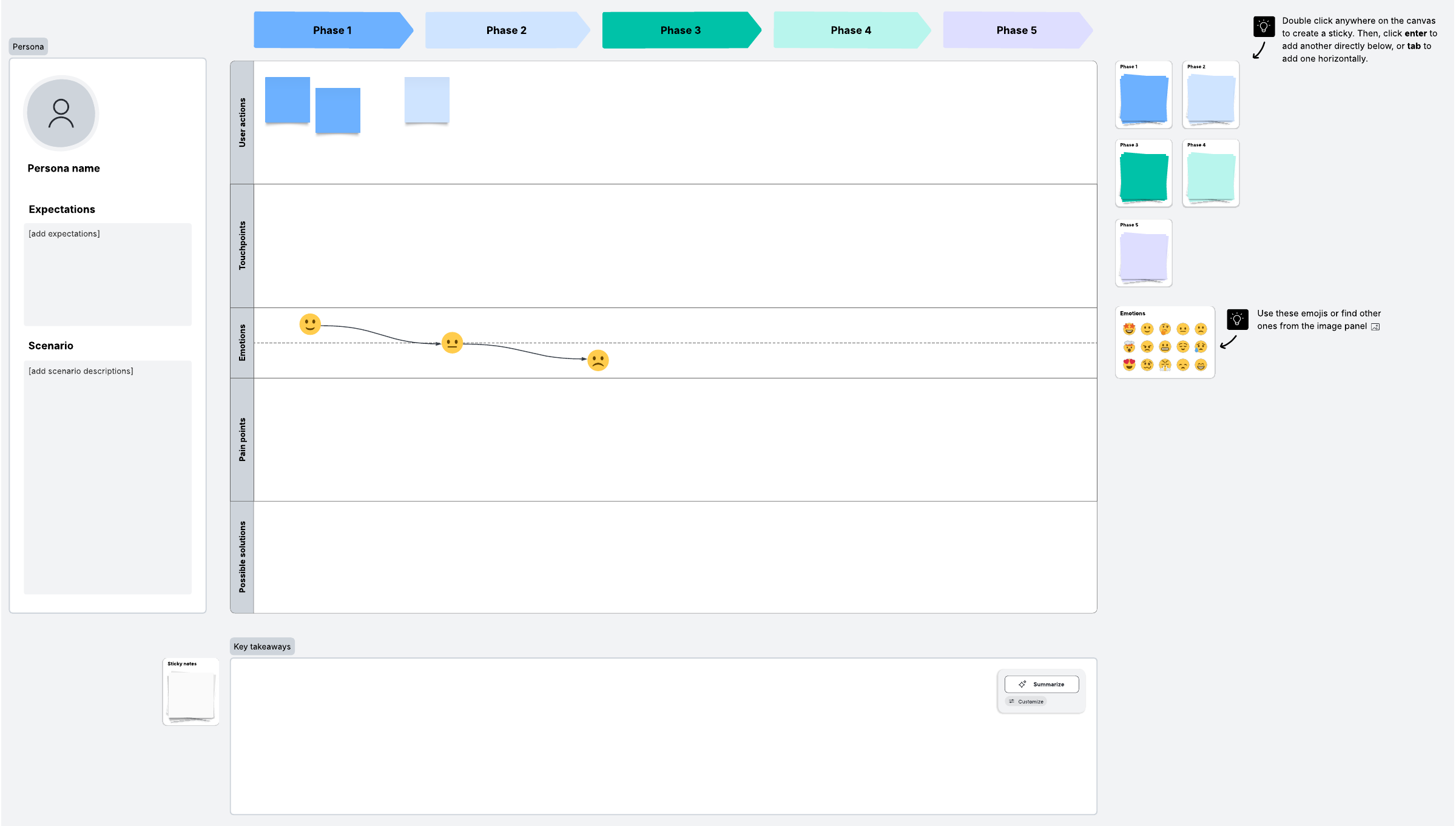
Start the process of crafting delightful experiences by creating a customer journey map. Record the actions, emotions, and thoughts that a customer or user experiences as they use a product or go through a process.
What is a customer journey map?
For your business to succeed, you need to keep your customers happy—and to keep them happy, you have to understand them. A customer journey map can help.
This customer journey map template will help you chart a hypothetical customer’s experience with your company. You’ll map touchpoints in your service and how that customer may react to them, gathering insights along the way. This process helps you refine the customer service experience into something seamless that inspires brand loyalty.
Benefits of customer journey mapping
You can have a technological miracle of a product, but if it doesn’t actually meet the needs of your customers, you won’t get anywhere. Customer journey mapping helps you refocus your strategy on your customers and what they want. If you use that insight to change how you do business, you’ll reap the rewards.
Perhaps you’ll find that you’ve been spending too much time developing a feature that customers don’t really want, or maybe you’ll find that because no team has clear ownership of a specific task, something the customer needs is often delayed. What you learn from your customer journey map can enable you to make changes with confidence.
How to create a customer journey map in Lucidspark
Get started with our customer journey map template. Follow these steps:
1. Prepare thoroughly
Before you begin, you need to consider two things: what you’re hoping to accomplish by creating this map and who you’re creating this map for.
Make sure you have a clear objective, such as reaching new customers or improving retention, and create a detailed customer persona based on research with existing customers. (You might want to try our user persona template for this step!) Fill in information about the persona and their situation at the top of the template.
2. Add touchpoints
Touchpoints are where the persona interacts with or experiences your brand. A touchpoint could be signing up for an online account or making a purchase—whatever makes sense for your business.
Once you’ve decided on your touchpoints, divide them into phases and add them to the columns in the template. Beneath the touchpoints, you can map how customers feel about the touchpoints and add any thoughts you have with sticky notes.
3. Get new points of view
You’re going to need help if you want to make this customer journey map as accurate as possible. Your co-workers will have new perspectives, and you need their input. Make sure to share this template with them in Lucidspark, and you can collaborate on it in real time.
4. Take the next steps
See what you can learn from your map: Where and how can you improve the customer experience? Use freehand drawing or emojis to highlight areas for improvement. Try making a new map that shows not what’s currently happening, but what you’d like to happen.
Again, get feedback from other stakeholders so you can move forward confidently. Try the voting feature in Lucidspark so you can decide on the best ideas for moving forward.
When you’re ready, take action and make strategic changes, knowing you’ve got your customers’ interests at heart.