Affinity Diagram Template
Note: For all Lucid plan types
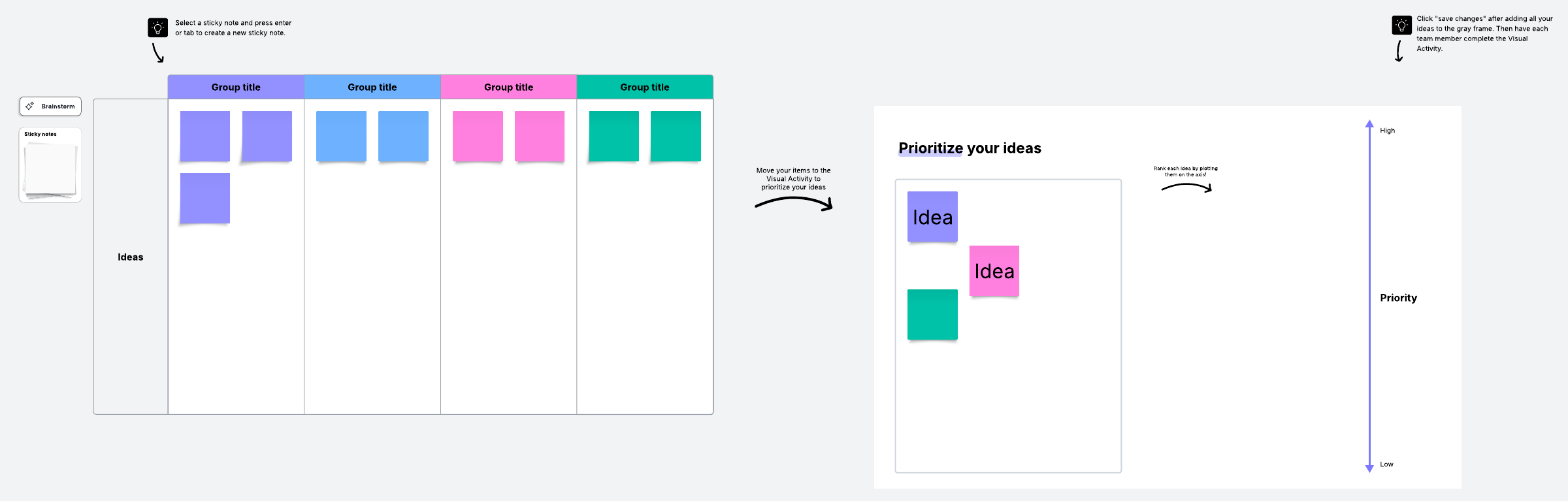
With an affinity diagram, you can take large amounts of data or ideas you've brainstormed and sort them into groups to review, analyze, and determine next steps.
About this affinity diagram template
Many think of the brainstorming process as spontaneous and flexible—and sometimes it is. But brainstorming doesn’t always have to be off the cuff. In fact, you’ll get more from your brainstorming sessions with just a little bit of planning and structure. If you’re unsure what exactly that looks like, don’t worry! An affinity diagram is a great place to start.
What is an affinity diagram?
The purpose of brainstorming is to generate ideas, usually to solve some sort of problem. Affinity diagrams are a simple, effective way to organize and interpret those ideas.
Created in the 1960s by Jiro Kawakita, this type of diagram groups ideas and information by their similarities, which can be useful for reaching group consensus and clarifying complex issues.
How to use an affinity diagram
Before starting a brainstorming session, you’ll need to complete two steps.
First, identify your purpose. What problem are you trying to solve?
Second, appoint a facilitator. Brainstorming is a collaborative process—without someone moderating the conversation, the session could easily be dominated by a few team members. You want to hear from everyone.
Next, it’s time to do what you set out to do: Generate solutions. Give team members some time to record their ideas on sticky notes. You can complete this process with a physical whiteboard and sticky notes, but we’d recommend having team members use Lucidspark. Because your Lucidspark boards are cloud-based, you never have to worry about losing sticky notes—they’ll all be recorded and saved in the same centralized document!
By the end of this process, you should have a board full—and we mean full—of possible solutions to your problem. Not every idea is going to be totally unique and that’s okay! As a team, identify themes and clusters, and sort the sticky notes accordingly. You can use containers to do this on your shared Lucidspark board!
Once you’ve sorted the sticky notes, it’s time to take a step back: Do any solutions or clusters of solutions immediately jump out to you? As you analyze your sorted data, the way forward should become more clear.
Get started with our free affinity diagram template
With this Lucidspark template, you don’t have to worry about setting up your Lucidspark board—you can just dive right into the brainstorming process. And once your team’s wheels are turning, sort their ideas into the pre-made, color-coordinated boxes.
Alternatively, you can use the Magic Sort feature to make the process as seamless as possible!