Bullseye diagram
Note: For all Lucid plan types
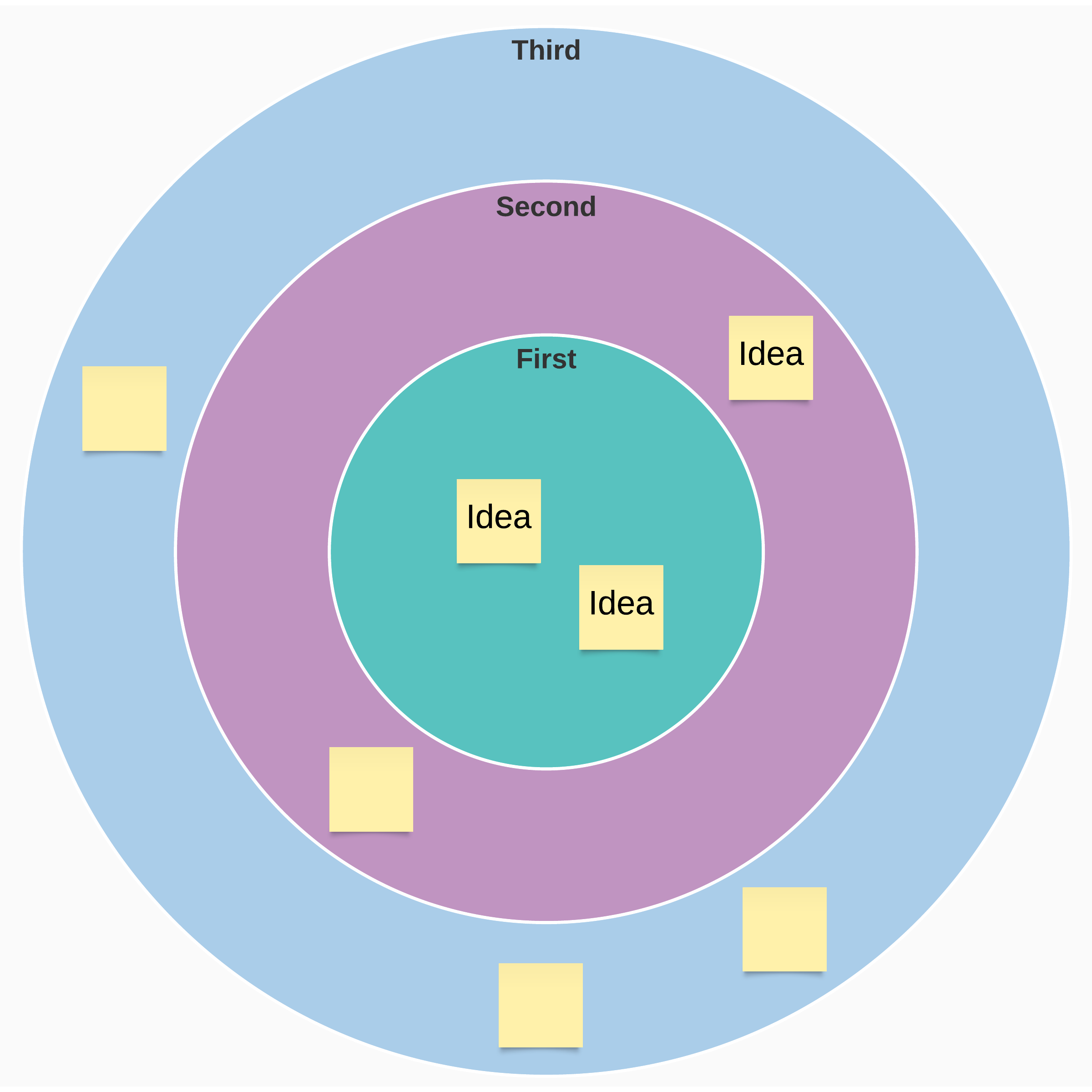
Make tough decisions faster using a bullseye diagram. Once your team has brainstormed ideas, rank those ideas by importance, with the highest-priority items in the center of the bullseye. This method can help teams establish priorities in a snap.
What is a bullseye diagram?
If you have a lot of tasks on your plate, you can’t do all of them at once. A bullseye diagram is a tool to help you prioritize so you work on the most important things first.
You’ll put the crucial items in the central ring (also the smallest ring), which forces you to cut down your list of important things instead of letting it balloon. Your somewhat important items go in the middle ring, and your least important items go in the large outer ring.
When to use a bullseye chart
A bullseye chart is helpful whenever you need to prioritize several items. These items could be tasks on your to-do list, features in a software project, or factors in a complex decision.
While you can use a bullseye chart by yourself, you can also use this template with other people in Lucidspark. Use this template to help you and your team talk through whatever you’re facing, and take advantage of your co-workers’ perspectives.
How to use our bullseye diagram template in Lucidspark
Before you begin filling out the template, make sure you and your teammates know what you’re trying to accomplish: is your goal to prioritize your workload or to make a tough decision about your project’s direction? Once you’re aligned on your purpose, you can get started.
Use sticky notes in Lucidspark to create a list of tasks or items. Don’t worry about the order yet—just get all the information you need written down. If you’re working with other people, it can help to do this part independently and then consolidate everyone’s ideas.
Once you have your sticky notes, you need to move them to the appropriate rings on the circle. Try starting with the large outer ring for least important items—that way you can cut down the number of unplaced sticky notes rapidly. When you’ve made the easy decisions, it’s time to start sorting the items you aren’t as sure of.
As you sort your medium- and high-priority items, avoid overloading the central ring. It’s small for a reason, and you should have no more than two or three sticky notes there for items that are absolutely essential.
When you’re done sorting your items, it’s time to get to work on next steps! Make an action plan with the sticky notes in the central ring, perhaps by moving them to a roadmap template so you can plan how to accomplish your goals—and you and your team will be well on your way.
Related templates
Start, stop, continue retrospective activity
Go to Start, stop, continue retrospective activity template