Developing a successful product involves more than just having an idea. Before you dive into creating a new product, you need to know:
- What the product is
- What specific need or problem it addresses
- Whether or not customers want the product
- That your team and stakeholders agree on the product vision
Several tools can help you at various stages of the product development cycle. In this post, we’ll discuss the product canvas—what it is, when and how to use it, and how it can keep your team aligned and focused on creating the right product with the right features for the right people.
What is a product canvas?
The product canvas is a tool that succinctly describes your product, why you are creating it, who it is for, and its key components. A product canvas is like a blueprint for the development team—it gives your teams and stakeholders a concise overview of the product you are developing.
A product canvas is typically presented on a single page. The information is concise, but the content is rich enough to help your team and stakeholders understand the product so they are aligned and focused on the same goals.
When should you use a product canvas?
Consider using a product canvas in the following situations:
- Developing a new product: Use a product canvas to communicate the product’s vision, target audience, value proposition, features, metrics for success, etc.
- Redesigning an existing product: A product canvas can help you reevaluate an existing product’s purpose and determine which features are most important to your target audience.
- Communicating with stakeholders: A product canvas helps you easily convey important information about the product’s purpose and strategy to stakeholders, executives, team members, etc.
- Developing a strategy for entering a new market: Use a product canvas to understand the wants and needs of potential customers in a new market. This allows you to design a product to precisely fit that market.
You should use a product canvas early in product development after the product vision and goals are defined, and user stories have been written. You’ll want to use a product canvas after you know:
- Who will use the product
- The problems or pain points the product addresses
- How the product benefits potential customers
- What makes it stand out from the competition
How to use a product canvas
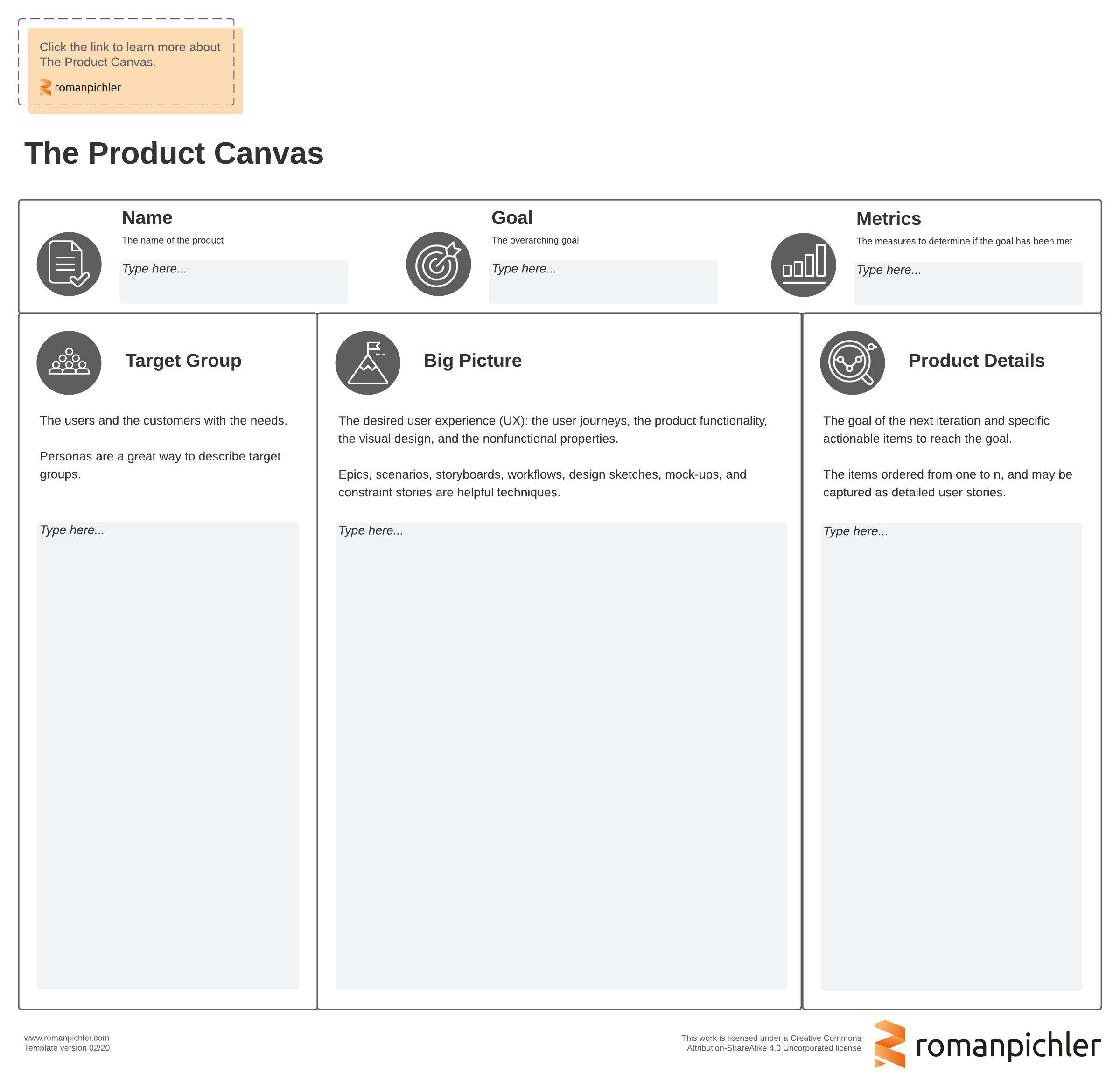
A product canvas has a relatively simple design. This design can vary depending on the product type you’re developing, the information you want to capture and communicate about it, and what industry you work in. But a typical product canvas will include the following sections:
Product name
Including the product’s name is essential because sometimes a code name or “working title” might be used in the early planning stages. The product's official name is stated here to encourage everybody to use it rather than the code name.
If this is an update or a pivot to an existing product, you’ll also want to list the version number.
Goal
State the goal for this release. This is the main reason you are developing the product. Describe what you hope to accomplish with the product’s release.
Metrics
Define the key performance indicators (KPIs) that you’ll use to measure the product’s success. KPIs like customer satisfaction, conversion rates, user experience, and so on helps you understand if your specific goals have been met and the product meets customer needs. Analyzing this data helps you make better decisions in future product revisions.
Target audience
It’s essential to understand who your potential customers are. Learn about what they want and expect. This information will help you tailor a product to their specific requirements and preferences. It helps you solve their problems so they can get their work done more efficiently.
Define the primary persona that this product is being developed for. This helps you prioritize features and functions that will go into the product and future iterations of it.
Big picture
This is where you describe what needs to be done to meet persona goals. It is typically the most extensive section of the product canvas. It’s kind of like a summary—it gives you a high-level overview of what needs to be done but doesn’t include the specific details of how it will be done.
In this section, you can include text and visual elements, such as user stories, workflow diagrams, storyboards, charts, and maps, to describe how your defined persona interacts with your product.
Product details
Use this section to outline the next steps/actionable items needed to meet the stated goals. These items are usually prioritized based on their importance to the target audience and how well they can solve the audience’s problems. The product details section helps you to prioritize features and functions that can go into the next iteration.
Make a product canvas with Lucidspark
A product canvas is a simple and powerful tool that provides clarity and focus on a product’s development. This concise overview of the product’s vision, target audience, features, and metrics aligns team members and stakeholders and helps you make better decisions.
You can create a product canvas template with paper and pen, but you might consider using Lucidspark’s product canvas template instead—it can easily be shared with stakeholders anytime, anywhere.

Explore hundreds of other templates that make product planning a cinch.
Go now