The pandemic saw the rise of remote work culture, as offices shuttered their brick and mortar locations and opted for a digital, geographically dispersed workforce that collaborated virtually. Now that the pandemic is lifting in certain areas, some offices are lifting their remote work mandates, but they're not returning to pre-pandemic work models. Instead, they're opting for a hybrid work model, where employees have the opportunity to work in person or from home on a flexible schedule.
The reality of the pandemic forever changed the workforce, and many—from CEOs to employees—have shifted their expectations accordingly. A recent survey showed that a full 65% of Americans want to work remotely full time. In comparison, another 31% would like a hybrid work option that combines in-person and remote collaboration.
In a CNBC poll of human resources, finance, and technology executives, nearly half said they planned to use hybrid work models in 2021, with a third indicating their companies would prioritize in-person work. Remote work isn't just good for employees who want more flexibility and an assurance of safety. It can also be good for employers—it saves money on office space and allows companies to pull talent from every corner of the country.
What the hybrid work model is sometimes not good for is meeting morale. In the shift to a hybrid meeting culture, it can be hard to balance the needs, perspectives, and contributions of in-person participants with team members calling in remotely. But planning and pulling off good meetings is core to team members feeling valued, productive, and clear about their jobs.
Challenges of hybrid meetings
Meetings can be challenging even when everyone's in person. People often complain that there are too many meetings and too little gets done—no matter if people are in the same room. But when you add remote callers to the mix, the power dynamic (not to mention the logistics) can get tricky. Sometimes participants calling in are treated as an afterthought, trying frantically to hear what everyone is saying and imagine visuals they can't see. Sometimes in-person participants forget that remote participants are even there or feel frustrated that they have to keep looping them back in. And many offices are not currently set up to host meetings with digital elements.
Luckily, much of what makes a good in-person meeting makes a good hybrid meeting: a good facilitator, a clear mission, good questions, and a little preparation. But there are unique solutions to hosting meetings in a hybrid work environment, and we've laid out four of them below.
Hybrid meeting solutions
Prepare to succeed
Hybrid meetings run on tech and social graces, and if the tech is buggy, it wears on the grace. Prepare for your next meeting by making sure your tech is up to the task. Do you have fast enough internet? Microphones? Screens? If not, see if your office can spring for better equipment—it's one of the best investments you can make.
Next, make sure everything, and everyone, is ready to go. Plug everything in and make sure sound and video are working. Then put in some face time (perhaps literally), working with your remote team members to make sure they know how to use the meeting software, chat, and other tools and have all the tech squared away on their end.
Finally, give people a chance to prepare for the meeting and participate fully by sending out the objectives of the meeting, the agenda, and any associated documents and visuals people will need to engage. Be specific with the purpose of the meeting. Asking a question or posing a problem to be solved are both great ways to get people thinking and leave the agenda structured but flexible. Remember that people calling into the meeting aren't physically in the room, so give them everything they'll need in the meeting before the meeting starts.
Put everyone on a level playing field
Meetings tend to naturally favor people who can be there in person, allowing participants to pick up on body language, chat before and afterward, and freely share visual and spoken information. It's easy for people phoning in to feel relegated to irrelevance or the chatbox.
Luckily, you can easily remedy these issues. First, set up the space so that everyone can see everyone else. Ask each participant to join the meeting with their own laptop, even if they’re in person with other participants. Introduce everyone as the meeting begins and regularly monitor the chat and check in with remote participants to see if they have something to add to the conversation. Calling on people specifically and making time for conversation can prevent people from talking over each other or remote participants from dropping out and getting distracted.

Check out this meeting facilitation toolkit created in partnership with Marsha Acker, CEO of TeamCatapult and master facilitator.
Take me thereCreate other options for participation
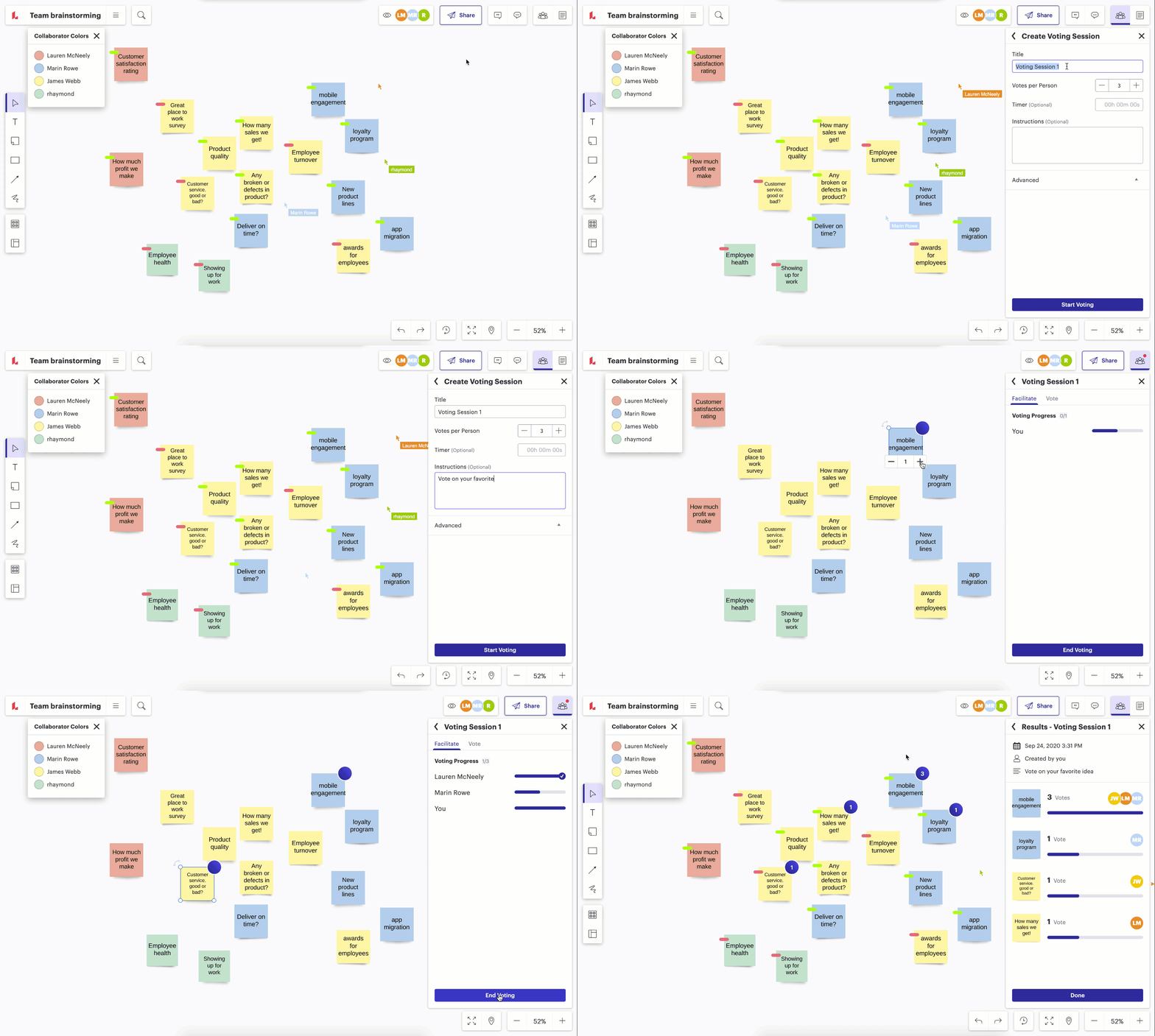
Luckily for hybrid teams, there are many apps and tools designed to help your team collaborate across distances. Instead of asking for a hand raise or verbal vote on a big decision, use a polling app to collect everyone's voices on the best way forward, or use a digital whiteboard or sticky-note brainstorm to help everyone contribute and track group suggestions and decisions throughout. If there are in-person visual elements, make sure to give remote participants all the images they'll need beforehand and make it clear which document you're focusing on and when. If there are in-person exercises, find a way for remote participants to contribute digitally or follow in-person participants with a webcam, so remote team members feel included in the process.
Get creative with feedback—encourage emoji reactions, ask for responses from members who've been quiet, or allow people to use a digital whiteboard to comment or upvote the best ideas from the meeting.
Encourage small group work
According to the Ringelmann effect, people tend to contribute more in smaller groups—something anyone who's been in a meeting knows intuitively. But breaking out into teams needs a little finessing when you're in a hybrid meeting.
First, make sure that you use breakouts to dig into people's opinions and ideas. Remember to give participants a clear task or question before they break out, so they feel clear in their mission. Pair remote participants with in-person participants, so both groups acknowledge each other throughout. Use breakout rooms for casual conversation, or—to keep everyone contributing or on track—use a breakout board where people can visually brainstorm, organize, and track their ideas together. Set a clear amount of time for groups to meet, and remember to bring everyone back together and capture the ideas as a large group.
The future is hybrid
Hybrid work is here to stay but with these and other meeting solutions, it doesn't have to be chaotic. Let the new model point out existing weaknesses in your meeting approach and use it as an opportunity to revamp your hybrid meetings so they're more productive, provide participation opportunities for every attendee, and are more enjoyable for everyone involved.

Uplevel your hybrid meeting game with our guide to effective hybrid meetings.
Download it now