The purpose of a use case diagram in UML is to demonstrate the different ways that a user might interact with a system. Create a professional diagram for nearly any use case using our UML diagram tool.
What is a use case diagram?
In the Unified Modeling Language (UML), a use case diagram can summarize the details of your system's users (also known as actors) and their interactions with the system. To build one, you'll use a set of specialized symbols and connectors. An effective use case diagram can help your team discuss and represent:
- Scenarios in which your system or application interacts with people, organizations, or external systems
- Goals that your system or application helps those entities (known as actors) achieve
- The scope of your system
What is a use case diagram in UML?
A use case collects scenarios. By writing out the main parts of your process, including alternative paths, you’ll have a clearer outlook on the scope of your project. Although you can copy and paste text and make simple edits in the Lucidchart editor, you may want to first write your use case scenario in a program like Google Docs. The Lucidchart add-on for Google Docs is an ideal solution for bringing together the visual diagramming and written aspects of project management.
When to apply use case diagrams
A use case diagram doesn't go into a lot of detail—for example, don't expect it to model the order in which steps are performed. Instead, a proper use case diagram depicts a high-level overview of the relationship between use cases, actors, and systems. Experts recommend that use case diagrams be used to supplement a more descriptive textual use case.
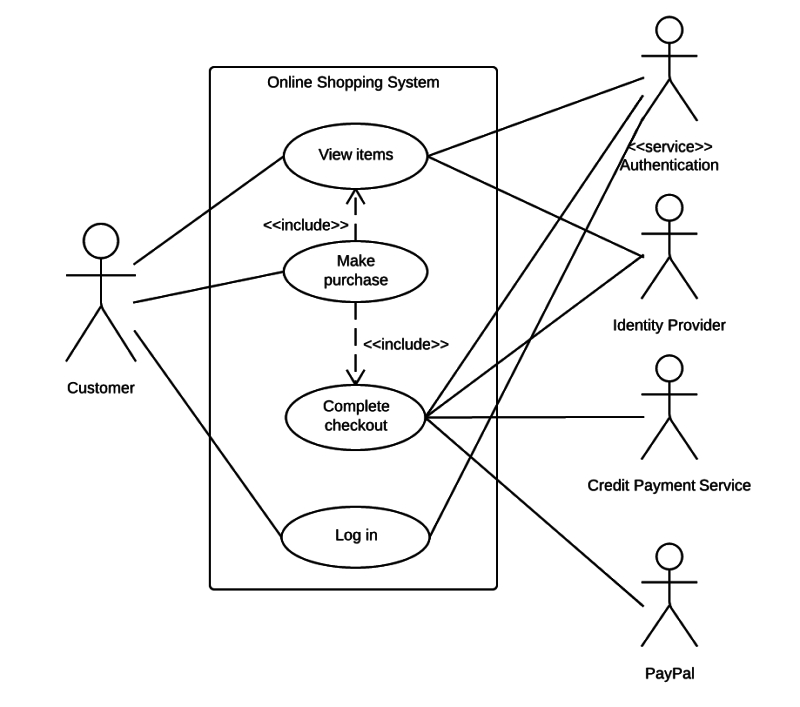
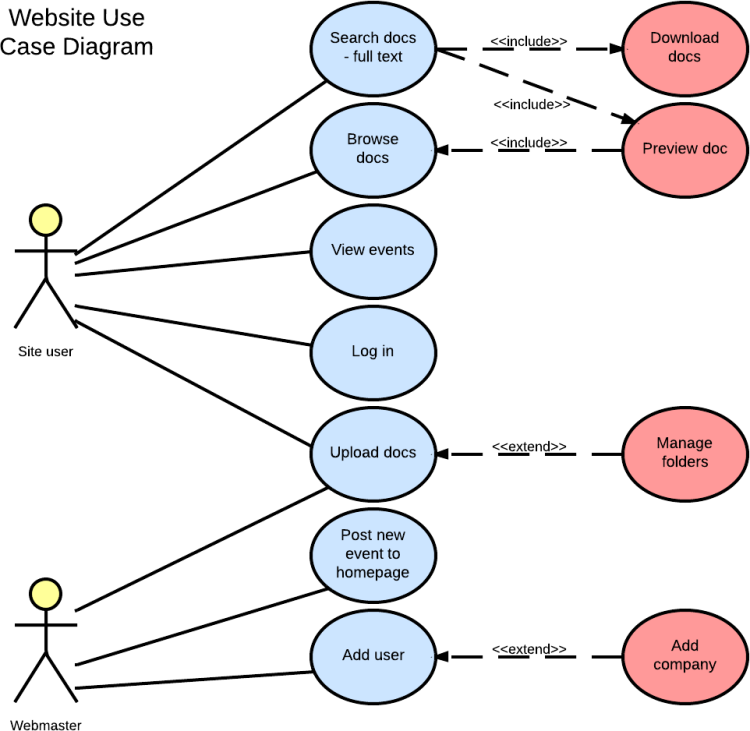
UML is the modeling toolkit that you can use to build your diagrams. Use cases are represented with a labeled oval shape. Stick figures represent actors in the process, and the actor's participation in the system is modeled with a line between the actor and use case. To depict the system boundary, draw a box around the use case itself.
UML use case diagrams are ideal for:
- Representing the goals of system-user interactions
- Defining and organizing functional requirements in a system
- Specifying the context and requirements of a system
- Modeling the basic flow of events in a use case
Use case diagram symbols and notation
The notation for a use case diagram is pretty straightforward and doesn't involve as many types of symbols as other UML diagrams. You can use this guide to learn how to draw a use case diagram if you need a refresher. Here are all the shapes you will be able to find in Lucidchart:
- Use cases: Horizontally shaped ovals that represent the different uses that a user might have.
- Actors: Stick figures that represent the people actually employing the use cases.
- Associations: A line between actors and use cases. In complex diagrams, it is important to know which actors are associated with which use cases.
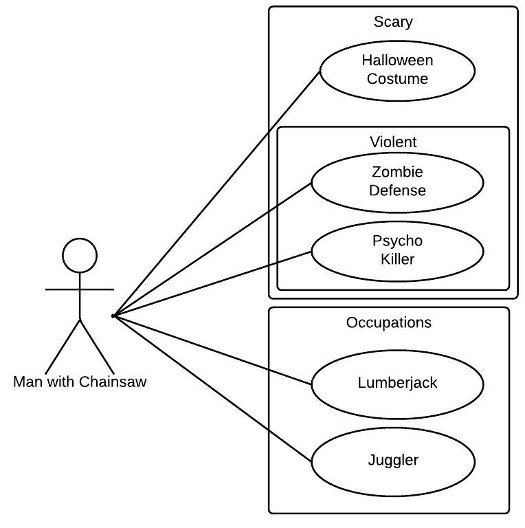
- System boundary boxes: A box that sets a system scope to use cases. All use cases outside the box would be considered outside the scope of that system. For example, Psycho Killer is outside the scope of occupations in the chainsaw example found below.
- Packages: A UML shape that allows you to put different elements into groups. Just as with component diagrams, these groupings are represented as file folders.
Outline your use case diagram
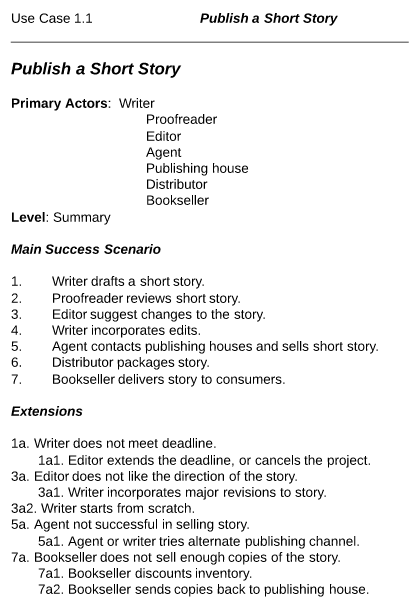
Use case scenario documents break down a process by describing the actors, the typical workflow, and the things that could go wrong, called extensions. When managing projects that use UML conventions, there can be a temptation to jump straight into the use case diagram, with stick figures, ovals, and lots of lines. But if you don’t know your goals and who’s involved, take a step back and write your goals down in prose. Alistair Cockburn is a leader in designing use case scenarios; visit his website to get inspired!
This is a brief example of the process for publishing a short story. The outline goes through each of the steps that are likely to occur in the process, including each of the errors that could likely occur. Outlining the process like this will make the act of diagramming your use case scenario easier than ever.
How to make a use case diagram
In Lucidchart, creating a use case diagram from scratch is surprisingly simple.
-
Create a use case scenario document to organize the process and all possible alternative extensions.
-
Open a blank Lucidchart document or start with a template and enable the UML shape library.
-
Select the shape you want and drag out symbols from the toolbox to the canvas
-
Then model the process flow by drawing lines between shapes while adding text.
It's easy to resize and style any element. You can even import SVG shapes and Visio files for a custom solution. If you'd like to learn more about UML, check out our What is UML tutorial.
Use case diagram examples
Use case diagrams are visual representations of written use case scenarios. Once you’ve hammered out the kinks in your goals, use Lucidchart to diagram the interactions between the use cases and actors to write the success story for your project. The drag-and-drop interface is responsive and easy to learn. Lucidchart comes populated with an extensive shape library for every UML diagram type, including activity diagrams, class diagrams, and use case diagrams.
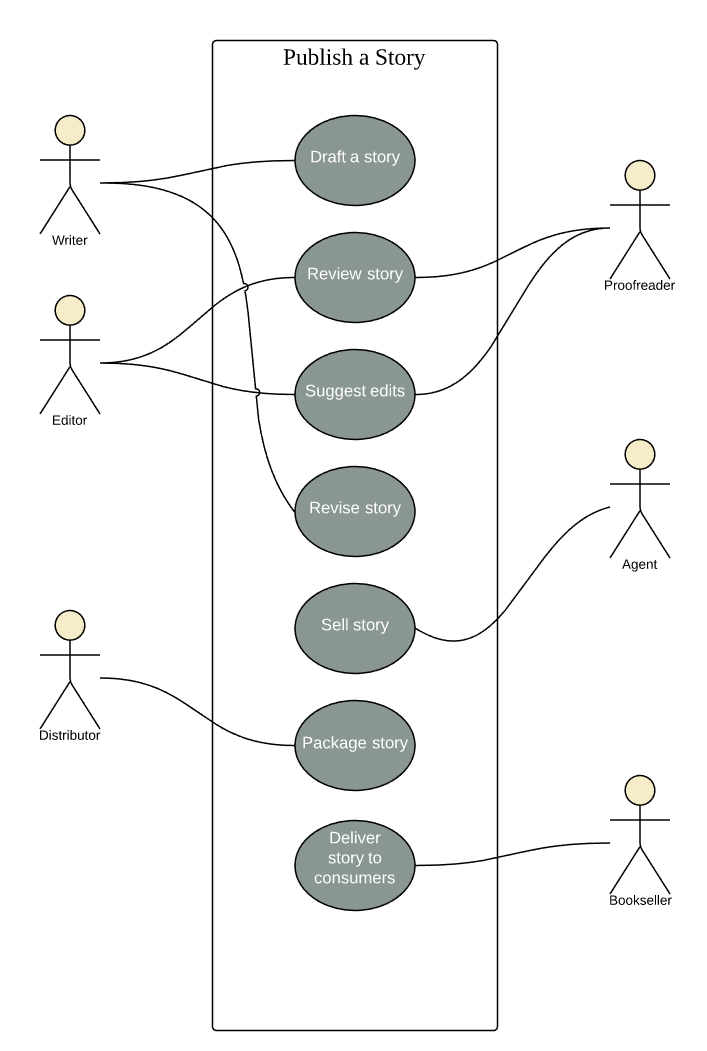
Book publishing use case diagram example
This use case diagram is a visual representation of the process required to write and publish a book. Whether you’re an author, an agent, or a bookseller, inserting this diagram into your use case scenario can help your team publish the next big hit. Try this demo template to get started on your own.
Travel reservation use case diagram example
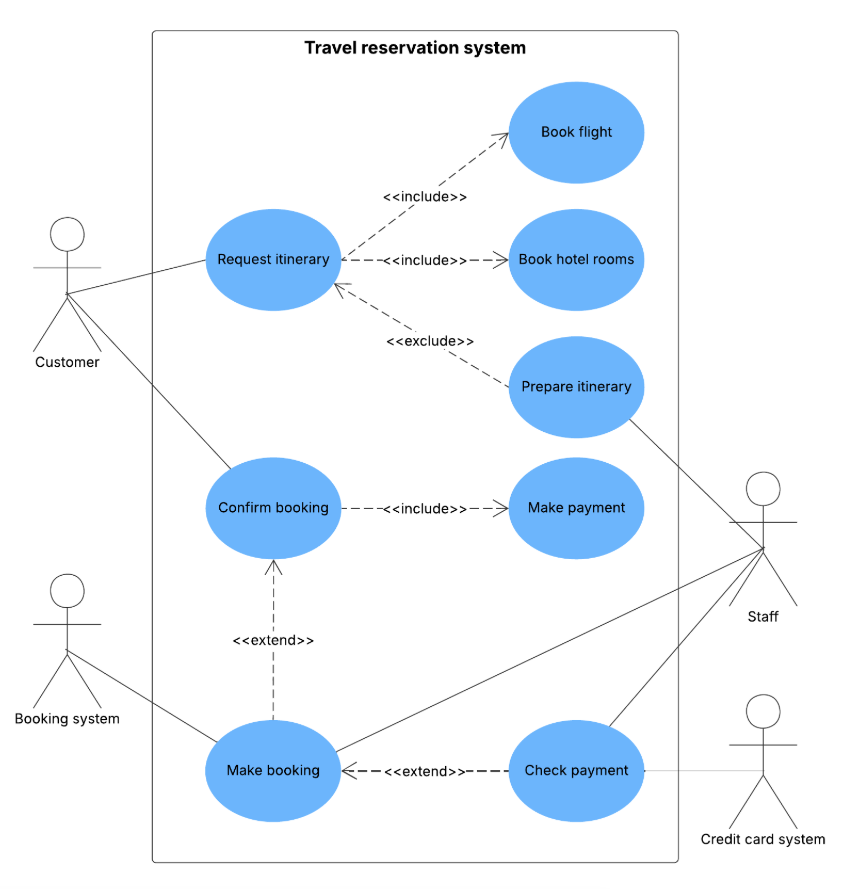
You can adapt this template for any process where a customer purchases a service. With attractive color schemes, text that’s easy to read and edit, and a wide-ranging UML shape library, you’re ready to go! Click to try out this template on your own.
Chainsaw use case diagram example
Consider this example: A man with a chainsaw interacts with the environment around him. Depending on the situation and the context of the situation, he might fall into one of many different use cases. Does he seem to be on his way to work? Is there anything ominous about the way he is wielding his chainsaw? For example, if he is using the chainsaw in a non-occupational setting, we might have reason to think that he falls within the scope of "scary."
Use case diagram components
To answer the question, "What is a use case diagram?" you need to first understand its building blocks. Common components include:
-
Actors: The users that interact with a system. An actor can be a person, an organization, or an outside system that interacts with your application or system. They must be external objects that produce or consume data.
-
System: A specific sequence of actions and interactions between actors and the system. A system may also be referred to as a scenario.
-
Goals: The end result of most use cases. A successful diagram should describe the activities and variants used to reach the goal.
Everything you need to make a diagram
Make a polished, professional diagram for free with Lucidchart. No matter what you have in mind, we have the tools you need to build it. Make an account and start diagramming today.
Sign up free