Key takeaways
As-is process analysis evaluates an organization’s current operations to establish a foundation for process optimization.
Comparing current state versus future state processes helps teams identify operational gaps and design clear to-be process maps, enhancing alignment and efficiency.
The three main steps of as-is process analysis include researching current workflows, documenting processes, and identifying bottlenecks or gaps.
Organizations can use Lucid AI’s Process Capture to document workflows and Process Agent to quickly create as-is diagrams for improvements.
Companies rely on solid processes to meet objectives efficiently and effectively. But without strong processes, your business could be losing money, talent, and even clients.
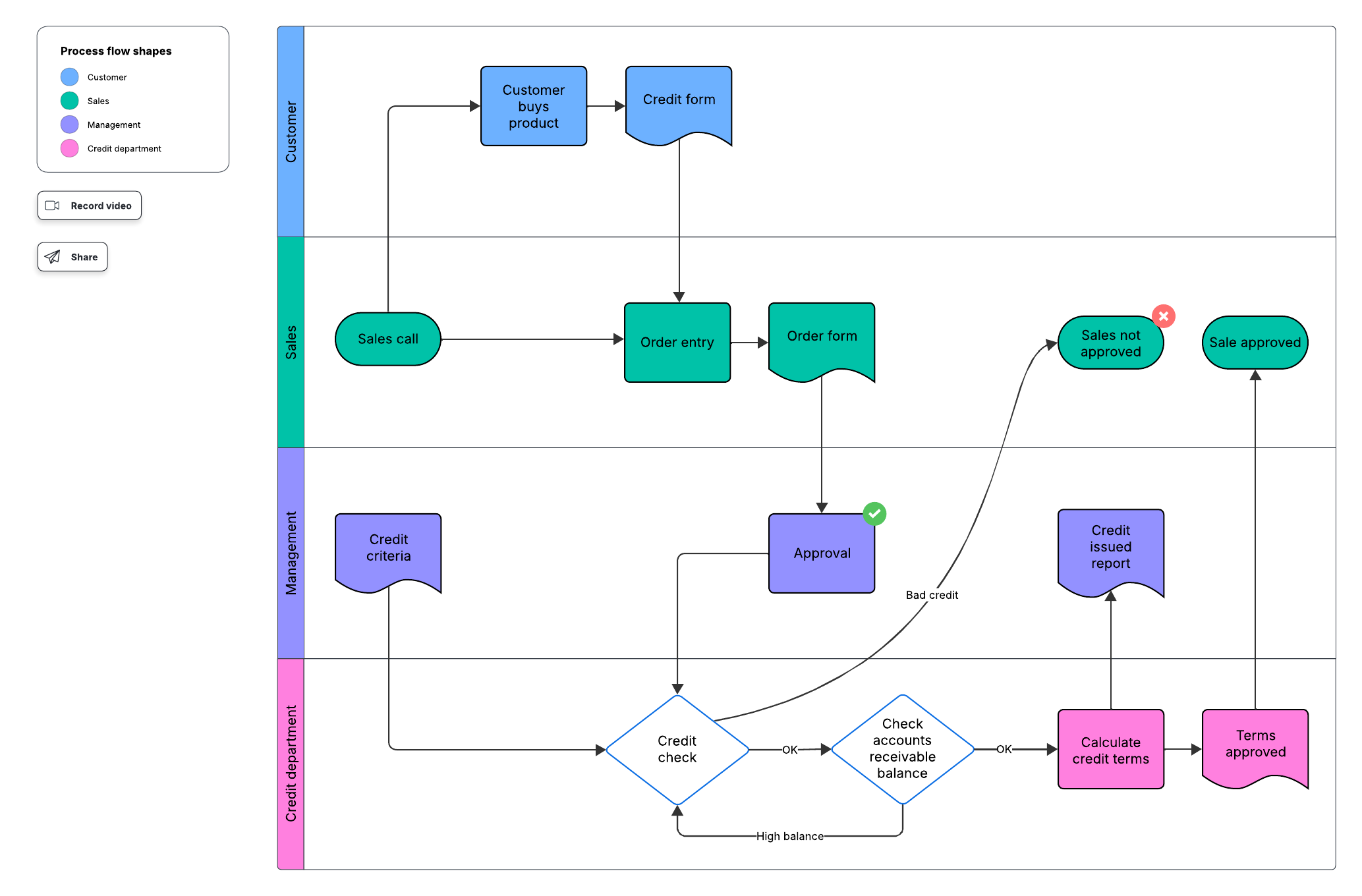
That’s where as-is process analysis comes in. An as-is process flow is a process management strategy that documents how business processes are currently implemented. Usually, an as-is process flow diagram helps track procedures that are organized step by step. This process flow can later be analyzed and optimized when the business creates a to-be process.
Evaluating your current state helps organizations document, track, and optimize processes for better performance, greater efficiency, and improved outcomes.
Here’s how you can take your business to the next level by documenting your as-is process.
What is as-is process analysis?
As-is process analysis or current state analysis is a process management strategy that identifies and evaluates a business’s current processes.
An as-is analysis can focus on an entire business organization or on one or more specific processes within a department or team.
There are several key goals for implementing as-is analysis, including:
Saving money
Optimizing existing processes or creating new processes
Increasing customer satisfaction
Improving business coordination and organizational responsiveness
Complying with new regulatory standards
Adapting processes following a merger or acquisition
According to a study by Forrester, 61% of businesses adopt end-to-end process management to reduce errors and improve data quality, while 45% adopt it to gain organizational agility.
Process documentation is an important aspect of AI transformation, as well. Celonis’s Process Optimization Report shows that 89% of business leaders cite understanding how business processes run as crucial for AI deployments to deliver meaningful results and operational efficiency.
Current state vs. future state process analysis
Current state and future state process analysis go hand-in-hand when evaluating business processes. Simply put, an as-is (or current state) diagram maps where your processes are currently, and a to-be (or future state) diagram maps where you want them to be.
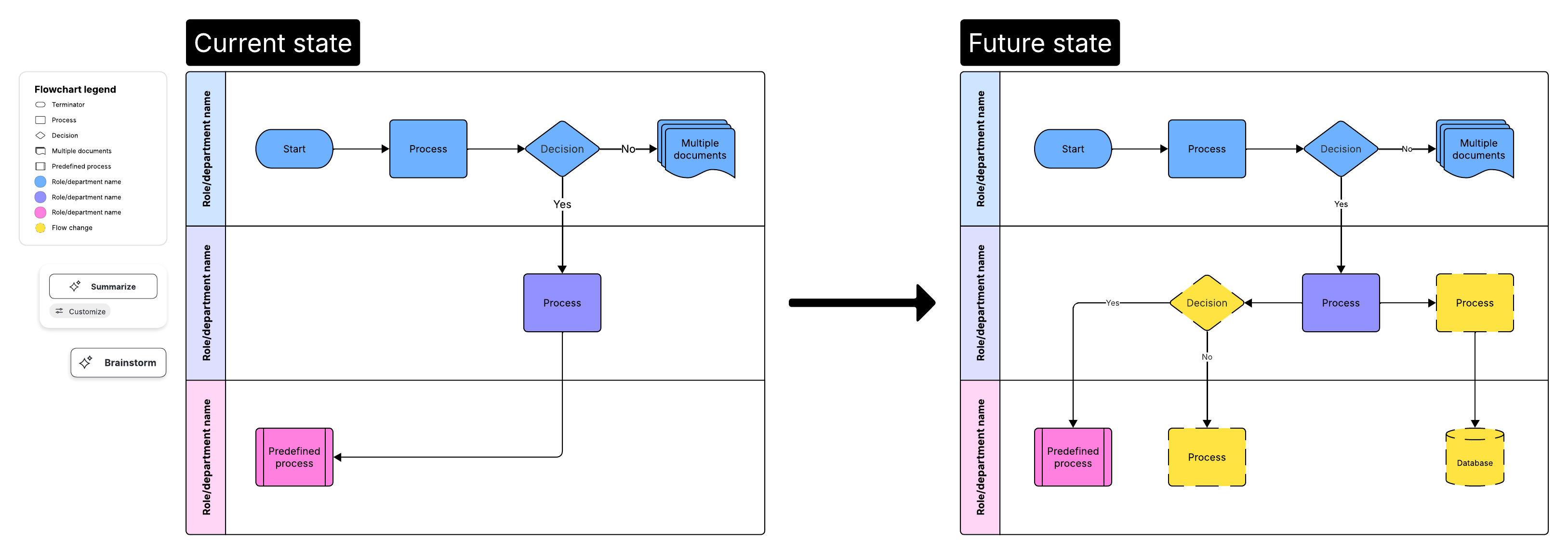
The as-is phase outlines the current state of your processes and any gaps or issues with the current mode of operation. Once you have that mapped out, you can enter the to-be phase of process management.
To-be process mapping documents what you want the process to look like. Using the as-is diagram, you work with stakeholders to develop improvements to the current process and outline those changes on your to-be map.
Pro tip: Keeping records of both current and future state documents will help everyone in the organization maintain process consistency and track progress and outcomes more effectively.
Using an intelligent diagramming solution like Lucid makes it easy to conduct process mapping. With Lucid AI’s Process Agent, you can create process diagrams from a text prompt, then iterate on your diagrams through an interactive chat experience. The Process Agent essentially acts as an AI coworker, asking guiding questions to capture all the context needed to represent your current state. And, with Lucid’s Process Capture, you can automatically generate a process diagram by recording your screen as you walk through a workflow.
Video of Process Agent feature in Lucid
After creating your process diagrams, Lucid facilitates collaboration through easy sharing and commenting features. Stakeholders can quickly view your current and future state documents, easily providing feedback at each iteration.
Benefits of analyzing your as-is process
The main advantage of an as-is analysis is that it creates a solid foundation for documenting an organization’s processes. As-is analysis allows a business to evaluate the current state of its processes, identify opportunities for improvement, and prepare for AI transformation.
Without this fundamental information, it is difficult to manage and improve processes. In other words, if you don’t know where you’re starting from, you’ll have a hard time getting to where you want to be.
By conducting current state and future state process reports, businesses can also expect to:
Align operations with the business strategy
Improve process communication and training
Increase operational efficiency
Increase control and consistency across the organization
Gain a competitive advantage
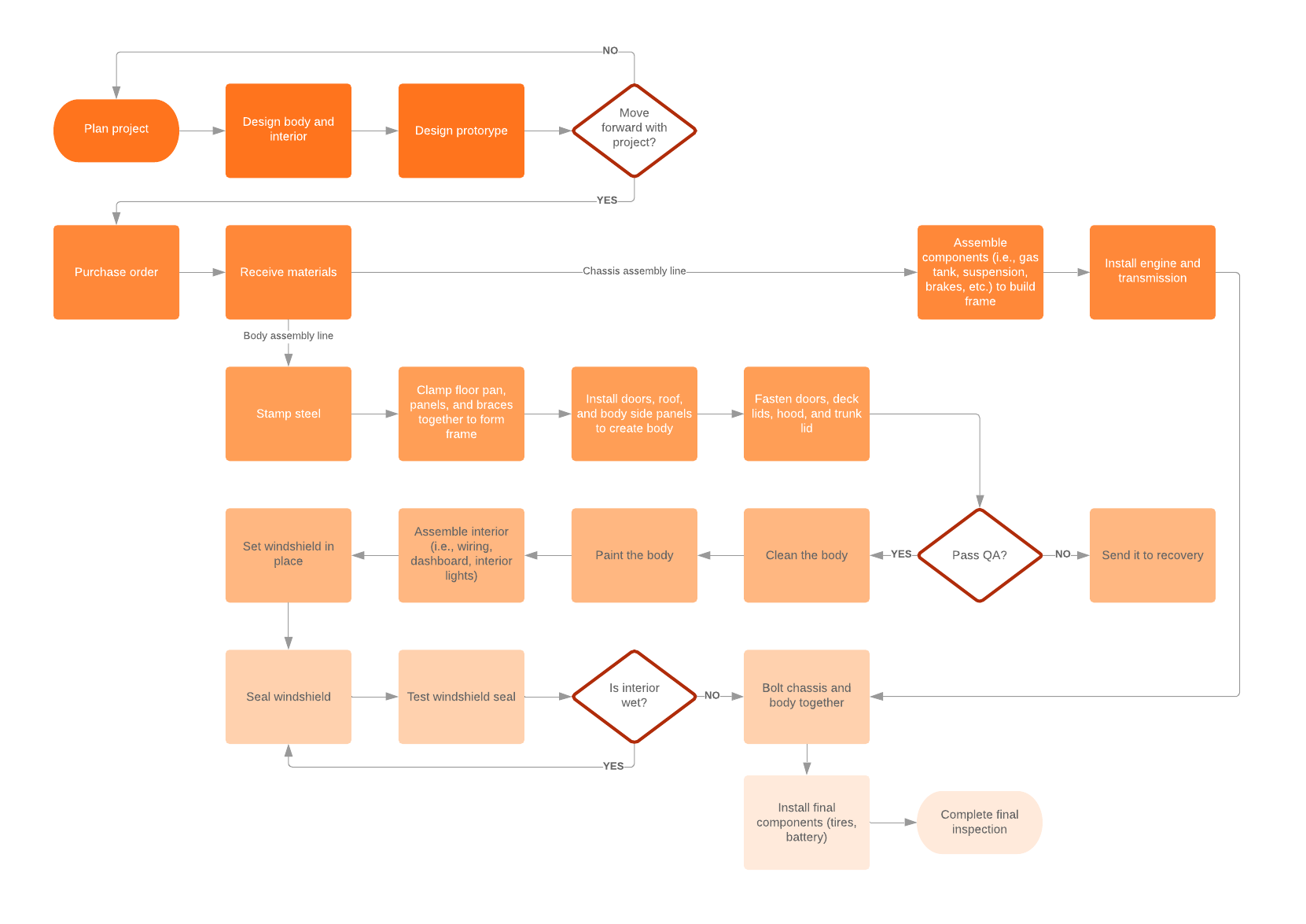
Steps of as-is process analysis
As-is process analysis consists of three primary phases: research, document, and analysis.
1. Research
For a full current state analysis of a business, you’ll need to get an overview of the company’s main products and activities.
Start by compiling a list of all products and services to get a clear outline of the business’s value chain. Then identify all processes the company uses to generate those products and services at each level and order them chronologically. (Some processes may occur in parallel)
Be sure to note when each process starts and ends, and identify which teams or individuals are involved in (or responsible for) those processes.
Higher-level stakeholders and managers can help you with the broad outlines, but you’ll need to connect with the people who are directly performing and overseeing each process to create a full and accurate report. Using a tool like Lucid’s Process Capture makes it easy to for individuals to document their workflows.
Cursor clicks "Start Process Capture" to start a screen recording and generate a diagram of requesting an absence
If your processes can’t be captured through a screen recording (for example, your processes take place on a manufacturing floor), here are a few of the ways you can collect the information you will need:
Personal interviews
Interview stakeholders who perform each process, as well as the managers or other subject matter experts involved in the process. Personal reports can confirm processes that are working well (or not) and illuminate steps in the process that you might not otherwise be aware of.
However, while personal interviews are valuable, interview multiple people (when possible) to ensure a more complete picture of the process. Be careful not to make conclusions based solely on any one person’s report.
Direct observation
In addition to interviewing the people on the ground, take time to directly observe processes in action. Take note of the people involved at each step, as well as any systemic support functions and resources available or utilized.
Surveys
Send surveys or questionnaires to process participants to collect formal written responses. Surveys allow you to ask specific questions that you may not have found answers to from observation or interviews.
Surveys also give you the opportunity to get feedback and answers from participants to questions that arose during other information-collecting tactics (like observation).
Group meetings
Finally, consider holding a meeting with relevant stakeholders to outline the processes and confirm previous findings with process participants.
The goal is to meet several times to document the process together. Schedule these meetings after you conclude interviews and observations, so you can outline everything you’ve learned and then collaborate with participants to identify any gaps and confirm your findings.
2. Document
Once you’ve collected the process information, you’ll need to document it clearly in a process map. There are a few ways you can create process diagrams:
Lucid’s Process Agent
With Lucid’s Process Agent, you can generate an initial draft of a process diagram based on a description. The Process Agent asks clarifying questions to refine the diagram, such as what stages to include and which people are involved. The generated process flow includes a title, owner, last updated date, diagram key, and diagram outline. From there, you can suggest improvements to your diagram, share it with stakeholders, and keep it up to date.
The BPMN system
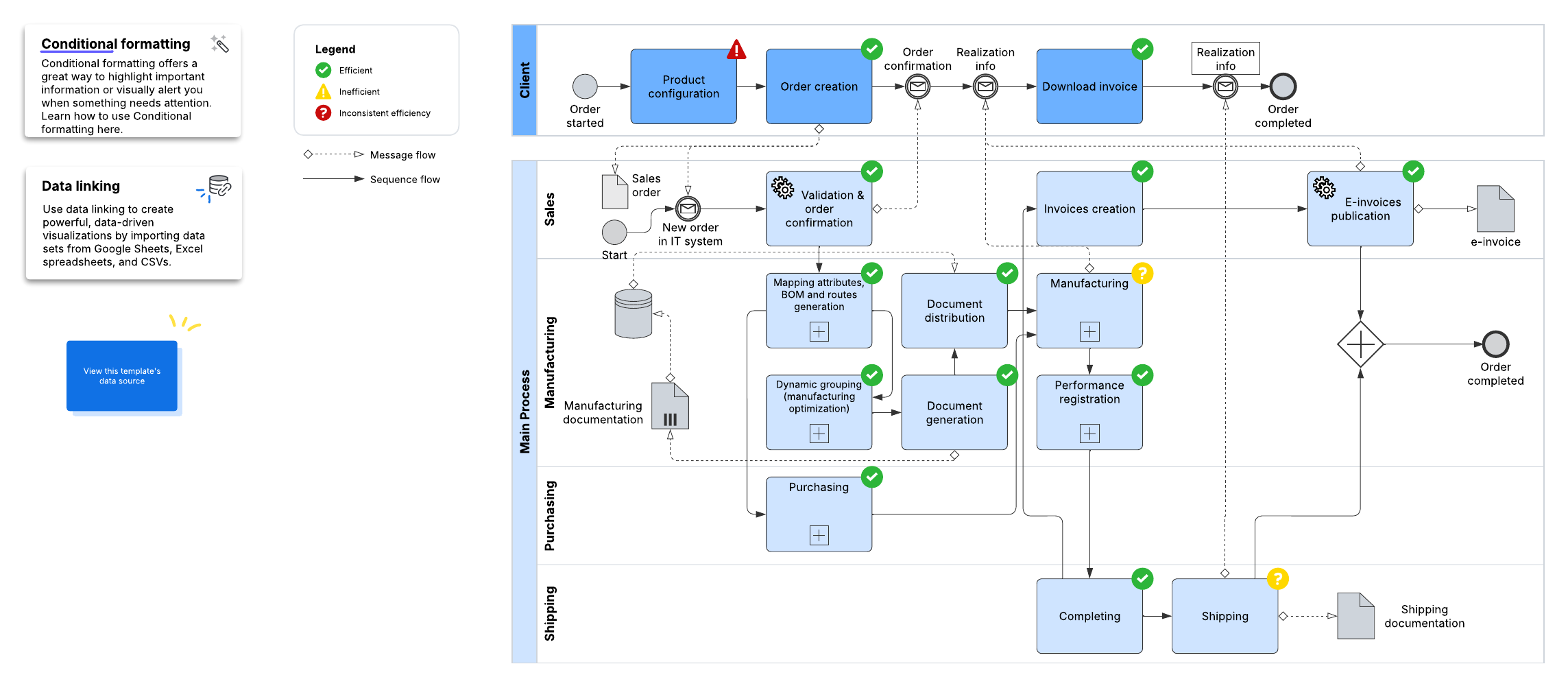
Many process managers use the Business Process Model and Notation (also known as BPMN) to diagram their current state processes. BPMN is the standard process modeling system designed to streamline process documentation and make it easy for all stakeholders to understand. Industry best practice defaults to the current BPMN 2.0 process notation.
Lucid makes it easy to apply BPMN 2.0 methodology with its BPMN shapes library. Simply drag and drop the shapes onto your document and format as needed.
Other process diagram types
While BPMN is a popular process diagram, your processes can also be outlined in other types of diagrams, whether you need to outline DevOps process flows, design your ITIL/ITSM processes, create account maps, or visualize your customers’ journey.
No matter your process or diagram type, at its core, your as-is process diagram should document all process inputs, systemic support functions, detailed descriptions of how the process is performed, and all process outputs.
3. Identify gaps, bottlenecks, and weaknesses
Before you build a future state diagram, you need to understand your current state. You can either manually analyze your current state diagrams or use a tool such as Lucid AI to quickly identify gaps and areas of improvement.
As you analyze your current processes, look for the following:
Bottlenecks
Determine where there might be stalls in your processes and what’s causing them. A bottleneck might look like too many meetings or too many people involved in an approval process.
Gaps
Look for potential gaps in your process that hinder your desired performance/outcome. For example, you may need to add another step in your process or even hire another person.
Weaknesses
You might have the right process in place, but look for weaknesses in your existing process. For example, maybe you could afford better communication and handoffs.
After you identify where your as-is process is lacking, you can start planningyour to-be states and implement process improvement.
Lucid streamlines how you build and maintain process documentation, ensuring a smooth foundation for as-is process mapping. Learn more about the Process Agent and the AI features Lucid offers that transform your diagrams into dynamic, editable documents that stay up to date.
A guide to AI features in Lucid
Learn how to use Lucid’s Process Agent and other AI features for accurate, efficient process documentation.
Read more