Key takeaways
-
Reactive IT approaches lead to wasted time and momentum, lost money, and increased vulnerabilities. Staying in a reactive loop means you are inherently always behind the market.
-
The keys to moving toward proactive IT include standardizing infrastructure hygiene, implementing predictive monitoring, documenting response flows, and developing strategic roadmaps.
-
Lucid can support your team’s shift from reactive to proactive by providing the tools to visualize architecture, safeguard sensitive data, and standardize documentation with professional templates.
Modern tech moves fast, and it’s all too easy to fall behind. The difference between thriving and merely surviving for IT teams often comes down to a single mindset shift: proactivity vs reactivity.
Reactive IT involves solving problems as they arise. This could mean waiting for a server to crash or for a security breach to occur before taking action. And while this may be the traditional approach, that doesn’t mean it’s the best one.
In fact, according to Nathan Cooper, Director of Information Security at Lucid, “When you’re reactive in the market, you’re always behind.”
Why wait for a system to crash to fix it? Moving to proactive IT management means staying two steps ahead of vulnerabilities so your users never even know they existed. Below, we dive into Cooper’s perspective on the shift and the four essential keys to making the switch.
Consequences of reactive IT
Before we dive into proactive IT strategy, here’s a quick summary of the problems associated with the opposite approach.
Consequence #1: Lost time and momentum
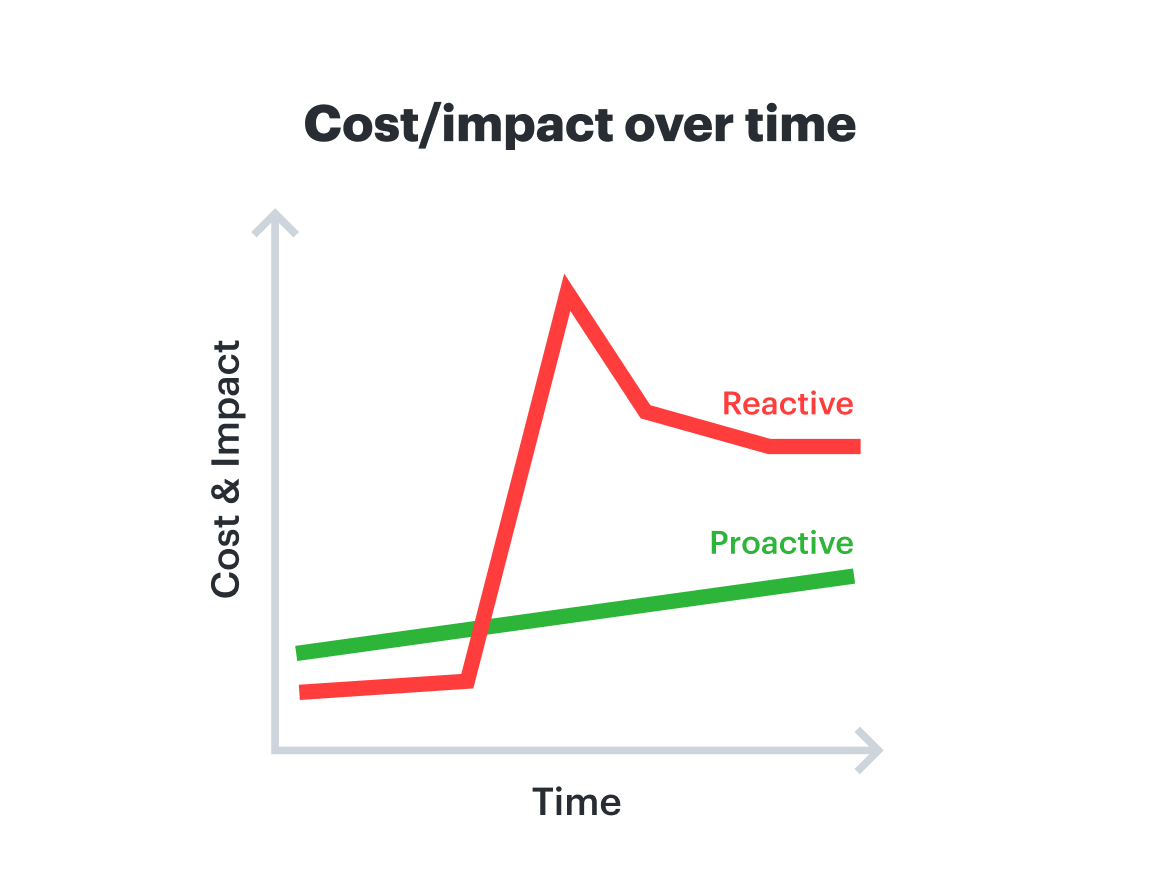
In reactive IT approaches, the only way your team can learn that there are problems is through reporting and alerts. This often leads to excessive reporting, which wastes IT teams' time on potentially low-value tasks. It also means lost time needed to innovate and stay ahead of the competition.
It’s not only impossible to respond to every single request, but it’s super expensive compared to proactive IT support. It also makes prioritization much more difficult because IT teams aren’t in the driver’s seat and can’t get a bird’s-eye view of demands and the best way to allocate their resources.
Consequence #2: Wasted money
If you wait for a report that tech isn’t working properly, you’ve already lost productivity from the employee who was trying to use it. Every minute you don’t catch a bug or performance issue, the bill for fixing exponentially increases. And as the problem becomes more concerning over time—such as with a data leak that can cause increasing damage by the second—the cost to fix it jumps about 50x at each step it moves down the pipeline. A vulnerability that costs $100 to fix in design can easily cost $5,000 once it reaches production. Proactively identifying problems saves money in this way.
Consequence #3: Increased vulnerability gap
“Your competitive edge dissolves when you’re reactive.”
—Nathan Cooper, Director of Information Security, Lucid
Reactive IT puts your most critical resources at risk. Every minute a system flaw or intrusion goes undetected is an additional minute that an unauthorized actor has to map your network and exfiltrate proprietary data. This doesn’t just increase the technical complexity of the fix, it leads to a direct loss of customer trust.
Examples of proactivity
So, what does proactivity actually look like in practice?
Example #1: Hardware failure
Reactive approach: You wait for a “disk failure” alert. But by then, the server is down, data is at risk, and your team is scrambling for backups so nothing is lost or leaked.
Proactive approach: By monitoring drive health metrics, such as S.M.A.R.T. metrics, you can identify that a drive is likely to fail in the next month. You swap it out during a scheduled maintenance window. Neither customers nor employees even notice, and all issues are prevented.
Example #2: Data breach
Reactive approach: You discover an unauthorized user account that has accessed sensitive data. At this point, you have no idea how long it’s existed or what exactly has been leaked. Your team is forced into an emergency containment mode to prevent further damage. You shut down servers, reset passwords, and are then tasked with explaining the lapse to stakeholders and customers, rebuilding trust, and mitigating damage.
Proactive approach: Instead of waiting for an alert, your systems automatically flag vulnerabilities. You use real-time monitoring to spot concerning user behavior and can automatically lock accounts before they access sensitive data.
Keys for moving from reactive to proactive IT management
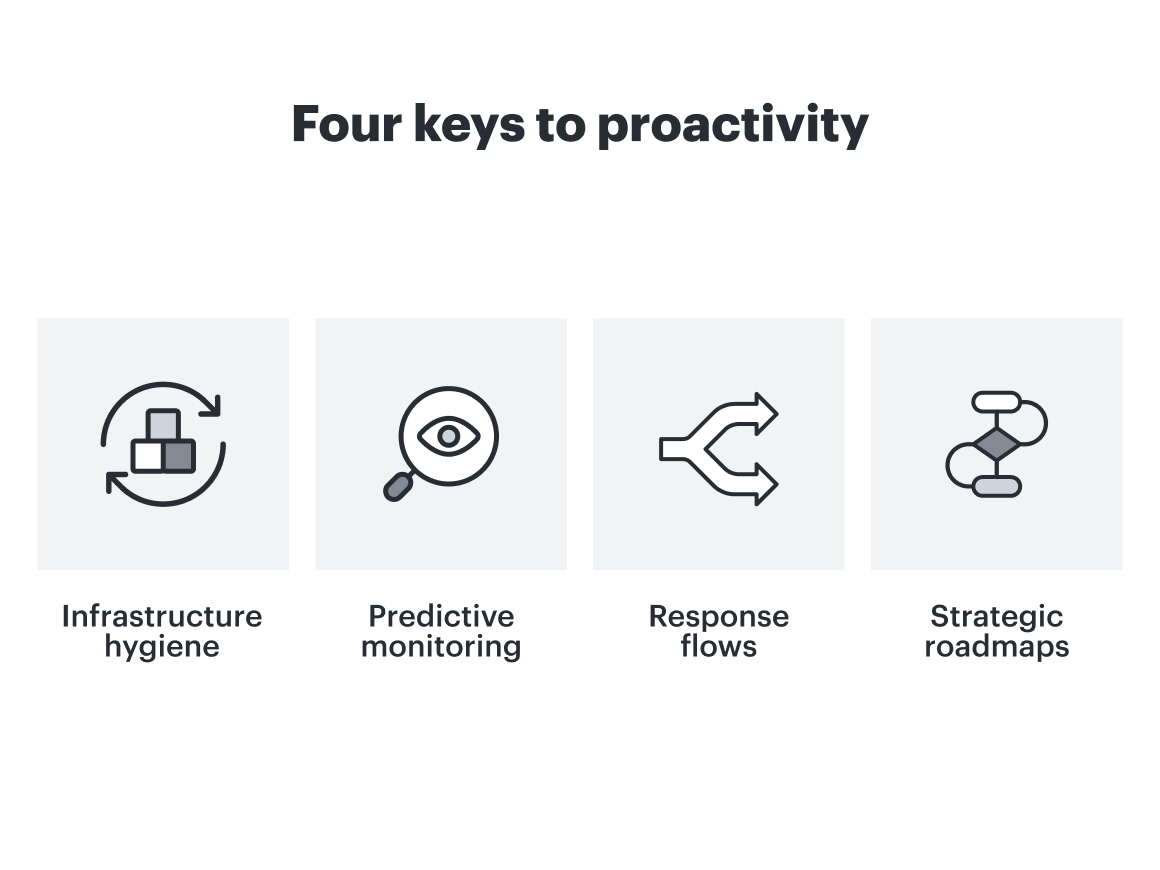
Shifting from a reactive to a proactive stance requires a structured approach. These four pillars serve as the foundation for that transition:
1. Standardize infrastructure hygiene
Proactive IT requires a foundation of uniformity. By establishing standard hardware and ensuring all systems, from company laptops to servers, run the same updated software, you significantly reduce the variables that lead to failure. Treating infrastructure as standardized, replaceable resources (sometimes referred to as the “cattle vs. pets” philosophy) allows for automated configuration management and infrastructure as code (IaC). This simplifies the enforcement of security requirements, such as SSO and SCIM, and enables more effective centralized auditing.
Cooper suggests, “To maintain this hygiene, start with a comprehensive audit of your existing environment. By grouping resources by purchase date or firmware version, you can create a visual timeline to identify exactly which assets are nearing their end-of-life and may be vulnerable. This allows you to formalize a refresh schedule and stay ahead of hardware degradation.”

2. Implement predictive monitoring
The goal of proactive IT is to identify trends and set alerts before a resource fails. By utilizing logs and metrics to detect anomalies such as dropped packets, server errors, or poor WiFi signals, teams can intervene before stakeholders ever report an issue. Integrating feedback mechanisms for primary stakeholders ensures that IT is alerted to abnormal behavior the moment it starts, effectively minimizing downtime. Map live data to your infrastructure diagrams to visualize system health in real time for immediate oversight.
3. Document actionable response flows
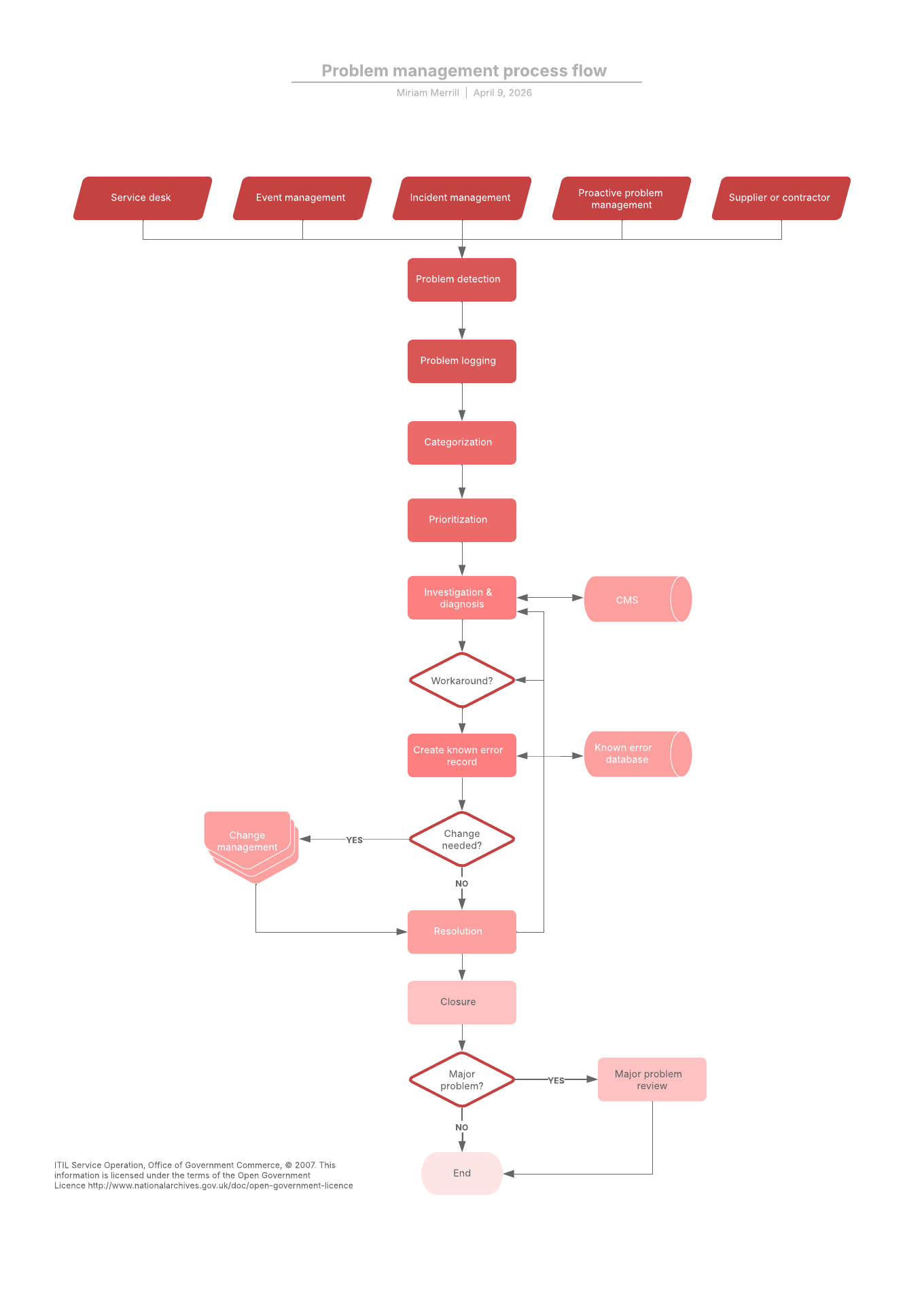
Reaching for a hefty manual during a data breach is not the way to efficient problem resolution. Proactive teams turn complex recovery plans into clear, step-by-step visual runbooks, opens in a new tab and test them regularly. This ensures that in the event of a data breach or system failure, the team can act immediately rather than losing time navigating documentation.
To further increase efficiency, actively work to eliminate false positives, which represent wasted operational costs. Instead, move toward automated evaluation or autonomous agents that can take low-risk actions based on these defined workflows.
Cooper uses Lucid for this step: “To ensure plans remain digestible, use visual flows that empower teams to act confidently under pressure. By utilizing automated layout tools to keep diagrams clean and using layered documentation to toggle between high-level overviews and granular technical details, you can maintain a comprehensive yet accessible source of truth.”
4. Develop a strategic roadmap
Proactive IT requires aligning technical capacity with the broader business calendar. By anticipating growth such as regional expansion or larger scale hiring events, IT can map upcoming initiatives from other departments to ensure infrastructure is designed and hardware is ordered well in advance.
Establishing an IT changeboard group and participating in roadmap discussions ensures that technical requirements support, rather than impede, company progress. Map upcoming initiatives of other departments so you are well prepared for them now and don’t impede progress.
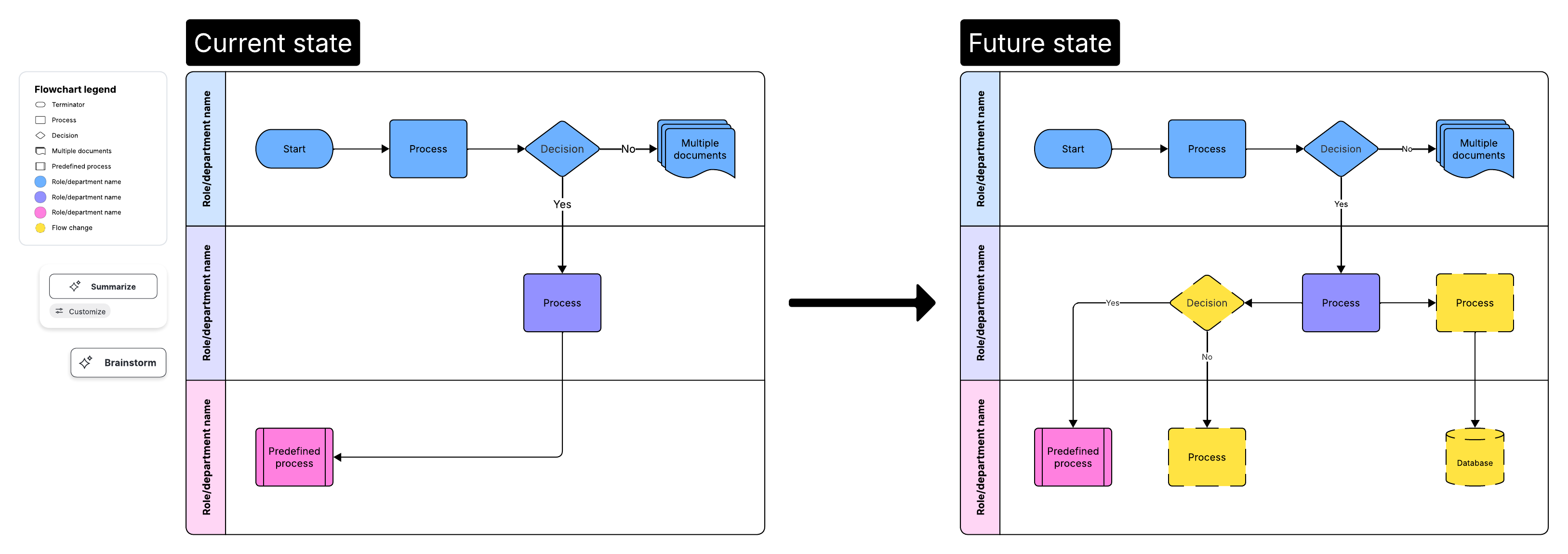
Cooper elaborates: “Bridge the gap between business goals and technical requirements by syncing company milestones with IT dependencies, such as hardware lead times or testing phases. Using current vs. future state diagrams allows stakeholders to clearly visualize the infrastructure needed to scale, making it easier to identify gaps and secure the necessary budget and approval for upcoming initiatives.”
From static documentation to operational intelligence
While these keys provide the roadmap to proactive IT support, executing them will require both visibility and automation. You can’t fix what you can't see, and you can’t scale what you haven’t organized.
By integrating data-driven insights with intuitive design tools in Lucid—all backed by enterprise-grade security—you can transform static diagrams into a proactive engine for your organization. This ensures your team spends less time searching for answers and more time building the future.

Learn more about how Lucid can provide your team with the visibility and automation to break the reactive cycle, scale, and lead the market
Get in touch