While the cloud significantly increases storage capacity and real-time collaboration capabilities, it also comes with some unique security risks. Securing data in the cloud—whether it’s information about your users, finances, competitor strategy, or other confidential information—is one of the most important things you can do to protect your business. Plus, you have a legal obligation to keep users’ data safe.
Following cloud security tips and best practices will keep you on the right track for protecting data for both your business and your users.
Cloud security risks
In an increasingly digital world, data can become compromised in many different ways, but some of the most common cloud security risks come from:
- Phishing
- Weak passwords
- Application vulnerability
- An inside man
- User error
It’s a good idea to review your cloud security policies to ensure best practices are implemented consistently across your organization. Identify which areas of cloud security your organization is already doing well and which areas could be improved. Some team members may have more to do with data security than others, but all team members should be cognizant of keeping data safe.
Cloud security best practices
Following cloud security best practices goes a long way in mitigating risks. From visualizing your data to using two-factor authentication and file-level encryption, there are many ways you can improve data security for your organization.
Know and visualize your data
Good cloud security policies start with knowing and visualizing your data. You can’t implement policies that work for your business if you don’t know how your cloud provider stores and manages that data. Think about these four components of the cloud provider you’re using or are considering using:
- Data security: Systems in place to protect your data
- Data location: Where the cloud provider’s servers are located; where users work; how data is transferred (these points in particular will impact which data protection laws and regulations you’ll need to adhere to)
- Data oversight: How data is monitored including intrusion detection, security audits, and reporting
- Data control: Who has access to your data among the cloud provider’s employees and contractors
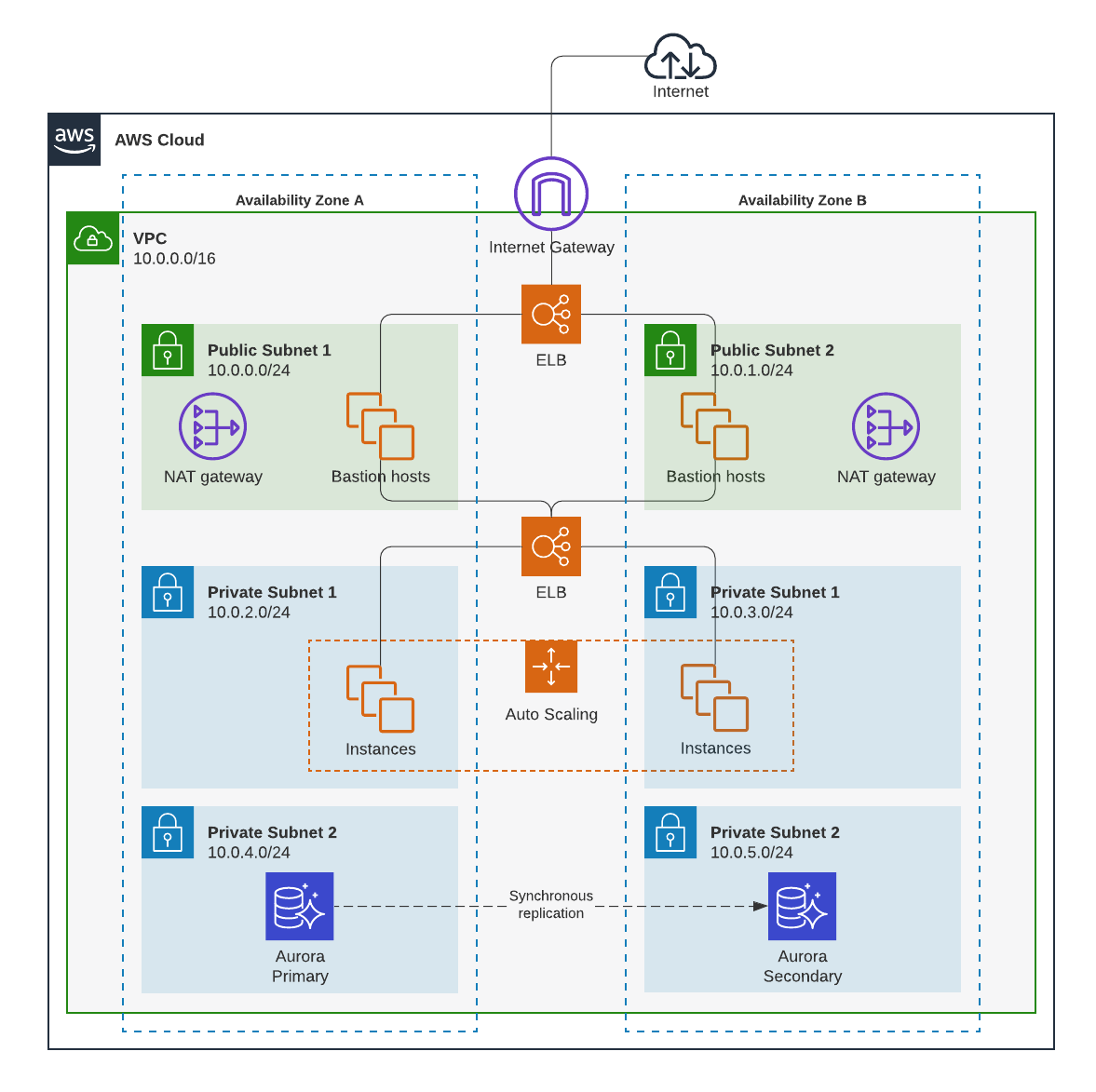
Once you have a good idea of where your data is stored and how it’s monitored, managed, and protected, you can take that information a step further by visualizing those technical systems.
With Lucidchart, you can build data flow maps to fully understand how data passes through the four different areas: data security, data location, data oversight, and data control. Data flow maps will help both technical and non-technical team members in your organization see the way data is stored and managed in the cloud.
Choose the right cloud provider
By choosing a cloud provider that follows strict security standards, some of the work securing the cloud will be done for you (including compliance with data protection laws and regulations). In addition to building a data flow map for each cloud provider you’re evaluating, seek out reviews of different providers and find out which features differentiate them. Also consider researching what trusted advisors in the space have to say.
One cloud provider will not be the best for every type of organization—you’ll want to find the one that best meets your needs.
Consider regulatory demands
Once you’ve found some cloud provider options that could be right for your business, consider the regulatory demands of the industry, users, and countries your business works with. The cloud provider you choose should be compliant with all security regulations your business needs to meet.
Implement file-level encryption
File-level encryption takes encryption measures a step further by encrypting data at the file level to make files unreadable to unauthorized viewers no matter what device they access the file from. Files or file systems should be encrypted before you upload them to the cloud.
There are a variety of tools and resources available to help you encrypt files—research the credibility of any you plan on using.
Secure user devices
According to a study conducted by Stanford University and Tessian, 88% of data breaches are caused by human error. That means that even if your cloud provider offers excellent security features, your organization’s data still may be compromised by one of your employees if you don’t have clear, end-user security policies in place.
You should define clear rules and policies around who can access data, where it can be accessed from, and how access to data will be monitored for everyone within your organization to follow. After you’ve established those policies, you’ll want to communicate those policies clearly to team members. This may be a use case for your previously mentioned data flow maps.
Follow password best practices
Encouraging the use of strong passwords across your organization is a significant step toward securing data in the cloud.
The 2021 National Institute of Standards and Technology (NIST) guidelines for passwords include:
- Between 8-64 characters in length
- Spaces and ASCII characters acceptable
- Not on the list of commonly used and compromised passwords
Commonly compromised passwords include:
- Dictionary words
- Previously breached passwords
- Repetitive or sequential characters
- Context-specific passwords such as a username, company name, etc.
NIST also approves the use of password managers like LastPass and Bitwarden.
Use two-factor authentication
Two-factor authentication enhances security by requiring two forms of identification for a user to access information. Those two forms are typically a combination of the following:
- Something you know
- Something you have or something you are
Something you know is your password, and that’s where authentication starts. After you’ve filled in your password, the next authentication comes from something you have (such as a code sent to another device) or something you are (such as a fingerprint or face scan).
Requiring team members to clear two hurdles to access sensitive data is much more secure than just requiring a password.
Secure data transfers
The data you keep in the cloud should be secure not only when it’s stored but also when it’s transferred. By implementing things like encryption, SSL, secure email tools, and more, you can help protect your data as it gets shared.
Many applications also offer permission control to grant or revoke access to different individuals. Be sure to look into the permissions capabilities within your organization and set them accordingly.
Back up data
Last but not least, it’s a good idea to store data in more than one place to protect against data loss in the case of a security breach. Back up data may be the difference between remaining operational after a security breach and not.
Just be sure security standards at the second location are as strict as they are at your primary location. You don’t want your backup data to become an additional security risk.
Consider using Lucid
Using Lucid during your cloud migration can help you visualize your infrastructure and plan your path forward, maximizing agility, clarity, and alignment. Plus, Lucid's Enterprise Shield can help organizations migrate to the cloud with even greater confidence. Enterprise Shield is an add-on that enables you to create policies, control who can access and delete documents, and much more. It automatically identifies sensitive content and continuously monitors documents for internal-only data, keeping your information safe and secure.
Securing data in the cloud is a large task, but it will become more manageable as you implement the cloud security tips shared in this article. Keep in mind that while we’ve shared some of the best practices to be aware of, cloud security has many additional areas you could delve into. When it comes to keeping the data of your organization and users secure, you can never be too thorough.
Understand your complex, technical systems by creating visuals in Lucidchart.
Technical solutions start with visuals
