Key takeaways
- Agentic AI transformation requires more preparation than generative AI experiments. AI agents need comprehensive business context to avoid operational bottlenecks and security risks.
- AI readiness means having documented and optimized operations across processes, technology, data, and people.
- When preparing for agentic AI, start by defining your AI objective and documenting the processes, systems, and roles required to reach your goal.
- A structured assessment helps you prioritize AI projects by evaluating your current state for gaps, complexity, risk, and opportunities.
Until recently, most organizations have been in the experimentation stage with AI. Maybe a few pockets of the business have tinkered with generative AI or LLMs to draft emails or review code. This type of exploration didn’t require much preparation at all.
But the true power of AI comes when companies adopt AI at scale, building agents or implementing new platforms that radically alter their processes, systems, and operations. This large-scale adoption, which we refer to as AI transformation, requires much more preparation than early experimentation, particularly for agentic AI.
There’s a lot of groundwork to lay for an AI agent to perform a task autonomously and, of course, accurately. In fact, without this preparation, powerful AI agents won’t be able to integrate into your business and carry out tasks—or worse, they may execute flawed logic that leads to operational bottlenecks, security risk, or reputational damage.
So, how do you know if your enterprise is AI-ready? I’ll share a step-by-step AI readiness assessment that you can follow, along with some strategies to close gaps and maximize the value of your AI transformation.
“Despite the significant hype and solutions emerging from vendors, a considerable gap exists between the potential of AI agents and their widespread, reliable adoption within enterprise environments. AI agents are not ready for enterprises—and enterprises are not ready for AI agents.”
—Gartner®, “Close 5 Gaps to Succeed in Your AI Agent Adoption,” By Tong Zhang, Leinar Ramos, etc., July 17, 2025
What is AI readiness?
At the highest level, AI readiness refers to how well-equipped your organization’s processes, technology, data, and people are for AI transformation.
Getting AI-ready is all about context; if AI agents are to integrate into the business, after all, they need to know how it works. For most organizations, though, critical information like how decisions are made or how systems connect isn’t formally documented and exists primarily in workers’ heads. Only 16% of knowledge workers in Lucid’s AI readiness survey say their workflows are extremely well-documented, with 80% relying on institutional knowledge to complete their work.
Because this info isn’t typically well-documented, it’s likely that existing processes or systems may have inefficiencies, security risks, or other problems unknown to workers that would be problematic when incorporating AI agents. Adding AI to an inefficient process would only magnify the inefficiency, not fix it.
With that in mind, an AI-ready organization is one that has both documented and optimized its operations.
AI readiness example
To better illustrate why context is key to AI readiness, let me walk you through an example. Imagine you’re building or using an AI agent for your own personal life. The goal of this agent is to do your online grocery shopping for you.
For our simple agent example, there are numerous ways that things can go wrong if you don’t first provide the agent with context around your preferences and shopping process. For example:
- If it doesn’t know which stores you shop at, then it could place an order from a store that doesn’t deliver or that is 500 miles away.
- If it doesn’t know your meal plan or which brands you like, then you could end up with a pile of food that you will not use.
- If it doesn’t know when you’ll be home to receive orders, then you could have milk and other refrigerated foods going bad on your front porch.
In a business setting, an agent without context could lead to outcomes far worse than spoiled milk. Consider this situation: If a customer support AI agent is unaware that you have a 30-day refund window, it could promise full refunds to customers outside this time period. Or an internal HR agent could provide employees with detailed salary data intended only for executives because it lacked context around the permissions needed to access sensitive data.
I could go on, but I think the idea is clear: You shouldn’t consider your business AI-ready until you have clearly documented context for AI agents to follow.
How to evaluate AI readiness: A step-by-step walkthrough
Capturing all this context can seem like a daunting task. That’s why the steps below are designed to simplify the process by helping you focus your documentation efforts on your specific goals.
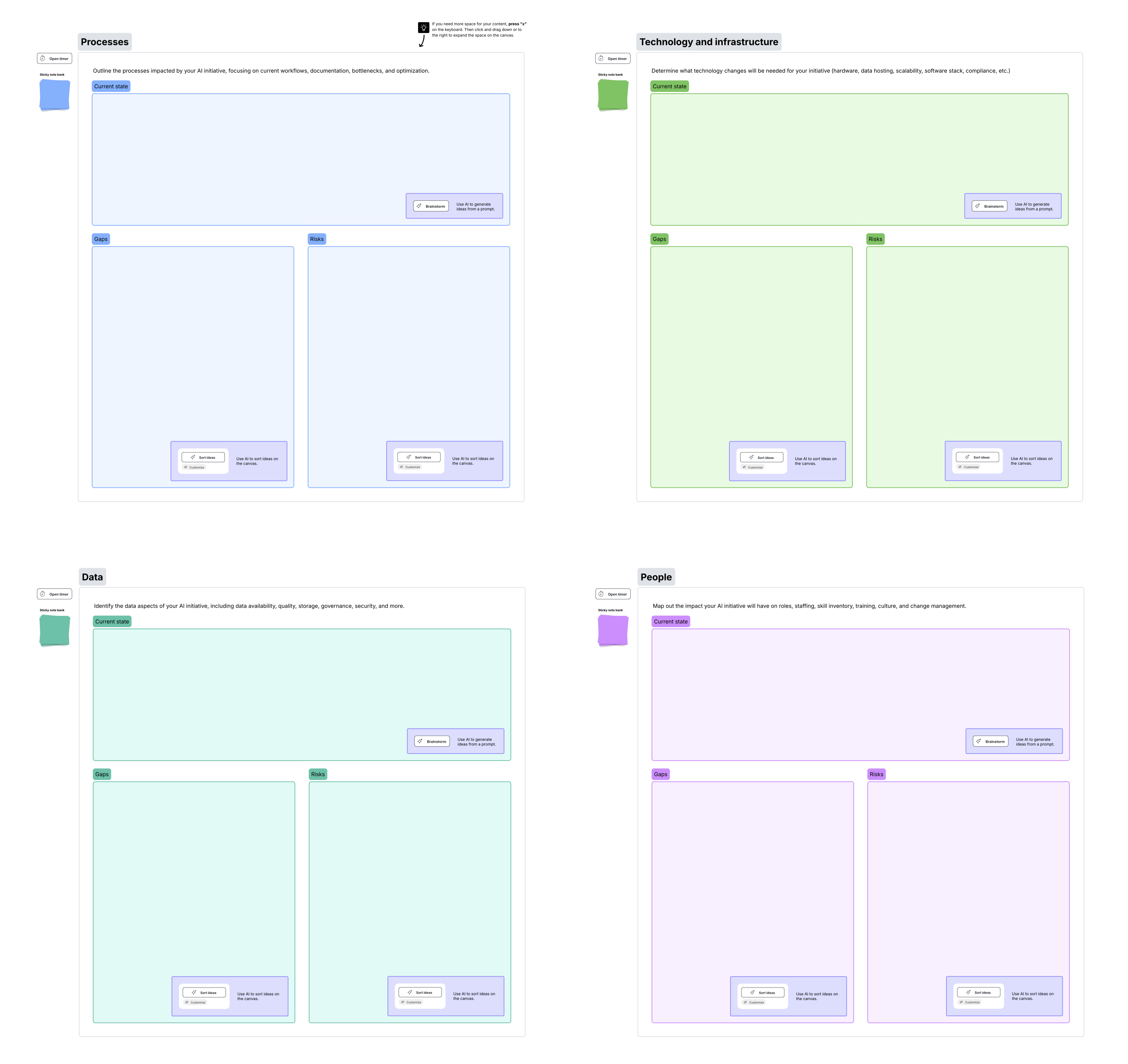
I recommend following along with the AI readiness assessment template as you work through each step below. You’ll notice that this template uses an AI readiness framework centered around four core business elements: process, technology, data, and people.
AI transformation affects the entire business, so it’s essential to consider the readiness of each of these elements. For instance, if your technology is AI-ready but your culture isn’t yet, you’ll have a powerful tool that nobody knows how to (or wants to) use.
Step 1: Outline your AI objective
Before you can assess how ready you are to implement AI, you must first nail down why you’re implementing it. For example, maybe you want to improve the customer experience through more personalized interactions, increase efficiency by automating time-consuming tasks, or accelerate time to market with better decision-making.
As part of this process, you’ll want to clarify scope—that is, how narrow or how broad your transformation will be. As Gartner® states, “In a world where artificial intelligence (AI) can do everything from converse with customers to discover proteins, executive leaders need to determine where they will and will not use AI in their enterprise”(Gartner Report, “Gartner AI Opportunity Radar: Set Your Enterprise’s AI Ambition,” By Hung LeHong, Brook Selassie, etc., February 6, 2025).
Consider whether your goal is to simply improve existing operations or create entirely new product or service offerings. You can think of this step as defining the ideal operating model post-AI implementation. Whenever possible, attach metrics and timeframes to your goals, so you have clear benchmarks to work towards.
You can (and should) revisit your objective as you progress, but this step gives you a clear focal point to gauge your readiness.
Step 2: List what parts of the business support your AI objective
With a clear objective, you’re ready to identify the processes, systems, data, and collaboration practices needed to achieve your goal. Think of all the different tools and tabs you have to jump around to get your job done. You know where to find the information you need to accomplish a task, but unless this info is documented, an agent won’t know how to interact with the different systems and data.
If your goal is to improve the customer experience, you might determine that an AI agent would need to understand specific workflows and decision logic, such as when to issue a credit versus when to escalate to a specialist. To perform these actions, it would need to interact with databases such as your CRM to understand a customer profile, an ERP to verify refund eligibility, and an order management system to process cancellations or returns. You could also start to consider which roles would be affected by the AI agent, such as customer experience, procurement, and sales.
You’ll likely need to loop in other teams at this stage to make sure you’re not missing any key considerations. If you’re using the Lucid template, you can simply invite teammates to collaborate on the board or tag individuals in comments to draw their attention to a specific section of the board.
Step 3: Create the documentation
After you’ve brainstormed what systems, processes, data, and roles are needed to support your AI goal, it’s time to begin gathering and creating documentation.
You can start by looking at what documentation you already have. For instance, maybe you already have org charts for the customer experience team or technical documentation of certain systems.
Keep in mind, however, that there are likely workflows that an AI agent would need to follow that are not yet documented because, as the survey I mentioned earlier showed, teams “just know how.”
For example, a senior support rep might “just know” that when a high-value client reaches out with a tone of frustration, they should bypass the standard ticketing queue and message a developer directly on Slack. An AI agent cannot replicate this gut feeling unless that informal escalation path and the criteria for high-value customers and frustration are explicitly defined.
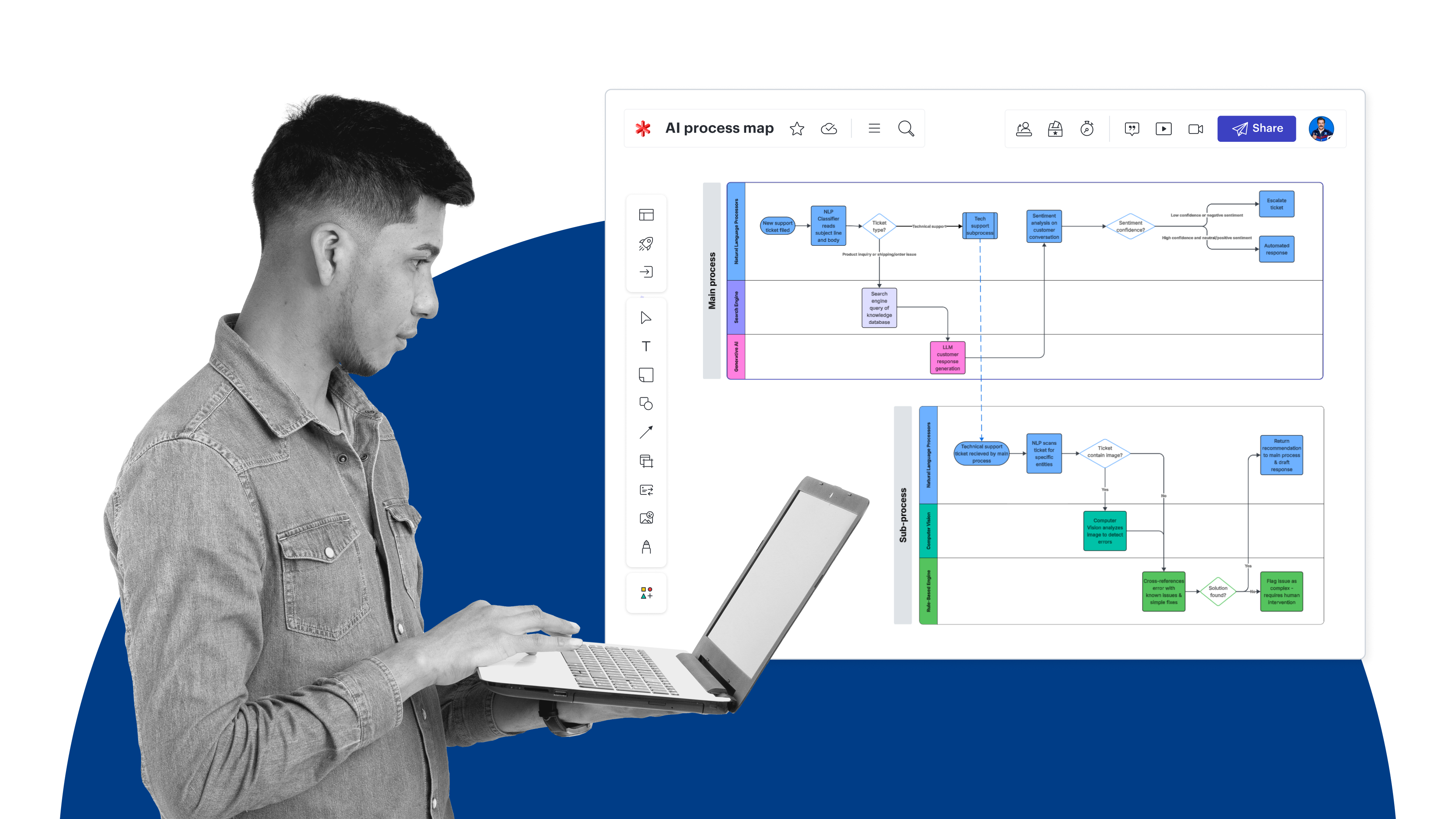
These moments are the shadow processes of your business that must be turned into digital instructions. Thankfully, Lucid makes it really easy and quick to document nearly any process, workflow, system, integration, or data flow. I recommend starting with one of hundreds of templates for processes, systems, plans, and org charts or using Lucid AI to create diagrams from a prompt.
If you’re following along with the template, you can drop links to your documentation directly in that board to create a single source of truth for your evaluation.
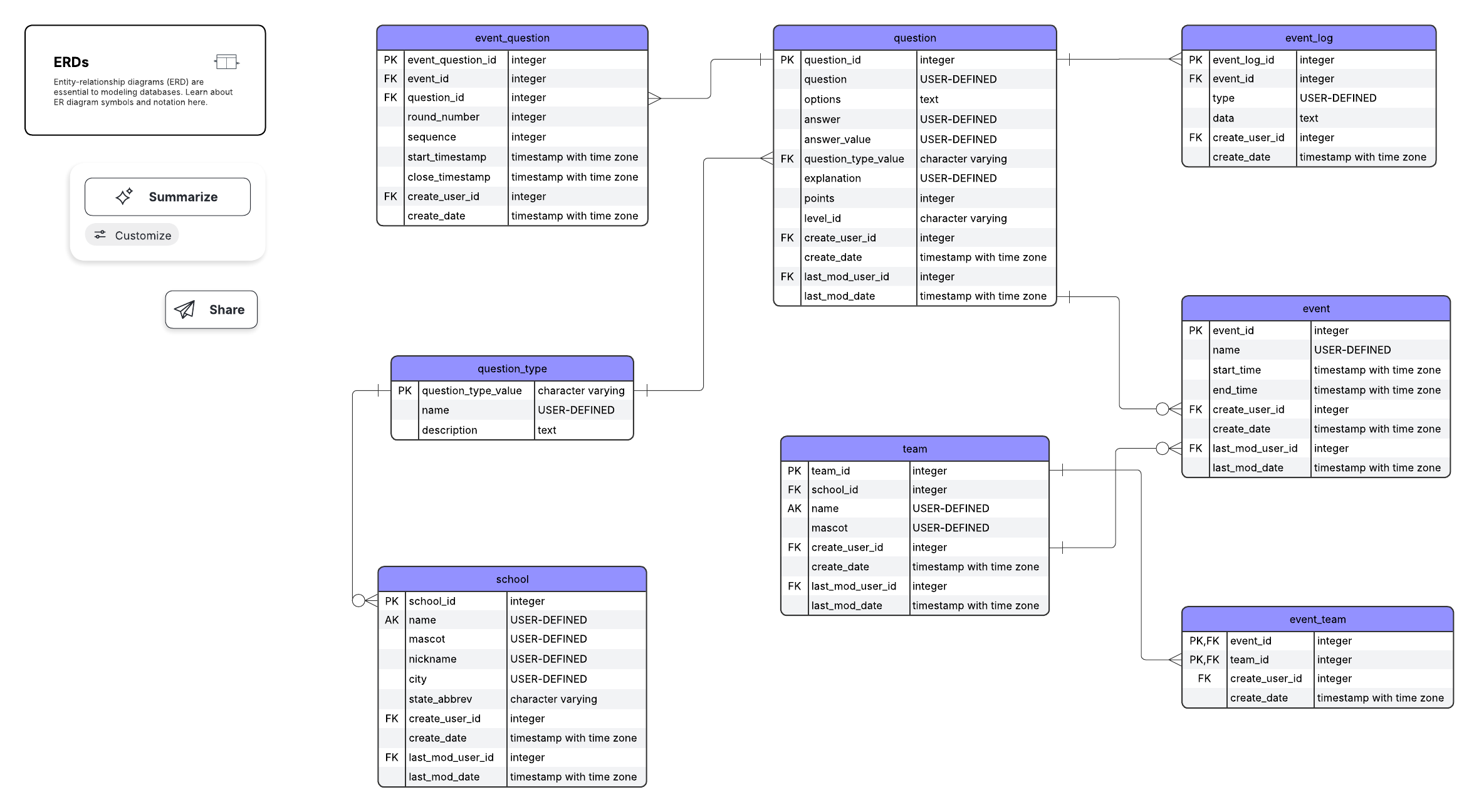
An entity relationship diagram is generated from a prompt in Lucid using Lucid AI
Step 4: Evaluate your current state
Once you have the necessary documentation created, it’s time to assess whether your current state is ready for AI, and if not, what changes are needed to be AI-ready.
Using your current-state documentation, you’ll want to look for:
- Gaps: If you simply don’t have the proper data, integrations, or skills to implement an AI project, it could take varying degrees of effort and cost to close these gaps. Given the novelty of agentic AI, it’s highly unlikely that you’d have everything you need in place from the get-go, so use this evaluation to prioritize which gaps to close first.
- Complexity: A complex process or system could require more effort and higher costs to integrate AI into. It’s also likely that complex processes will need to be streamlined and simplified prior to AI implementation.
- Risk: Consider how risky AI integration is with different systems and processes, whether that’s security risk, reputational risk, or anything else that could be costly to the business.
- Upside potential: Your current-state documentation should help you identify areas where AI could lead to the most efficiency gains, increased sales, new revenue streams, improved customer satisfaction scores, or cost savings.
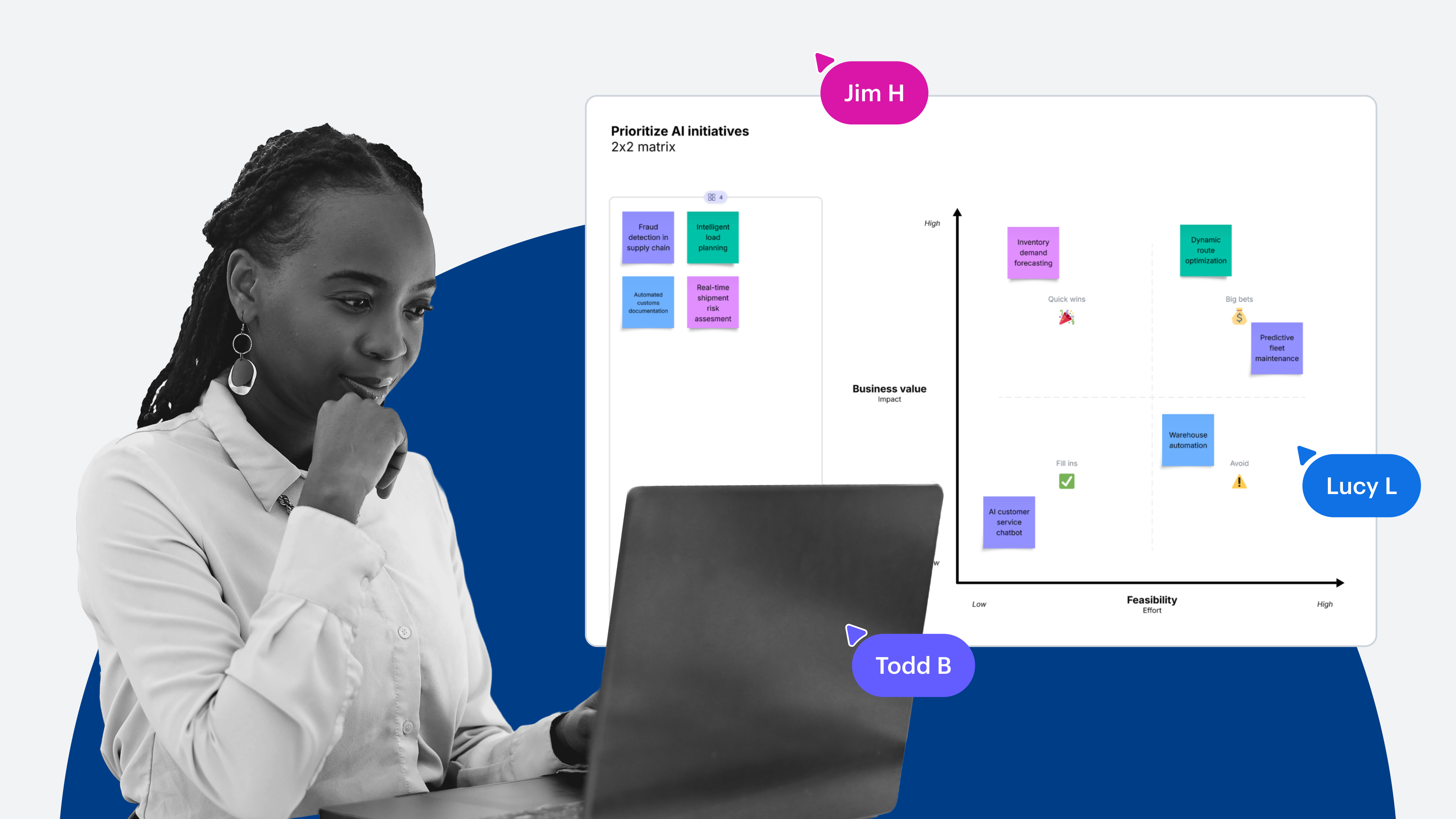
Part of your evaluation should also include prioritizing different AI projects to reach your goal. If you identify a few AI implementation projects with lower risk and associated costs and moderate upside potential, you may decide to prioritize these over risky projects that require a higher investment.
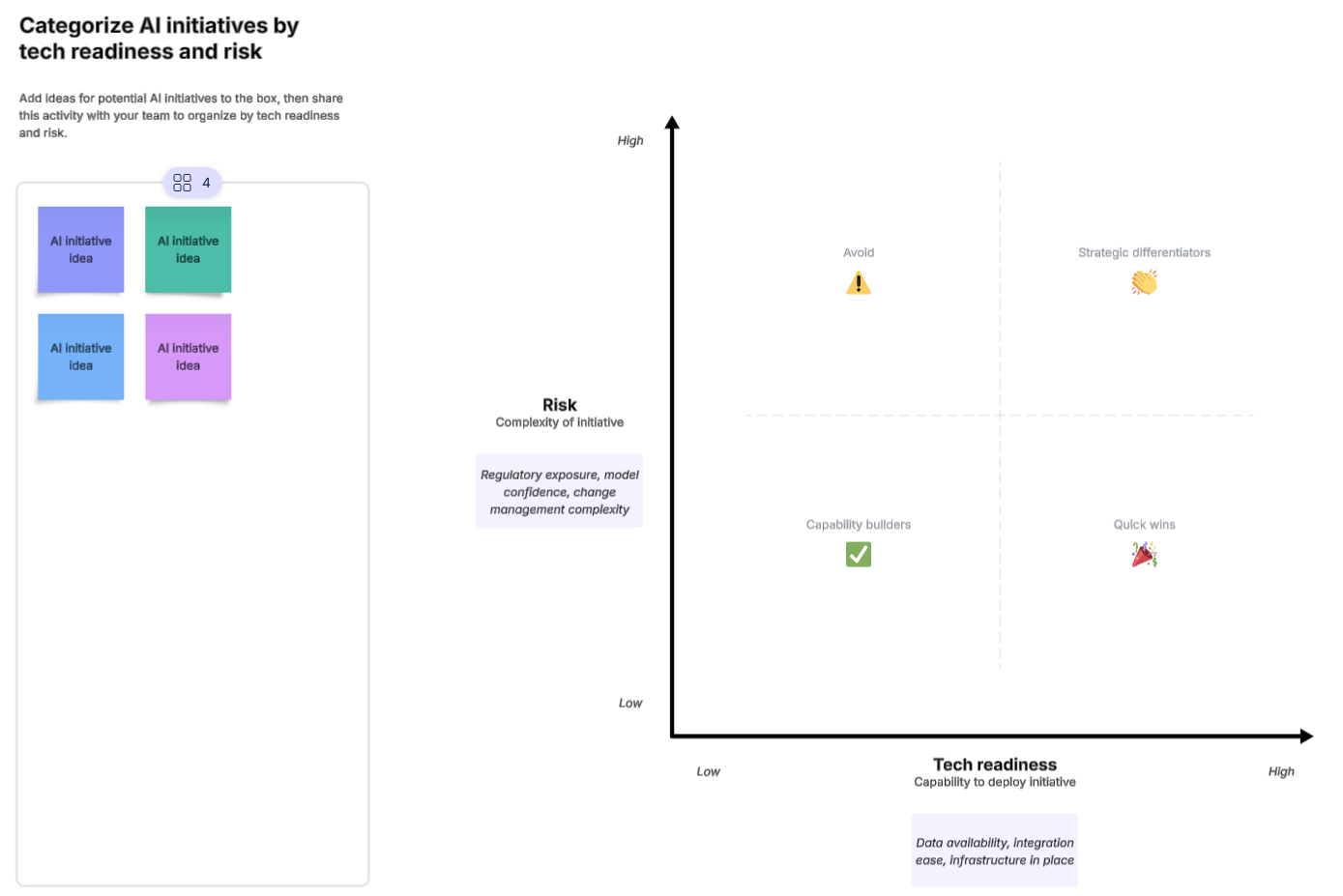
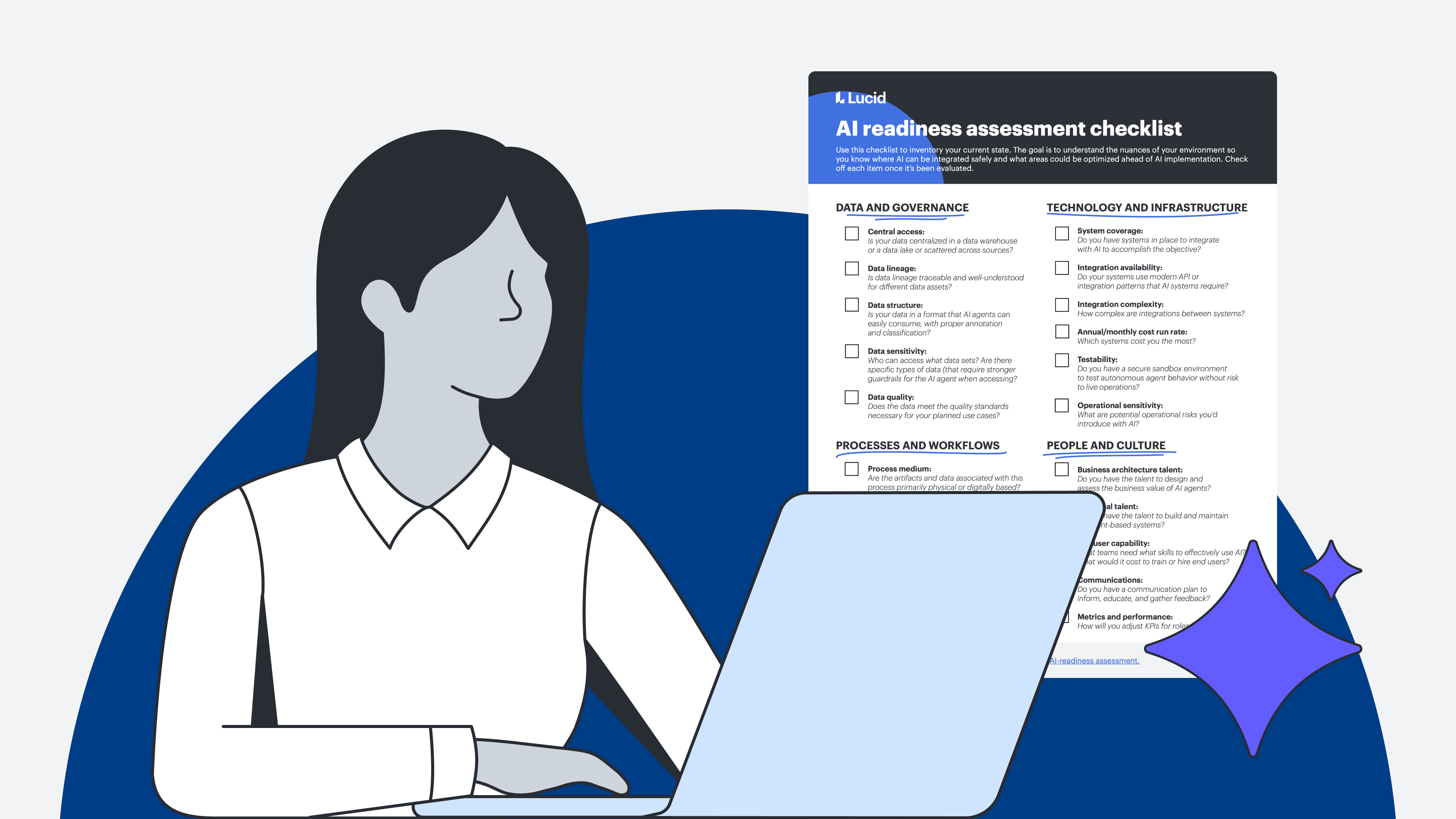
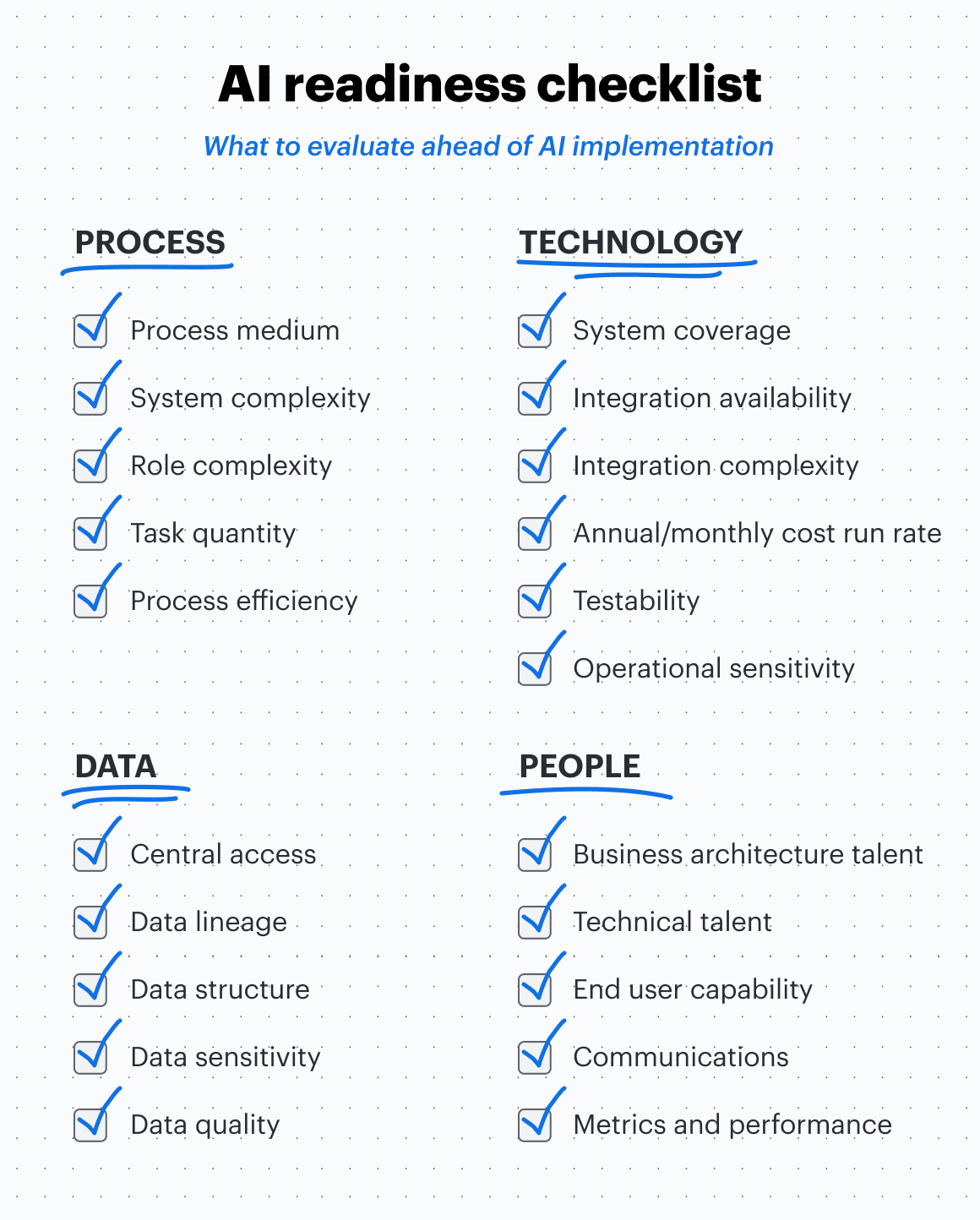
When you’re ready to begin your evaluation, use the AI readiness checklist below to help you think through these factors for each area of the business.
AI readiness checklist
Evaluate your processes, technology, data, and people for AI readiness with the following checklist. I’ve included lists of questions and considerations for each category to guide your evaluation as you complete the checklist. I recommend having your current-state documentation on hand to answer the questions as accurately and thoroughly as possible.
Process
For each business process, you’ll want to evaluate its complexity, areas of waste and inefficiency, and impact.
Gartner provides the following recommendation for evaluating process complexity: “Complexity will generally materialize in the process’s life cycle (time), variability of inputs (over time), number and management of actors (human, AI agents, or software), variability of outcomes, volume of process instances, and system interoperability” (Gartner, “Understand Your Processes Before Investing in Agentic Automation,” February 10, 2026).
To fill out the checklist, ask yourself the following questions:
- Physical vs. digital medium: Are the artifacts and data associated with this process primarily physical or digitally based? It might go without saying, but if the artifacts are physical, it will be more costly to integrate with AI because you’d first need to spend the time and effort to digitize.
- System complexity: How many different systems are involved in a given process? The more systems involved means the more complex it is to integrate AI effectively into a process.
- Role complexity: How many different roles are involved in the process? Higher role complexity could indicate opportunities where AI could free up workers’ time, an important upside to note.
- Task quantity: How many different steps and handoffs are there in a process?
- Process efficiency: What is the process cycle time and lead time? Where are there bottlenecks and other inefficiencies? Use this data to identify where an AI agent can be integrated to save time or eliminate manual steps.
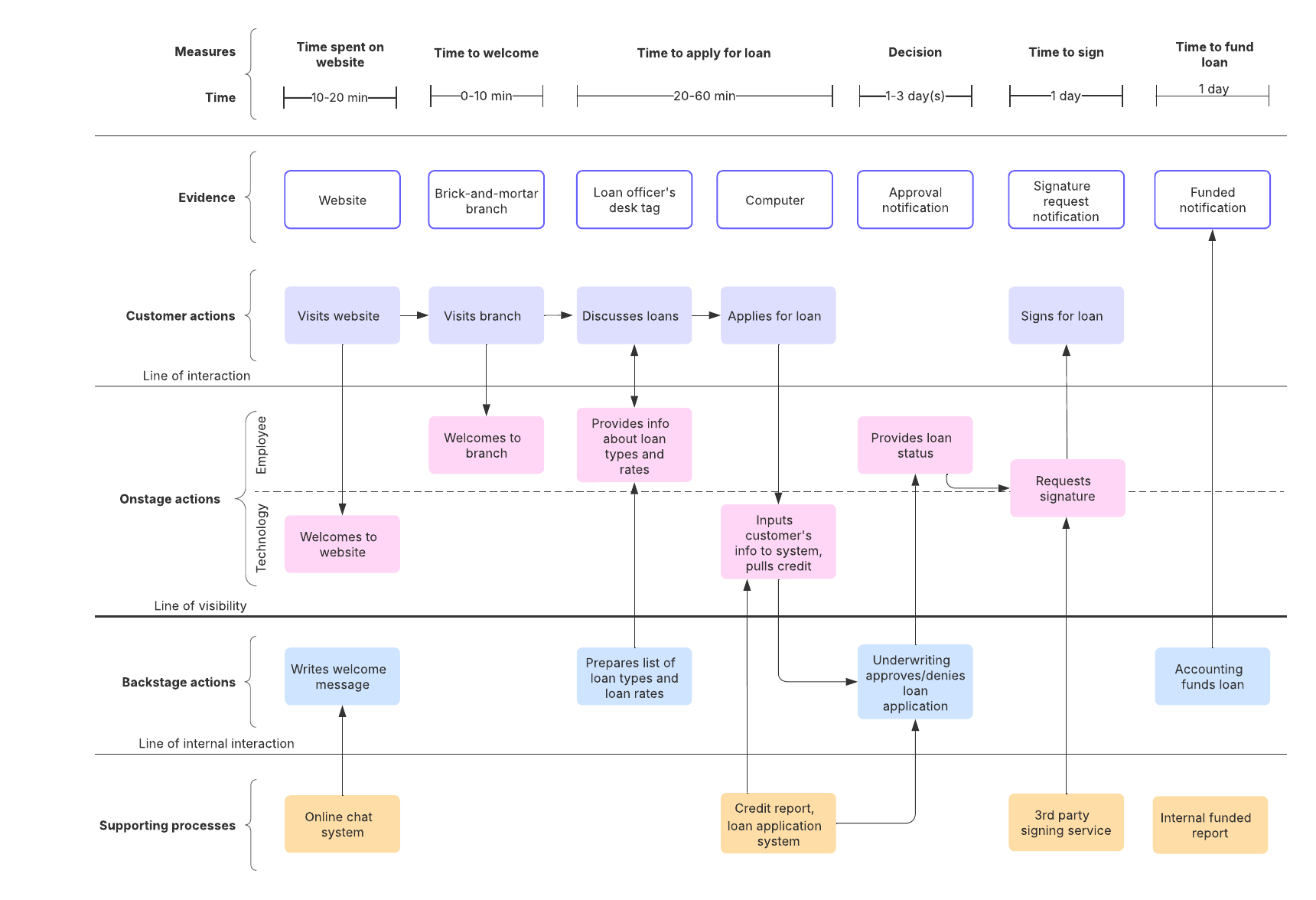
Pro tip: Value stream mapping is a powerful tool for identifying bottlenecks, delays, rework, silos, and handoffs in processes. When you create value stream maps in Lucid, you can use formulas to automatically calculate flow time and efficiency.
Technology and infrastructure
Using your system documentation, you can evaluate system scalability, complexity, and security.
The following questions should guide your analysis:
- System coverage: Do you have systems in place to integrate with AI to accomplish the objective? This may seem basic, but some goals may not be possible with your current infrastructure. If you need new systems, this would be an indicator of cost.
- Integration availability: Do your systems use modern API or integration patterns that AI systems require? If not, that system’s data will be inaccessible without first modernizing the integration capabilities.
- Integration complexity: How complex are integrations between systems? A complex web of tightly coupled integrations could indicate potential upside, as AI could serve as a better data bridge.
- Cost run rate: Which systems cost you the most? Could they be replaced or consolidated? Look for both areas you could simplify prior to introducing AI agents, as well as areas that could be simplified by introducing AI agents
- Testability: Do you have a secure sandbox environment to test autonomous agent behavior without risk to live operations?
- Operational sensitivity: What are potential operational risks you’d introduce with AI? Systems critical to business operations may require additional internal reviews and more comprehensive, costly controls to be implemented.
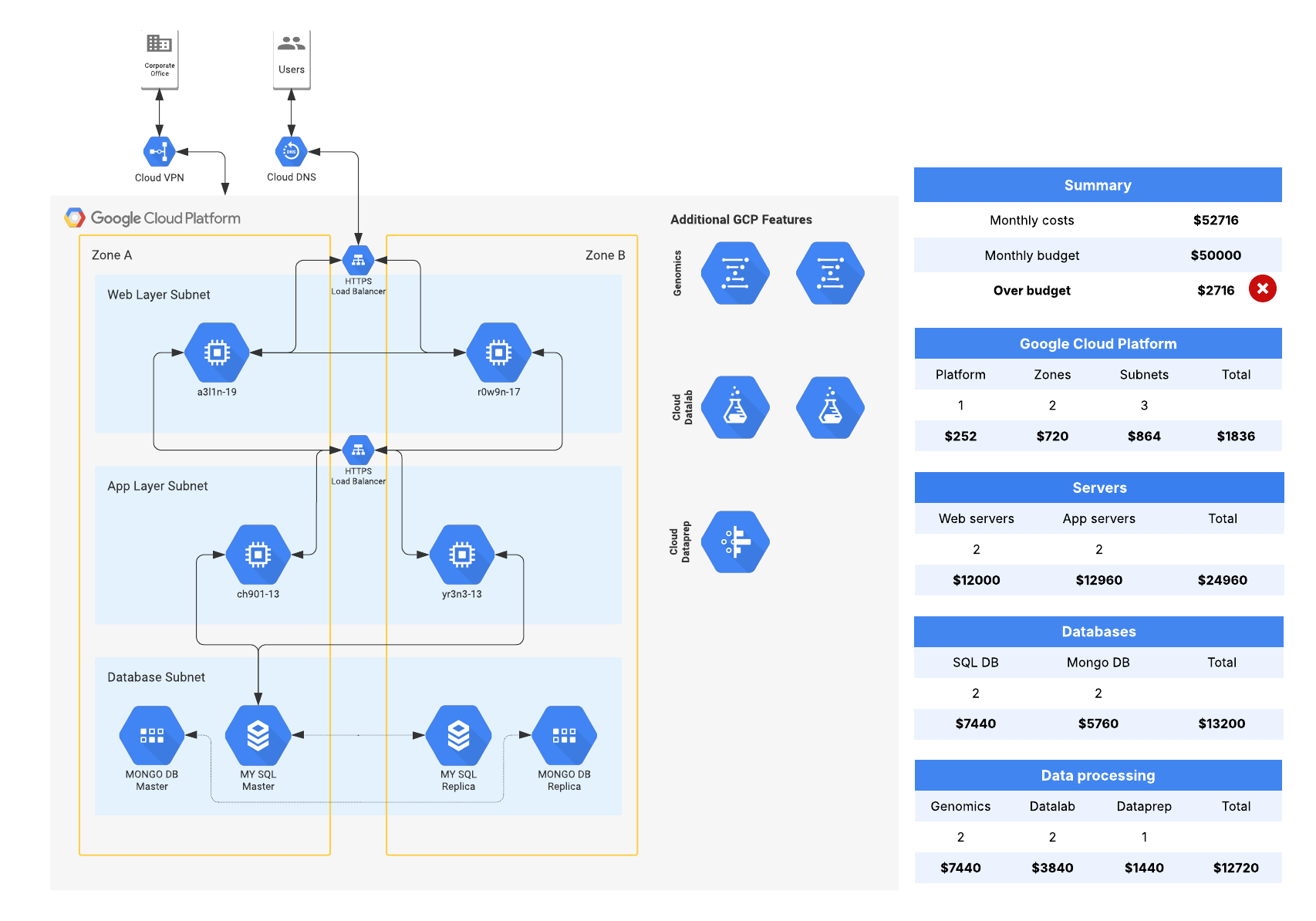
Pro tip: You can use Lucid’s Cloud Accelerator to automatically visualize your AWS, Azure, or Google Cloud infrastructure. Use these diagrams to understand system integrations, cost, and potential security vulnerabilities.
Data and governance
According to Gartner®, “AI-ready data means that your data must be representative of the use case, of every pattern, errors, outliers, and unexpected emergence that is needed to train or run the AI model for the specific use” (Gartner Information Technology, What Is AI-Ready Data? And How to Get Yours There, By Rita Sallam, October 2024).
Use the following questions to assess your data readiness:
- Central access: Is your data centralized in a data warehouse or a data lake, or is it scattered across different sources? Do you have the data you need inside of it?
- Data Lineage: Is data lineage traceable and well-understood for different data assets? This is necessary for AI to perform a deeper analysis, not only to understand your data but also where your data came from.
- Data structure: Is your data in a format that AI agents can easily consume, with proper annotation and classification, or is the data trapped in less AI-friendly formats (such as PDFs, highly structured databases, and XML)?
- Data sensitivity: Who can access what data sets? Are there specific types of data (like health records or trade secrets) that require stronger guardrails for the AI agent when accessing? Sensitive data will require more internal reviews as well as more comprehensive and costly controls to be implemented.
- Data quality: Does the data meet the data quality standards necessary for your planned use cases? If you can’t trust the data itself, you definitely can’t trust the result the AI gives you based on that data.
Given that data is foundational to agents acting autonomously, any gaps you notice in your evaluation would need to be addressed prior to implementing agents.
Pro tip: Use an entity relationship diagram (ERD) to identify orphaned or redundant entities, sensitive data, or unnecessary complexity in your data.
People and culture
Of course, building, maintaining, and interacting with agentic AI will require intentional skill development and change management.
You can assess your workforce’s readiness with the following questions:
- Business architecture talent: Do you have the talent to design and assess the business value of AI agents?
- Technical talent: Do you have the talent to build and maintain AI agent-based systems?
- End user capability: What teams need what skills to effectively and securely use AI? And what would be the cost to train or hire end users? Learn what everyday AI skills most employees need to use AI effectively in their role.
- Communications: Do you have a communication plan to inform, educate, and gather feedback throughout the change?
- Metrics and performance: How will you adjust performance metrics for roles affected by AI?
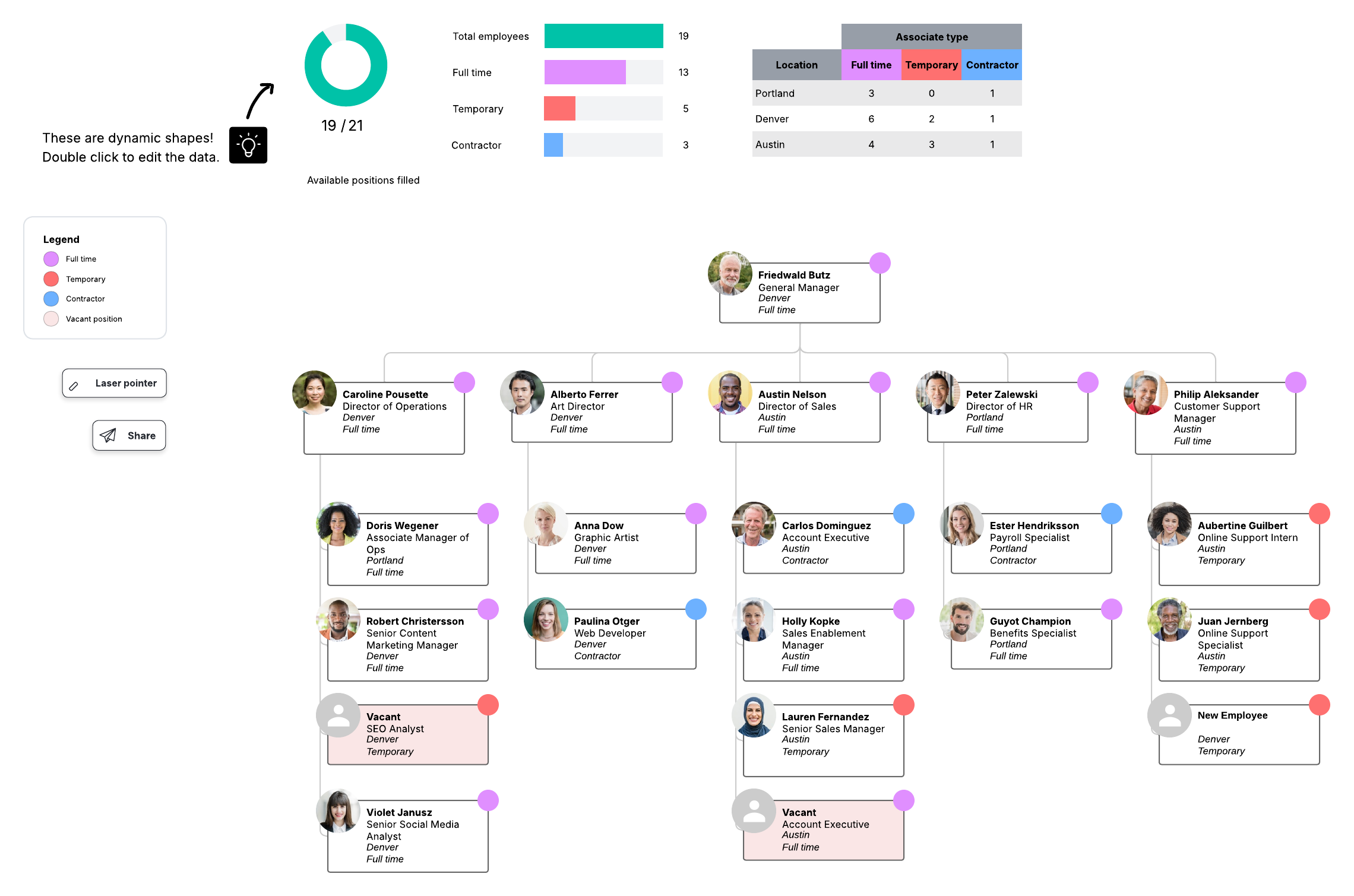
Pro tip: Process diagrams can help identify what roles would be impacted by an AI project. Then, I recommend using org charts with conditional formatting to analyze personnel or skill gaps.
Get expert help on your assessment
Lucid provides robust intelligence, automation, and collaboration features to streamline your documentation and assessment. If you want to accelerate the process even further and get expert recommendations, Lucid’s professional services team can provide a white-glove AI readiness assessment. We’ve helped dozens of organizations document their complex processes and systems, make detailed plans for technology implementation, and optimize key workflows.

Custom AI readiness assessment
Get a guided AI readiness assessment from Lucid’s experienced professional services team.
Contact usGartner is a trademark of Gartner, Inc. and/or its affiliates.