
Key takeaways
-
Visuals are essential for collaboration. In fact, 69% of workers believe visuals are crucial for effective teamwork.
-
Keep your system architecture diagrams visible and accessible. Everyone from engineers to stakeholders should be able to view them and improve their understanding and alignment.
-
Go beyond the basics. Diagrams should include detailed interactions and annotations to provide a holistic view of your system architecture.
Software environments are complex and dynamic. New features are frequently added to accommodate growing customer needs and demands. Your team, including those who aren’t immersed in the code every day, needs to understand your organization’s software architecture so it can scale seamlessly.
This is where architecture diagrams come in. They give the entire development team a visual overview making it easier to communicate ideas and key concepts in terms everyone can understand.
In this article, you'll learn about the different types of architectural diagrams and the purpose that each serves. We'll also show you how to create a system architecture diagram that encourages team engagement and collaboration.
What is a system architecture?
A system architecture is a conceptual model of a system or software. It includes details like behavior, structure, and connections between components within a system. It is used by engineers, developers, project managers, and stakeholders to maintain alignment, making it easier to mitigate obstacles and make data-driven decisions.
Benefits of using system architecture diagrams
It's no secret that visuals help people retain and recall information longer. In fact, according to a Researchscape study, 69% of workers stated that visuals are extremely or very important for collaboration. Mapping your system architecture diagrams can:
- Increase understanding: The diagrams provide an overview of the system, so everybody understands how the different components work together when determining what kind of impact updates and new features will have on the system.
- Improve communication: Software architecture diagrams visualize the game plan for everyone—aligning project goals across all teams, departments, and stakeholders. They also keep stakeholders informed of the project’s overall progress.
- Encourage collaboration and identify areas for improvement: Visualizing the application system structure makes it easier for your team members to discuss the design, find patterns that work well, and identify areas for improvement in a collaborative effort.
What to include in your system architecture diagram
The purpose of the architecture diagrams is to provide context for team members and stakeholders. A well-crafted diagram should:
- Show system interactions: Use simple shapes and lines to indicate process flows and how different elements interact. Highlighting these relationships makes it easier to assess how changes can impact the entire system.
- Include useful annotations: Add helpful explanations to critical pieces of your diagram giving teammates and stakeholders important context and information. These annotations should provide more nuanced details not easily conveyed in the diagram.
- Be visible and accessible: Your diagrams aren’t useful if nobody sees them. Attach your diagram to Confluence and wiki pages, so they are accessible across your organization.You can even share important diagrams across your chat platforms and reference them during standup meetings.

Level up your system architecture diagrams with conditional formatting.
Read moreTypes of architecture diagrams
Here are some of the different types of architectural diagrams, why they are useful, and how to build them.
1. Application architecture diagram
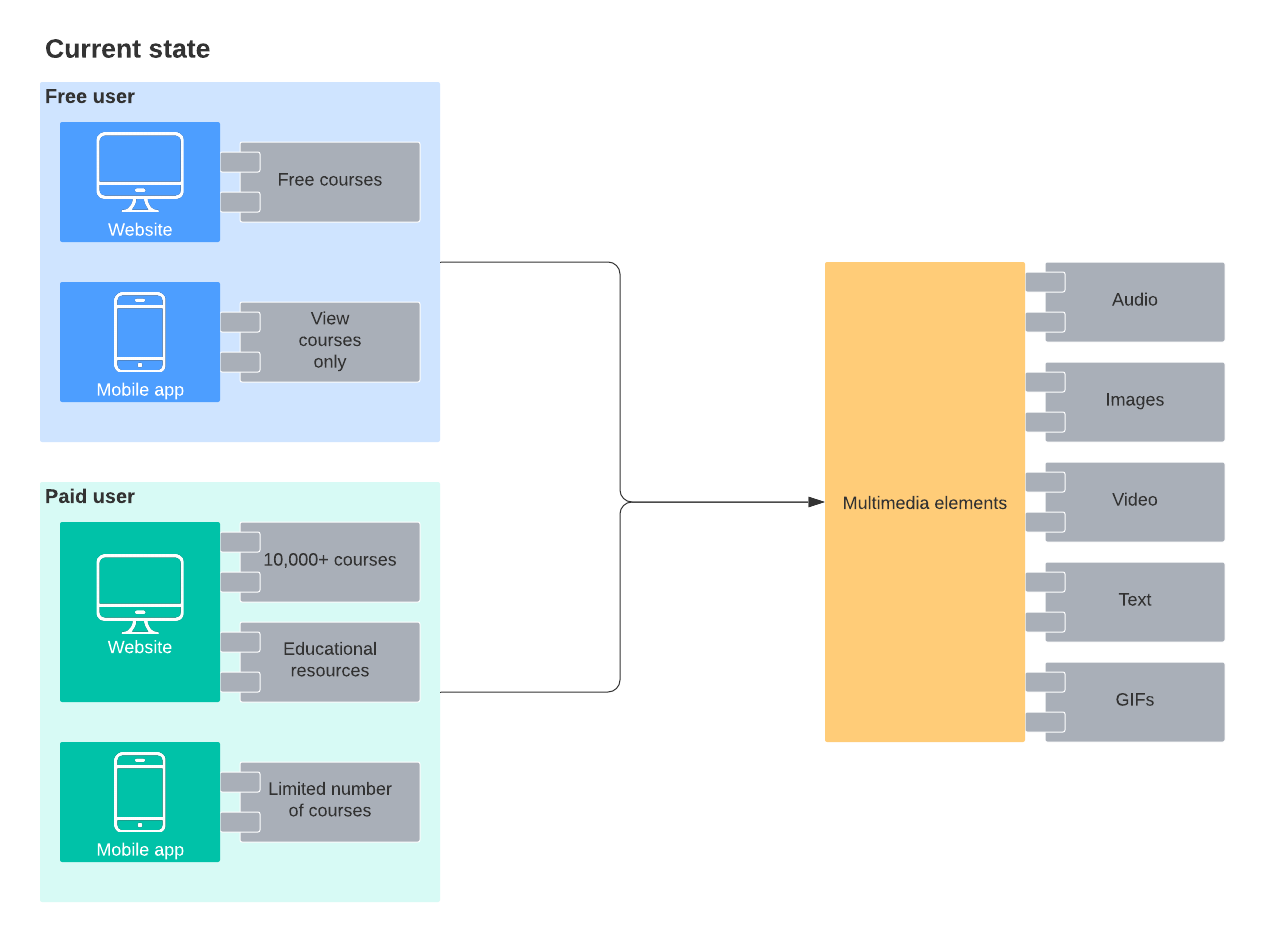
Application architecture diagrams work well for both software engineering and cloud-native applications. This high-level diagram shows the software’s basic structure, its components, their relationships, and their properties. It can also convey relationships with external components such as users, databases, and services. This type of diagram uses simple shapes and lines to represent various components. The basic design makes it easier for you to collaborate with executives and other stakeholders.
Application architecture diagrams help you assess the potential impact that upgrading, replacing, or merging existing applications may have on the system. This also makes them especially useful for code maintenance, enabling developers to easily review code and fix bugs.
Tips to create an application architecture diagram:
- Use simple shapes and lines to represent components, relationships, and layers.
- Group application layers into logical categories such as business layer, data layer, or service layer.
- Indicate the architecture’s purpose and the intended outcomes.
- Identify the application’s dependencies and interactions.
- Add text annotations to incorporate details about the structure, groupings, security concerns, types of applications included, application organization, and more.
2. Integration architecture diagram
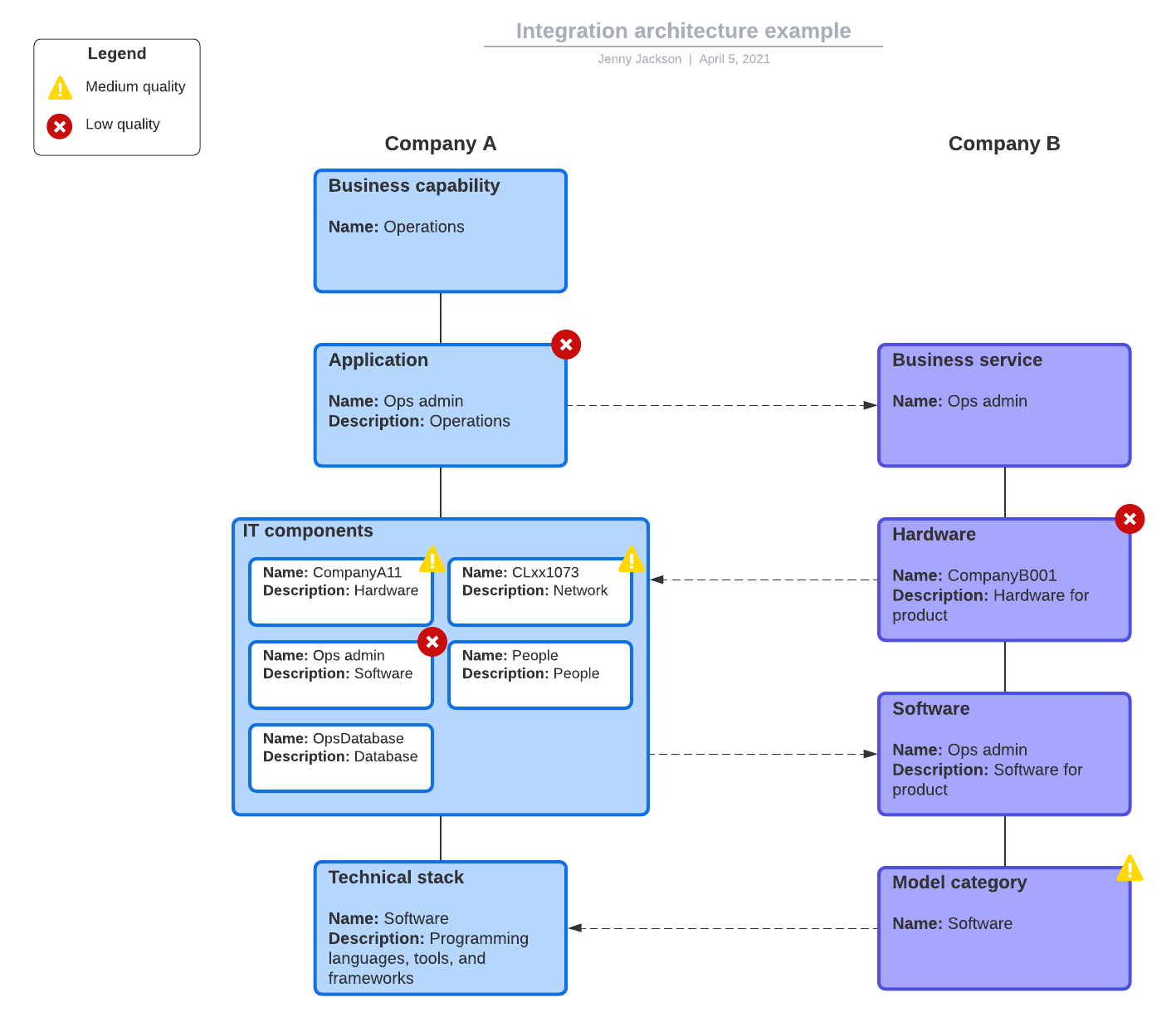
Unlike application architecture diagrams that show what components exist, integration architecture diagrams focus on how the components are connected. By highlighting the protocols used for these connections, you get a clear view of new integrations align with your organization’s growth strategy.
This type of diagram can help you to plan out how partner external systems, such as booking agents, fulfillment, ticketing, e-commerce, etc., will integrate with your software.
Tips for building an integration architecture diagram:
- Show how current services are organized and exposed both externally and internally.
- Indicate how third parties will integrate with the system.
- Specify how the system will be secured and managed.
3. Deployment architecture diagram
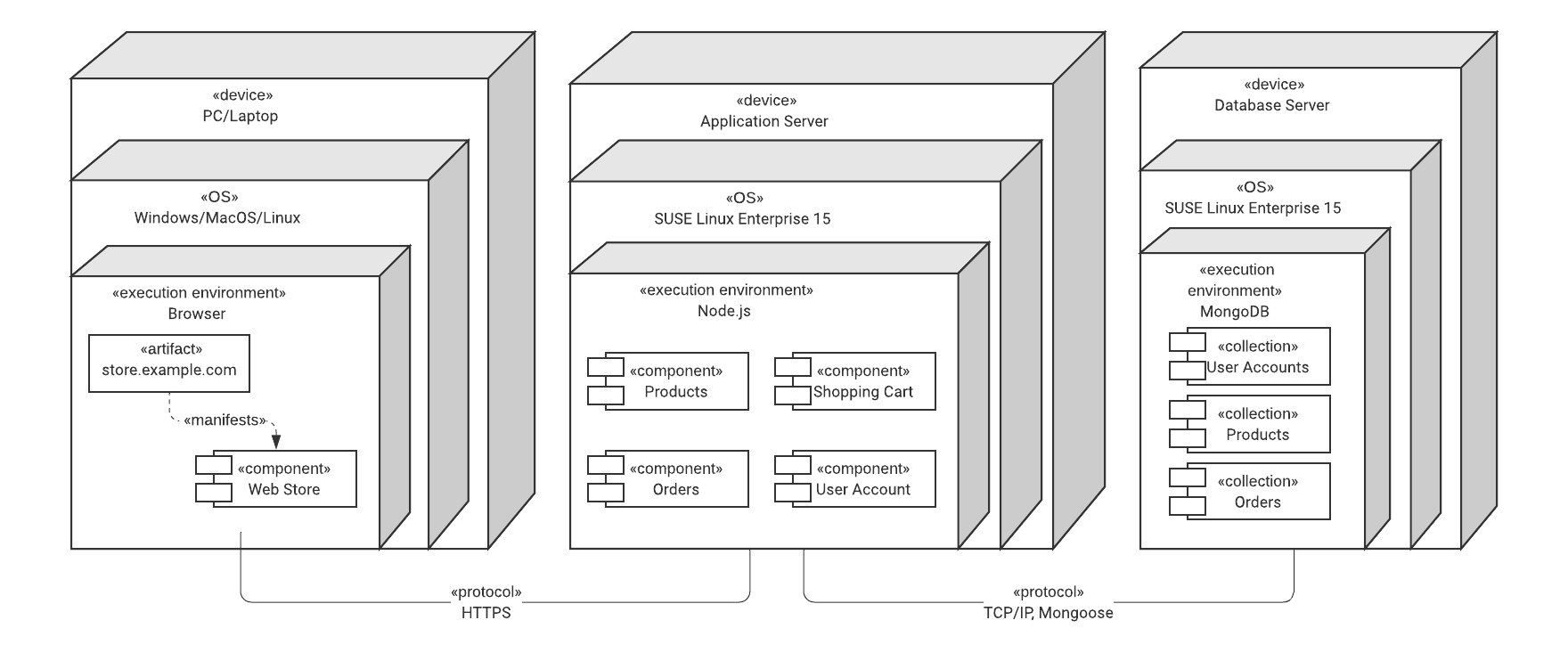
Deployment diagrams are the key to understanding your system’s physical structure. They help you visualize network boundaries at every component—from processors and nodes to software and other devices. By mapping out the entire system, deployment architecture diagrams facilitate better planning, helping you determine how many components are in the system and how they communicate with each other.
When you and your team are able to visualize how the system will be deployed on the hardware, it's easier to plan strategic application and service upgrades, optimize your resources, and handle additional process requests and workloads as your organization grows.
Tips for creating a deployment architecture diagram:
- Indicate network boundaries and areas where external systems can potentially connect to your system.
- Estimate instance size and indicate where new instances will be deployed.
- Show how and where the system extends to other systems and networks so you can streamline shared resources and services.
4. DevOps architecture diagram
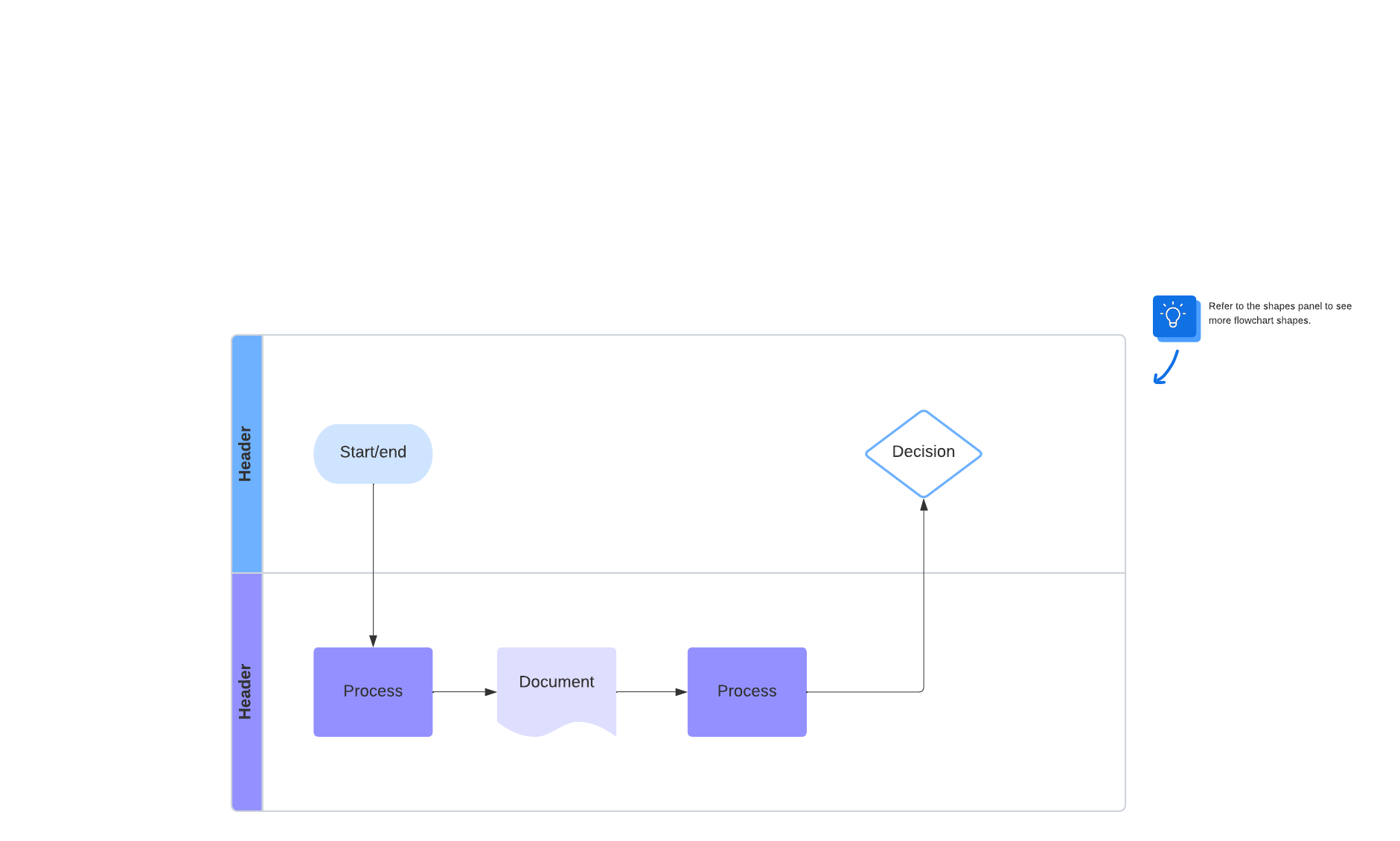
A DevOps architecture diagram is your operational map for application deployment. Similar to a process flow diagram, it visualizes every step, from development to deployment, to both internal and external systems.
Having a detailed overview empowers teams to proactively identify areas for optimization, staying ahead of deployment tools and system changes.
Tips for designing a DevOps architecture diagram:
- Define the current process flow as a baseline for finding ways to improve.
- Indicate what types of applications will be deployed.
- Display how processes flow across multiple environments.
5. Data architecture diagram
As the name suggests, data architecture diagrams demonstrate how and where the data flows, is processed, and used. It includes components that define how data is collected in the system. If you are looking for ways to update and streamline data storage resources you would turn to a data architecture diagram. Data collection and consumption is constantly increasing, so you will need to revise and update your data architecture frequently.
Tips for drawing a data architecture diagram:
- Illustrate how data is currently processed.
- Reveal how and where data is stored.
- Show the estimated rate of data incrementation. This will give you and stakeholders a good idea how much the system will need to scale.
- Indicate the components that will be needed for future growth.
The good news is you don’t have to be an artist to draw architecture diagrams. Lucid's work acceleration platform makes it easy to create and visualize your system architecture diagrams and stakeholders.

Learn top tips for designing your own software architecture.
Explore now