Migrating to the cloud is an attractive solution to many of the operating and maintenance problems companies experience with on-premise computing.
However, it can pose challenges of its own—namely, cost. It’s true that the price tag for a cloud migration can be high. Yet, despite the initial cost, cloud computing is ultimately an investment that can result in big savings.
Here’s what you need to know about the true costs of cloud computing and how you can optimize your savings on the cloud during and after migration.
What is the cost of cloud computing?
With the promise of reduced IT costs and improved automation, flexibility, and efficiency, moving to the cloud may seem like a no-brainer. However, migrating to the cloud does pose financial risks, and many businesses wonder exactly how much they will have to invest and whether the switch is worth it.
Part of the cause for concern is the shift from a fixed-cost operating model to a variable-cost model. On-premise computing gives businesses the (perceived) security of a fixed financial investment. They know how much money they will spend on computing month to month with a high degree of certainty.
Moving to the cloud removes some of this certainty because it allows organizations to pay only for what they use. Since their cloud computing needs will vary, their cloud computing costs may vary too.
Although cloud computing can help companies save more money over time, trying to predict and compare the variable costs of cloud computing to the fixed costs of on-premise computing leads to uncertainty about true cost savings.
This fear is not without foundation. There is potential for runaway costs when operating on the cloud.
The key is to manage the entire cloud migration progress and post-migration operations carefully. With smart planning and the right cloud management tools and processes in place, you can keep your cloud computing costs under control.
Cost benefits of cloud computing
Although moving to the cloud requires an upfront financial investment, the cost benefits of cloud computing are actually one of the top reasons many organizations consider making the switch in the first place.
There are several cost benefits of cloud computing:
-
Energy savings: When you switch to the cloud, you are no longer paying for unused infrastructure (like redundant servers). Efficient hardware utilization means less energy output and more money in your pocket.
-
Scalable infrastructure: One of the biggest advantages to cloud computing is the ability to scale your operations flexibly. In other words, you only pay for what you use.
-
No capital costs: Operating and maintaining physical data centers and servers is a big investment. With cloud computing, you no longer have to deal with these capital costs. Instead, you can redirect those resources toward other priorities and initiatives.
-
Decrease of downtime: The cost of downtime is only going up. When the average cost of downtime in 2024 is over $1 million/hour, businesses can’t afford to go offline. The cloud significantly reduces this risk with more redundant and reliable service.
-
Increased efficiency: On-premise computing requires a lot of attention and maintenance from IT to keep things running smoothly. Moving to the cloud frees your staff to focus on other priorities in the business, streamlining your talent and increasing operational efficiency.
Altogether, migrating to the cloud can mean greater efficiency, higher productivity, and lower operating costs for your business.

Switching to the cloud?
See our tips and a checklist to execute a successful cloud migration strategy.
Learn moreWays to save on the cost of cloud computing
There are several ways to optimize your cost savings during and after a cloud migration. Use the following tips to manage cloud computing costs and stay on budget from the very beginning.
Visualize current and future states
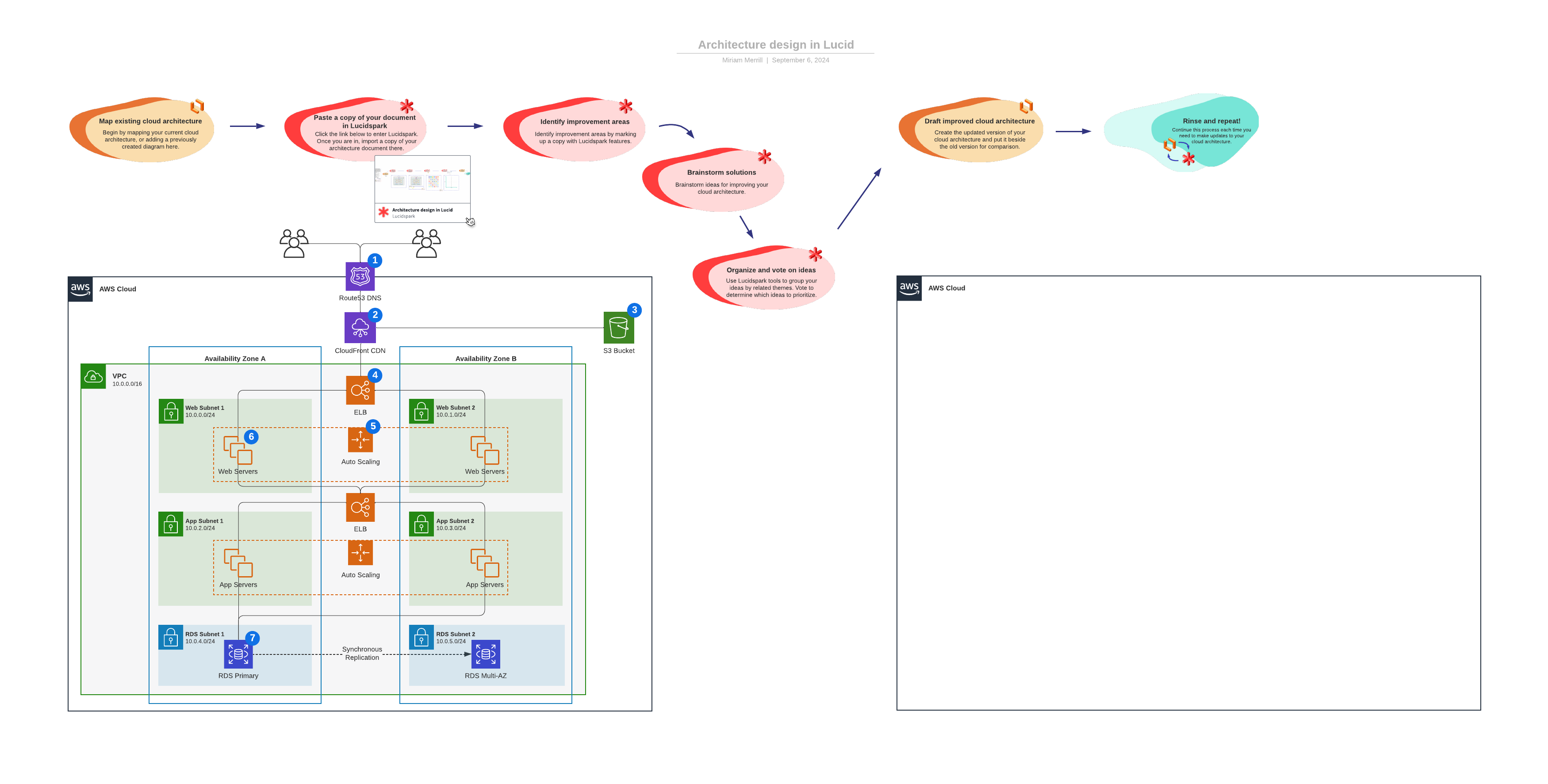
During the cloud migration process, it is helpful to visualize the current and future states of your cloud architecture.
Understanding your current cloud environment and defining your ideal future state post-migration can help you identify gaps in your infrastructure and streamline your migration with those issues at the forefront.
A clear cloud migration roadmap and strategy can also reduce the risk of costly delays or pivots during the migration process. Lucid’s Cloud Accelerator helps teams visualize and govern their cloud environments, making it easier to understand cloud costs, identify opportunities to optimize spending, and align migration plans with business goals.
Keep architecture diagrams updated
A cloud architecture diagram visualizes your infrastructure and processes so you can better understand how each component in your cloud solution works together. Cloud architecture diagrams are a great way to gain insights into which parts of your infrastructure are underutilized or wasting money.
Since any change to your network will affect your costs in some way, it’s important to rely on updated diagrams. That way, you’re making decisions based on what your network actually looks like right now—not what it looked like 6-12 months ago. Try using a diagram maker to easily keep yours updated and accurate.
Map out cloud processes and roles
Another simple way to keep cloud computing costs under control is to map out your cloud processes and roles.
Outlining the various teams and roles involved in your processes, such as security groups, cloud architects, network monitors, etc., can also help you understand how those roles fit together to maintain and protect your cloud network.
Having a clear picture of your processes makes it easier to spot spikes in usage and identify opportunities to improve operations for greater efficiency.
Purchase only the services you need
One of the keys to successful cloud management is “rightsizing,” which means identifying resources that are not provisioned correctly and reconfiguring them to optimal levels.
In other words, only purchase instances and cloud services that you actually need and use. Then track your usage to make sure your resources remain appropriately allocated. Adjust as necessary.
Rightsizing reduces waste, resulting in streamlined operations and cloud cost savings.
Automate scheduling
When it comes to saving costs on the cloud, automation is your friend.
Use automated scheduling to automatically switch off resources used for non-production workloads after peak hours. (While you can also do this manually, automating the process is the most efficient method.)
Like turning off lights when you leave a room, switching off unused resources during off-hours (like between 8 p.m. and 8 a.m. on weekdays) reduces your overall costs—by nearly 65% according to some measures.
Monitor cloud costs in real time
Just like personal spending habits, if you keep track of your costs, you are more likely to stay on budget. The same holds true for the costs of cloud computing and operations.
Monitor your ongoing cloud computing costs in real time so you can identify areas that need adjustment or attention before costs grow. Most cloud providers and management services offer policy-driven automation, which lets you create alerts and actions based on rules (i.e., policies) you’ve outlined.
For example, you can set an alert to notify you when:
- You’ve reached your monthly spending limit.
- The cost of cloud storage exceeds a set amount.
- There are unused instances or storage volumes for a certain period of time.
Tracking your spending and monitoring set indicators can reduce cloud computing costs and help you optimize your overall operations.
Getting the most out of your cost reports
Your cloud service invoice is arguably the best way to accurately track your costs on the cloud. After all, the invoice provides the exact usage and associated cost data on your account.
However, the invoice itself can be difficult to glean real insights from.
A typical invoice from AWS, Google Cloud, or Azure cloud services is formatted in a long, dense CSV or PDF file with blocks of text and numbers. On its face, it isn’t easy to see how different costs or services are connected to your cloud architecture.
Lucidchart can help you glean insights from these cost reports and put your cloud computing costs in context by visualizing the data.
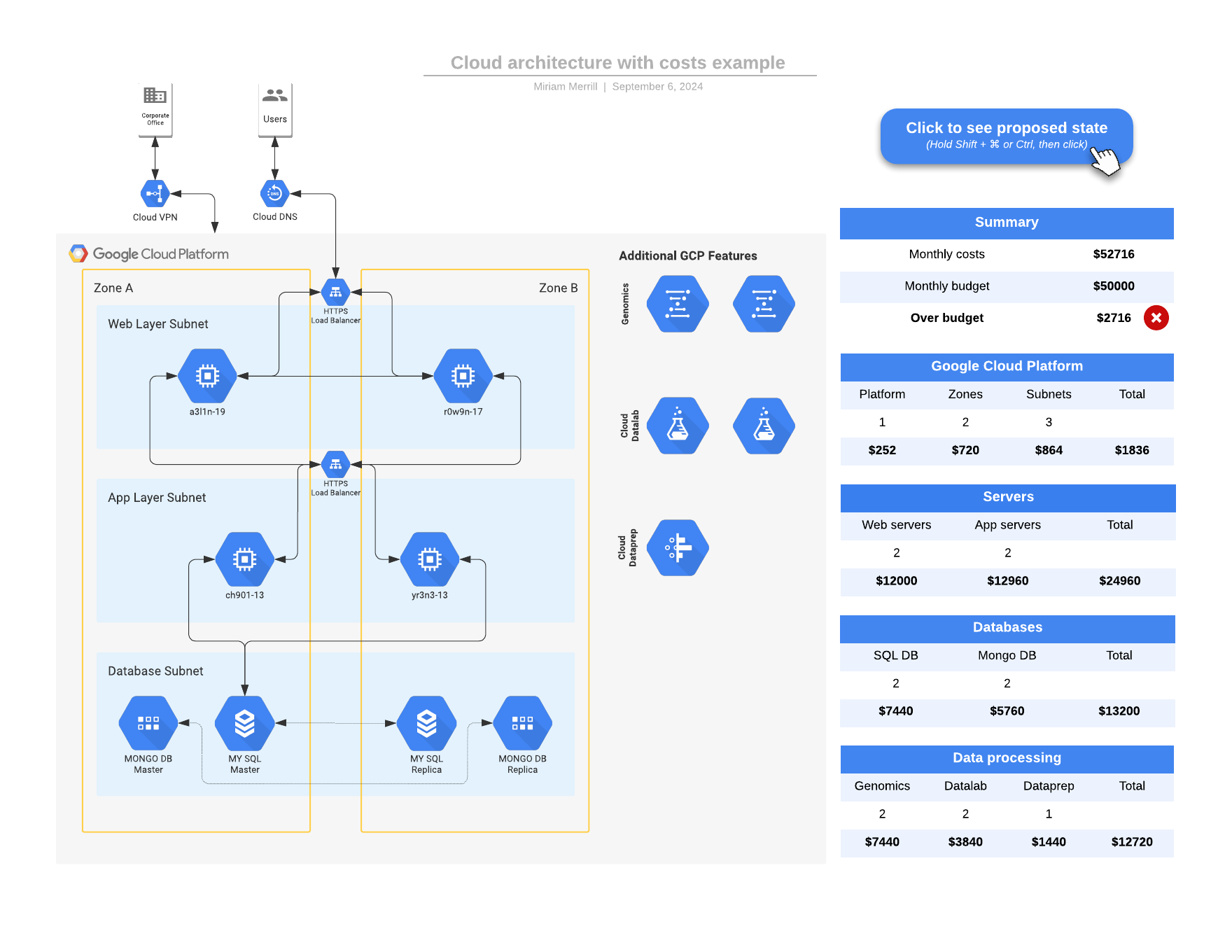
Overlay your cost data from the invoice on top of your architecture diagrams so you can visually connect the dots, identify where your costs are coming from, and even flag areas that may be overspending or underutilized.
With careful planning and management, and the smart use of resources like automation and data visualization, you can optimize your usage and keep cloud costs under control throughout the migration process.
With the Cloud Accelerator, you can automatically visualize your AWS, Google Cloud, or Azure cloud infrastructure to better understand and optimize your cloud environment.
Learn more