A data flow diagram falls into one of two categories: logical or physical. Learn more about how each one is used.
What’s the difference between a logical DFD and a physical DFD?
A logical DFD focuses on the business and business activities, while a physical DFD looks at how a system is implemented. So while any data flow diagram maps out the flow of information for a process or system, the logical diagram provides the “what” and the physical provides the “how.” They are two different perspectives on the same data flow, each designed to visualize and improve the system. The logical DFD describes the business events that take place and the data required for each event. It provides a solid basis for the physical DFD, which depicts how the data system will work, such as the hardware, software, paper files and people involved. In tandem, the logical and physical can fully visualize the current state and model the new state to be considered and then implemented.
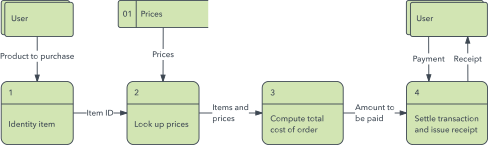
Logical DFD
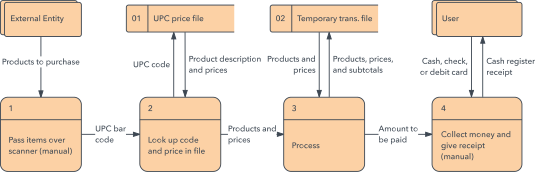
Physical DFD
Purpose and benefits of each
By starting with a current logical DFD, you map the flow of business actions as they exist, which can highlight any shortcomings or inefficiencies. Or, you may already know the type of functionality you’re seeking to add, and the current logical DFD will help to reveal process steps that may need to be dropped or changed. As with any diagram, the logical DFD should be detailed enough to be actionable. Depending on its scope, the current logical DFD may take time to produce and seem tedious, but the time may be well spent.
Another benefit of logical DFDs is that they tend to be more easily understandable to non-technical people. They will likely make sense to the people working in the business activities. They will serve as a good tool for collaborating and communicating about better information and functioning, without concern for the “how” yet. They will serve as a bridge from business needs to technical requirements. The discipline of mapping out the current logical flow will help everyone involved to gain a deeper understanding and reveal mistaken assumptions, misunderstandings or shortcomings. Doing logical models reduces the risk of missing business requirements that otherwise would arise belatedly in the process, causing delays and rework.
Then, with a solid understanding of the current business activities, you can model a better way with a new state logical DFD, showing new features and functioning based on what the business analysis has revealed. This new logical DFD models what data flows are necessary to create the better functioning, no matter what the technical solution or how the system will be implemented.
After the new logical DFD is drawn, it in turn can be used to figure out the best method to implement the business activities in an upgraded system. This becomes the basis for the new physical DFD, depicting that physical implementation of devices, software, files and people to enable the business processes. In this sense, the physical DFD becomes the method of giving the business what it needs. It’s the “how” fueling the “what.” The physical DFD then provides the basis of an implementation plan to provide the new software, hardware, people or other physical pieces needed to run the business process.
An example of logical vs. physical data flow analysis
Let’s say your HR department has an outdated approach and system for tracking job applicants. Rather than dive straight into reviewing new software, you start by mapping out the current logical data flow. You detail the business activities that take place, such as actions taken to write a job posting, advertise it, enter applicants into the company’s files or database, alert hiring managers, update the files, track process stages, alert candidates and so on. All of this is from the perspective of the business activities, not the technology or other parts of “how.” It lays out the current data flow, and it provides the basis for communicating and collaborating on better functionality to accomplish the necessary business actions to sort through job candidates. You then map out a potential new logical flow. For example, it might provide timely alerts to hiring managers, keeping them better apprised. It might allow them easier access to resumes and comparison of finalist’s qualifications. This new logical DFD is the basis for discussion of how to best implement better functioning in terms of software, hardware, filing systems and employees, all of which can be visualized in a physical DFD. This can be used to assess software solutions and other implementation pieces and to see which best meets business needs. For example, you could show how different software platforms would vary in different versions of the physical DFD, helping to reveal the best solution.
Contrasting elements of logical vs. physical DFDs
Data flow diagrams are composed of four elements: external entities, processes, data stores and data flows. But the elements represent different perspectives in logical DFDs than in physical DFDs.
For example, in logical DFDs, the processes are business activities; in physical DFDs, the processes are software programs, manual procedures or other ways information is processed. In logical DFDs, the data stores are collections of information, regardless of how they’re stored; in physical DFDs, data stores are databases, computer files and paper files.
How they are used in different fields
Logical and physical DFDS in software engineering: DFDs originated in software engineering and development. A logical DFD can capture current and necessary activities required for a process. A new logical DFD models a new set of activities and functions. A current physical DFD depicts the current software, hardware, databases and people to carry out the activities, and new physical DFD models a new system implementation. This analysis can provide a better way to get to the actual code that fuels the requirements.
In business analysis: A logical DFD can help to reveal business requirements that might otherwise go unstated until late in the process, causing delays and rework. It also serves as a clear communication tool with non-technical people involved in the business activities, both for the current flow of information and the proposed new way. The physical DFD then provides the system “how” to drive the requirements.
In structured analysis: In classical, top-down structured analysis, a logical DFD is drawn of a current system to describe its current state, and then an improved system is modeled in a new logical DFD. The top-down physical DFDs are then drawn to show the targeted physical solution of software, devices and other system pieces. In event-driven, bottom-up structured analysis, a context DFD (Level 0) establishes the project’s scope, and subsequent levels break it down into subprocesses. Then we specify system events that require a response, and event DFDs are drawn to depict how each event is handled. These event DFDs can then be merged in a system diagram.
In office and administrative: A logical DFD is used to depict the business actions that take place for an office to function. The new logical DFD can then model better functionality with the office’s data, such as personnel data or customer data and orders. It forms the basis for figuring out how to accomplish that, shown in a physical DFD depicting how to implement new software, devices, data files or databases and people.
In health care: A current physical DFD can depict the current system of data flow, such as patient information. That can be used to draw a current logical DFD, showing the data functions with the “how” removed. Those DFDs help to form a clear understanding of the shortcomings and requirements for a new system. That in turn forms the basis for a new logical DFD and then a new physical DFD depicting the new software, devices, databases and other physical items.
A quick primer on DFDs in general
Data flow diagrams were popularized in the late 1970s, arising from the book Structured Design, by computing pioneers Ed Yourdon and Larry Constantine. The structured design concept took off in the software engineering field, and along with it so did the DFD method. These data flowcharts can range from simple process overviews, to in-depth, multi-level DFDs that dig progressively deeper into how the data is handled. They can be used to analyze an existing system or model a new one. They used defined systems of symbols to depict the four components: external entities, processes, data stores and data flow. The most common symbol systems are named after their creators: Yourdon and Coad; Yourdon and DeMarco; and Gane and Sarson.
| Notation | Yourdon and Coad | Gane and Sarson |
|---|---|---|
| External Entity |

|

|
| Process |

|
|
| Data Store |

|

|
| Data Flow |

|

|

DFD levels are numbered 0, 1 or 2, and occasionally go to even Level 3 or beyond. The necessary level of detail depends on the scope of what you are trying to accomplish. DFD Level 0 is also called a Context Diagram. It’s a basic overview of the whole system or process being analyzed or modeled. DFD Level 1 provides a more detailed breakout of pieces of the Context Level Diagram. You will highlight the main functions carried out by the system, as you break down the high-level process of the Context Diagram into its subprocesses. DFD Level 2 then goes one step deeper into parts of Level 1. It may require more text to reach the necessary level of detail about the system’s functioning.
While DFDs are used in process modeling of systems, data modeling is often done with Entity Relationship Diagrams (ERDs) to show what the data is in the system. For object modeling, Unified Modeling Language (UML) best describes the “what” and “why” logic of the system. DFDs also differ from flowcharts, which show the steps to complete a process, usually with simple boxes and arrows. Flowcharts don’t show inputs or outputs from external sources, and they don’t show the path of data that will complete the process.
Want to know more? See this detailed overview article on data flow diagrams.