
Key takeaways
- Practicing incident response simulations and automating documentation during routine operations can prepare teams for inevitable system outages and problems.
- Bucketing critical issues separately from low-value issues helps prevent alert fatigue and allows employees to prioritize critical work.
- True recovery requires thorough testing to prevent recurring issues.
- A blameless culture and clear communication can help promote trust and efficiency.
In a perfect world, code would deploy flawlessly, servers would scale seamlessly, and systems would never break.
The bad news? That's not reality. Because modern technology is so complex, it's inherently prone to failure. The good news? Just because systems occasionally fail doesn't mean your business has to.
The difference between an organization that thrives in the face of unavoidable problems and one that crumbles under the pressure lies in planning and preparation. This guide serves as a resource to help teams make the transition from chaotic and reactive to structured, intentional resolution, helping you get back on track with minimal damage.
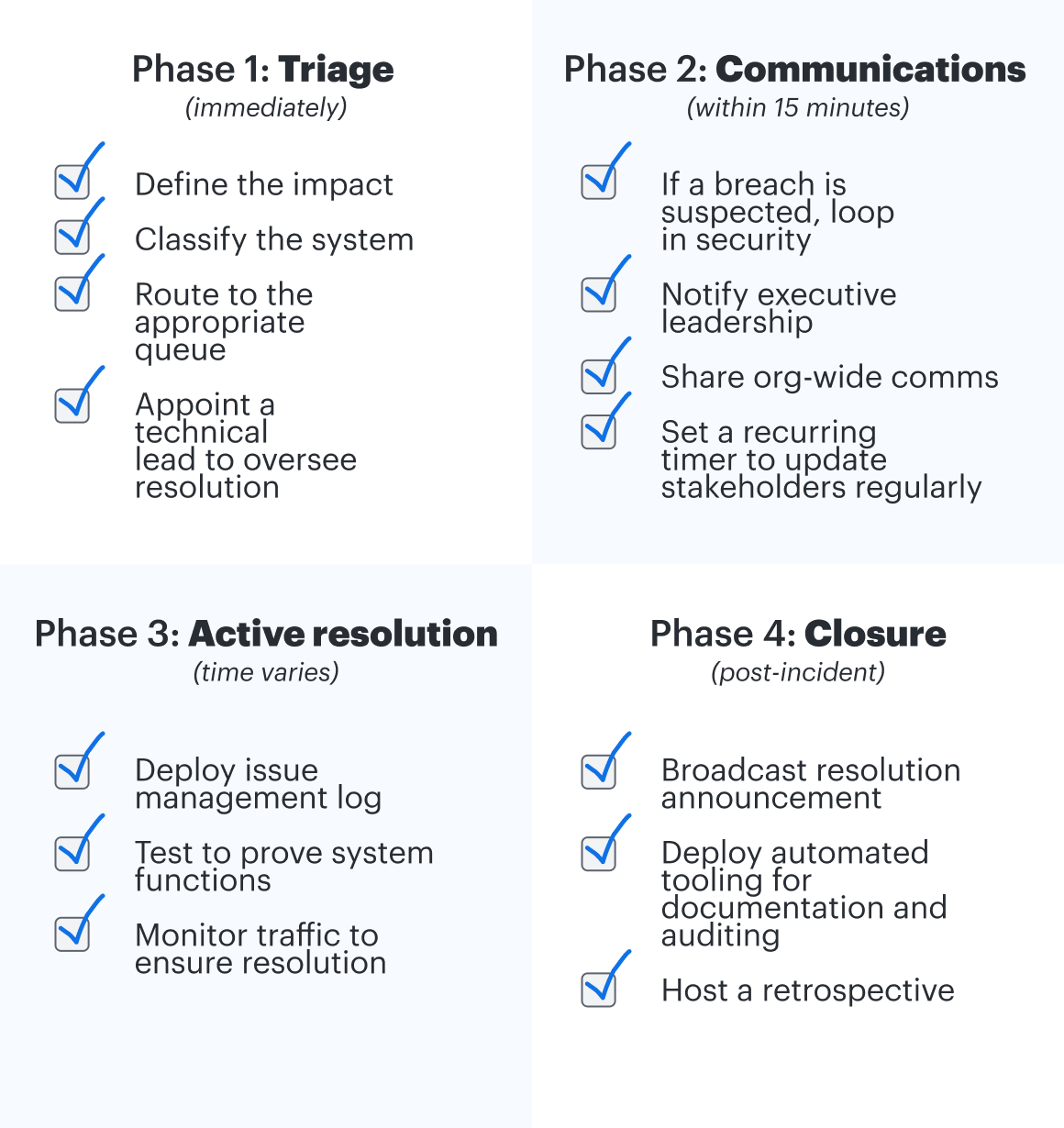
Phase 1: Triage
The first challenge in any incident response lifecycle is classification. Treating every minor issue like an emergency will lead to burnout and alert fatigue. Conversely, underestimating a major issue will damage customer trust and violate agreements.
To manage resources effectively, organizations must establish a clear, objective line between routine, operational tickets and high-urgency incidents.
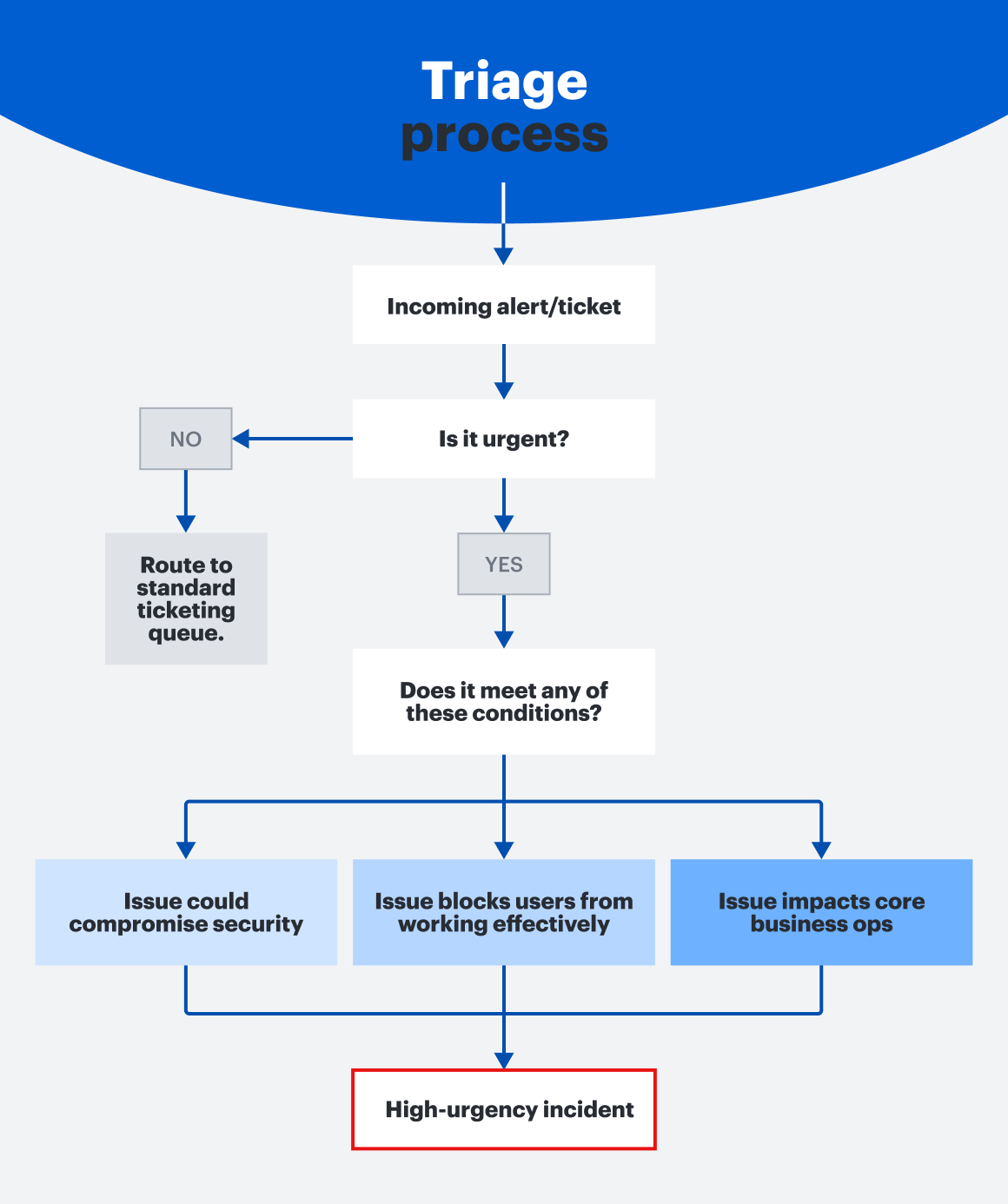
Routine incidents
Routine incidents are isolated issues that don't threaten core business operations. For example, this could be a single user forgetting their password or a non-critical dashboard failing to load. These issues can be handled through standard ticketing queues and standard working hours.
High-urgency incidents
While an exact definition should be set internally, high-urgency incidents are typically systemic issues or total outages that immediately impact core business operations, compromise security, or block at least part of the user base from completing their work.
While broad industry benchmarks exist, such as evaluating the percentage of an active user base affected by an outage or tracking latency thresholds that exceed time boundaries, there is no universal, one-size-fits-all metric that organizations can use to determine which category an incident falls into. Because thresholds deeply depend on context, companies should prioritize tracking averages to set their own classification standards.
Enterprise applications vs. customer-facing impact
The operational rules of engagement change dramatically depending on who the outage affects:
-
Enterprise/internal applications: When heavily used applications such as Slack, Zoom, or identity providers go down, company-wide productivity halts.
-
Customer-facing applications: If the issue impacts your own product that customers have purchased, the stakes shift from solely a productivity concern to a legal and financial risk, too.
For internal systems, incident definitions and documentation will typically live in an internal standards document. For customer-facing services, these definitions, response windows, and financial penalties are legally bound within respective customer service level agreements (SLAs).
Phase 2: Incident communications
It's common for engineers to want to focus solely on resolution when a problem occurs, but managing stakeholder anxiety is also an important part of incident response. It ensures their efforts are focused and efficient, that incorrect information is not spread, that efforts are not wasted, and more. Establishing a clear communication stream protects engineering focus from constant interruptions so they can work without distraction. To maintain trust and isolate the resolution team, effective communication is key.
Caveat: High-urgency mitigations
While classification and communication are both vital components of a structured response, there are certain critical scenarios that demand immediate action before any administrative overhead begins. When an incident is actively causing damage, the first responder's job should be to immediately mitigate the threat to stop it, even before initiating communications.
For example, if you realize your laptop is being actively used to compromise customer data, your priority should not be to open a security ticket or message your manager—it should be to force a shutdown on the laptop.
Notifying stakeholders
Once an outage or problem is validated, initiate the notification chain immediately. Depending on the severity and impact of the problem, teams should consider alerting the following stakeholders.
-
Leadership and management: Looping in leadership is important so they gain the context to field questions and are able to grant permission when required or provide support where needed.
-
Security teams: If an outage shows any signs of malicious activity, unauthorized data access, or a potential security breach, the security team should be added to the response chain as well.
-
The company: Mass announcements may be helpful for providing updates so teams know what to expect and can manage client expectations, when applicable.
The anatomy of a high-urgency alert
When writing an urgent notification for leadership or the company as a whole, prioritize conciseness and clarity. Following a strict framework will eliminate follow-up questions and unnecessary back-and-forth messaging. Consider including the following pieces of information in each alert update:
-
Issue: Include a one-sentence summary of the issue in simple terms.
-
Impact: Add a clear description of who is affected and how.
-
Owner: Specify the individual or team that is overseeing the resolution.
-
Updates: Provide a link to where stakeholders can find related announcements, or specify when they can expect additional updates.
Template examples of high-urgency alerts
Identity provider outage
NOTICE: Our SSO provider is currently down. This means that all employees are unable to log into corporate applications if they are currently logged out. Active sessions will still likely function. The internal IT infrastructure team will provide updates in the #it-incidents Slack channel.
E-commerce checkout failure
OUTAGE: Our payment processor is currently not working, causing credit card transactions to fail at checkout. All external customers attempting to purchase items are getting a “Payment declined” error. As of now, shopping carts are still preserved, but no new orders are getting processed. The billing engineering team is heading up resolution. Live tracking is available on our external status page. Updates will be posted every 15 minutes until the issue is resolved.
Phase 3: Active resolution
Once the notification chain is initiated, the response team shifts focus from external communication to problem containment and resolution. Follow established incident runbooks, track down the root failure, and execute a fix. Don't forget to maintain your stakeholder communication cadence while you work.
An adrenaline-fueled incident may prompt teams to close the issue as soon as metrics seem normal again. However, an incident is not immediately resolved when numbers return to baseline. Prematurely closing an issue can result in a “re-opening an incident” where the system crashes again shortly after because the root issue wasn't fully resolved or stabilized in the first place.
Before declaring a problem as fixed or a system as healthy, response teams should run through comprehensive functional verification checklists. While some organizations mandate a strict time window for stability before a ticket is closed, others allow more contextual sign-offs depending on the situation.
Nathan Cooper, Director of Information Security at Lucid, suggests: “Companies should clearly define what 'stable' and 'downtime' means for them, so they aren't relying on a subjective metric to inform their objectives.
Phase 4: Closing out the issue
Once an issue is officially resolved, documenting it can feel like a chore. However, teams are regularly audited on their responses during a crisis. Your working trail should be preserved as evidence of compliance. It also will serve as documentation to help promote continuous improvement.
Appropriate documentation is vital for maximum productivity, but it can traditionally be time-consuming to create. Writing a brief summary is much easier and faster, but it's less helpful for remediation or for audits. Teams should set expectations ahead of time regarding what “appropriate” documentation means for them.
Ensure future tasks are roadmapped
The immediate aftermath of an incident is a vulnerable time for a team. Many organizations will document the long-term fixes required to prevent the incident from happening again, but they never actually schedule them. This is where many organizations fail. If a remediation item is not explicitly prioritized and roadmapped, it is just as good as forgotten. Assign clear ownership, define a timeline for fixes, and review product backlogs regularly moving forward.
Accelerate documentation with automation
Organizations should prioritize automation to eliminate the manual overhead of incident reporting without sacrificing depth or data quality. Instead of forcing engineers to manually copy and paste error logs, create timelines, and track metrics, automation can do the heavy lifting. For example:
-
Use automated tools to instantly scrape system metrics and user access logs from the exact window of impact to the moment teams were alerted.
-
Integrate incident management tools with your chat infrastructure (such as Slack or Microsoft Teams) to automatically compile timestamps and communication into a timeline.
Lucid AI can help you create graphs and diagrams in seconds to visualize metrics and timelines, summarize content, and seamlessly build out processes. By leaving the data aggregation to automation, your team can spend their energy on analyzing the issue and designing system improvements.
Tips for staying calm under pressure during incident response
In a high-stakes moment when an unresolved issue could cost thousands of dollars or hours of productivity, it can be difficult to stay calm and think clearly. Proactively establishing norms and a culture that promotes blamelessness and trust can make the difference between chaos and clarity during an emergency and prevent unnecessary escalation. Maddy Maxwell, Sr Manager of the IT Helpdesk at Lucid, offers a couple of suggestions to do that successfully:
-
Establish a supportive culture: If an individual works on a team with a lot of finger-pointing and fear of termination, their self-preservation instinct will naturally be to hide their mistakes or delay escalation. This will directly extend the outage duration. A well-established culture of transparency will promote honesty, cutting down resolution time.
-
Establish and trust the process: Staying calm won't happen by accident when pressure is high. An established incident response plan, practiced regularly through simulated dry runs, can help. It will build trust, strengthen confidence, and deepen team members' expertise in managing challenges to maintain control and proactive problem-solving.
IT incident response plan templates
Frameworks and documentation are powerful tools when a problem hits, but only if they're understood beforehand. Navigating a hefty template or lengthy guidebook during a high-urgency outage is a recipe for failure. Select, practice, and automate tools and documentation during routine operations when the stakes are low, so they become second nature when the pressure rises.
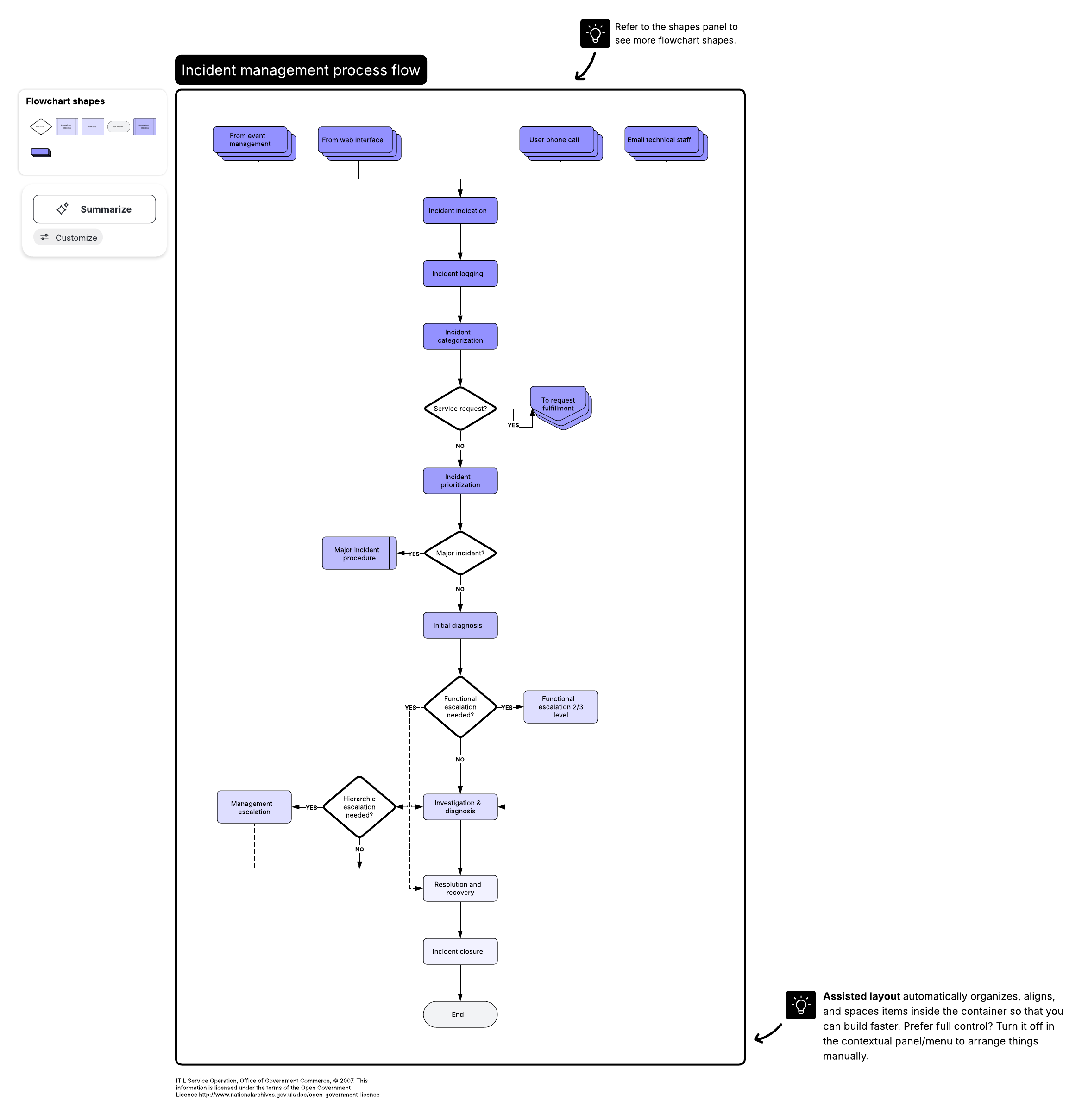
Incident management process flow template
The incident management process flow template can be used throughout the issue until resolution. It defines operational roles and maps out process paths, enabling teams to act with maximum efficiency.
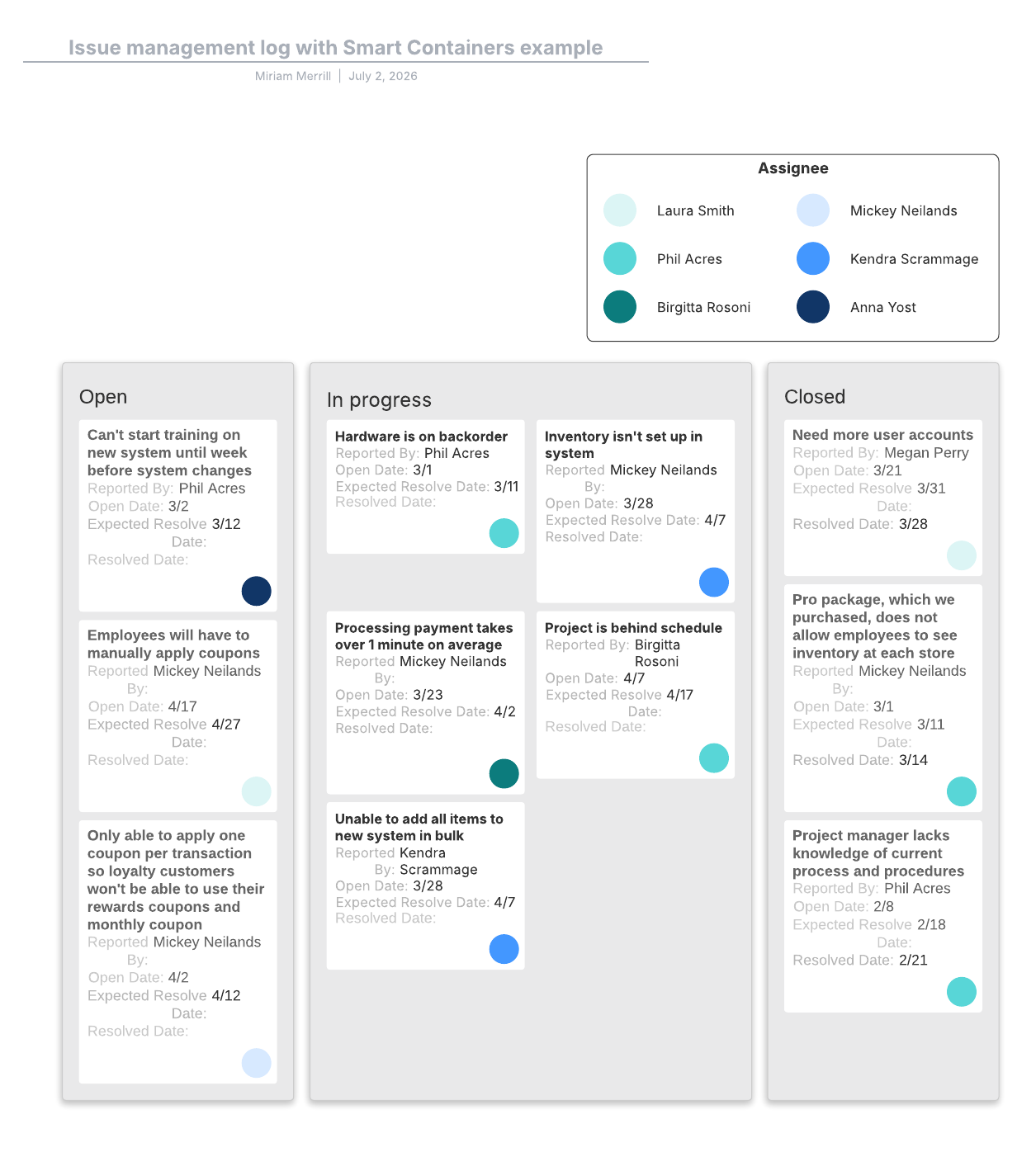
Incident management log template
Our issue management log template is a living document that can help you track an issue's progress in real time. The template not only creates documentation to review later so you can improve processes, but it also ensures that teams aren't duplicating efforts or repeating the same troubleshooting steps.
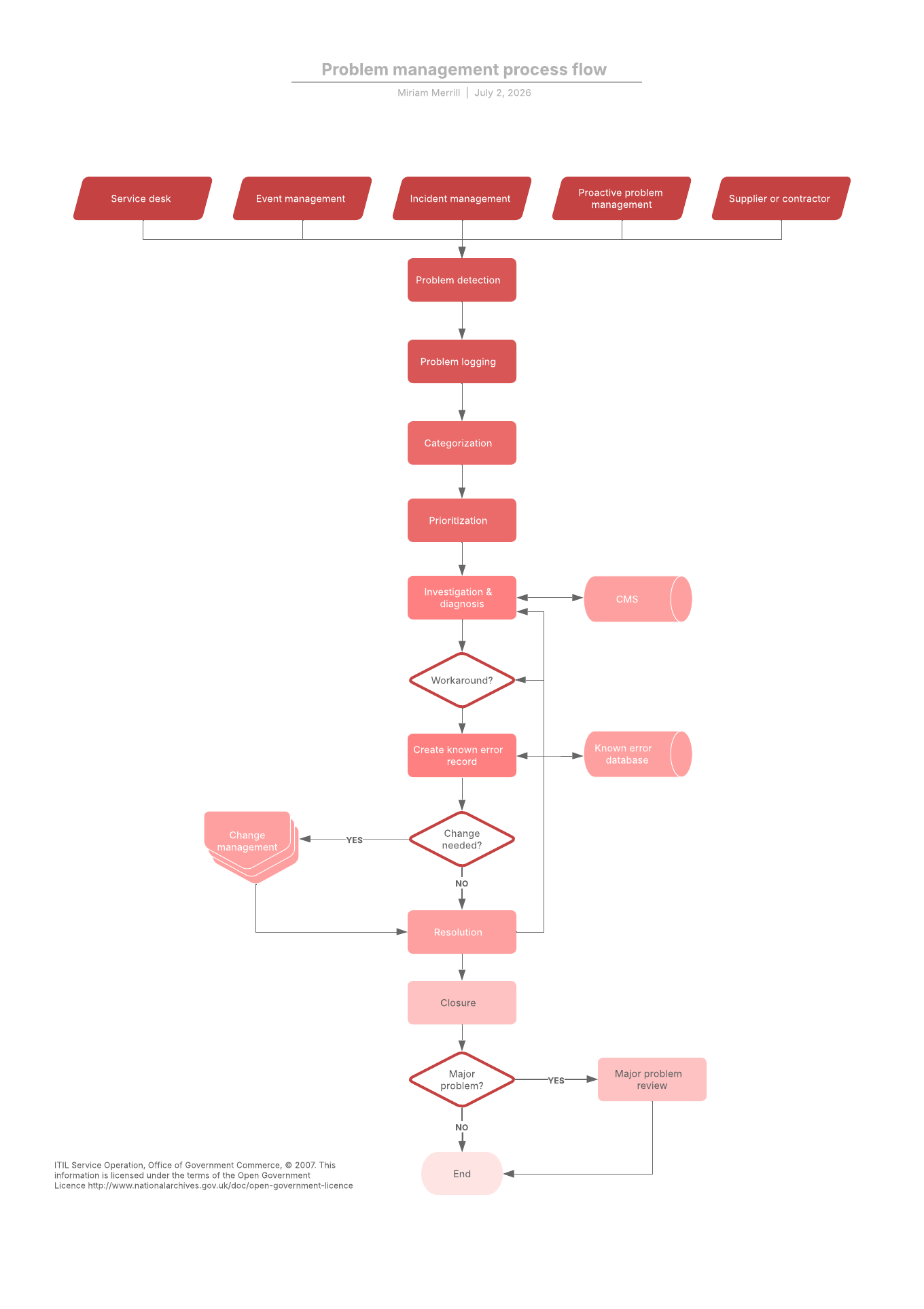
Problem management process flow
After the issue is resolved, this problem management process flow template can help you determine the root cause so it doesn't occur again.

Lucid can help IT teams design, document, and optimize their infrastructure to reduce outages and resolve issues faster.
Learn more