Key takeaways
-
Stop spending time on manual diagramming and focus on innovation. Lucid AI accelerates the initial design process by instantly generating diagrams like ERDs, flowcharts, and more.
-
Boost productivity by transforming complex diagrams into actionable insights. Lucid AI empowers teams to make data-driven decisions with features like conditional formatting to automatically highlight high-risk areas of your diagram.
-
Make technical documentation accessible to everyone. Lucid AI provides instant summarization and answers questions about diagrams, bridging the communication gap between engineers and non-technical stakeholders.
Engineers are one of the driving forces behind an organization’s innovation, yet they spend a significant portion of their time mapping processes, gathering documentation, and communicating with stakeholders. While many software engineers use AI to generate and refine code, there’s an untapped opportunity to use AI to accelerate other parts of their workflow.
Enter Lucid AI.
Our purpose-built platform doesn’t just make work quicker; it gives teams a strategic advantage by automating the heavy lifting involved in an engineer’s workflow. Teams can quickly translate complex system architecture into clear diagrams and documentation, ensuring seamless alignment with product teams and stakeholders.
With Lucid AI, teams free up capacity, enabling them to address core pain points in their work and dedicate their expertise to where it truly matters: innovation and delivery.
In this article, we break down clever and practical ways that engineers can leverage Lucid AI to increase efficiency, productivity, and alignment.
Accelerate initial design and documentation
Nothing slows velocity like blank canvas syndrome. Creating a diagram or design from scratch takes maximum effort, as translating concepts from your head into a visual structure is incredibly time consuming. Lucid cuts through this friction, speeding up the initial design process.
Engineers can instantly generate AI visualizations, such as ERDs, class diagrams, sequence diagrams, and flowcharts. This AI efficiency allows them to jump straight into iteration rather than spending time on manual diagram creation.
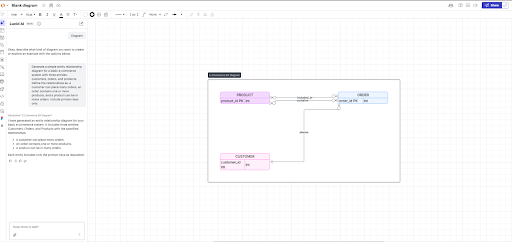
Additionally, Lucid AI can convert text-based notes and processes into polished diagrams, a significant time-saver. For example, an engineer can take a highly technical, detailed requirements document or a high-level architecture design and instantly transform it into a detailed, low-level engineering design, making it easily understandable and immediately available.
“Translating from unstructured content (requirements documents, feature requests, even emails) into technical diagrams is a place where Lucid AI can unlock serious productivity gains in the design process.”
—Patrick Saul, solutions consultant, Lucid
Pro tip: Paired with Lucid AI, the Cloud Accelerator instantly generates a cloud diagram and then allows engineers to compare it against the requirements document to identify and justify discrepancies, saving hours of manual work.
Boost productivity
Engineering teams are constantly looking for ways to not only be efficient but also productive. Just because someone can do something quickly doesn’t mean it is improving productivity.
One of the most persistent bottlenecks in their workflow is reviewing complex, technical diagrams. Messy visuals are unclear and complicated to analyze, making design changes tedious and time consuming.
Lucid AI helps teams avoid slowing down the entire development lifecycle. Here’s how:
Quickly analyze diagrams and data
Instead of manually scanning a complex architecture or process flow, use AI and conditional formatting to set specific rules that will automatically highlight certain information within the diagram.
For example, an engineer could ask the AI to flag areas within a process flow or architecture diagram that have an unusually high number of connections. By automatically applying a visual highlight, critical systems and over-connected process steps are easily identified, revealing points of failure, hotspots, and areas for process optimization. Engineering teams can use this tool to proactively correct errors, make data-driven decisions, and allocate resources more effectively.
Similarly, Lucid AI enhances the engineer’s workflow with data linking and data visualization. If a team has data from an observability platform showing where users are getting stuck on certain steps in the process, they can visualize that and design around those trouble spots.
Organize boards and documents
A cluttered diagram slows down alignment. Let’s say you’ve just finished a brainstorming session with your team and generated a diagram with Lucid AI. What you’re left with is a bunch of scattered ideas that you need to refine. Lucid’s assisted layout features can do just that! Transform chaotic brainstorming boards and rough draft diagrams into clean and polished visuals. Automatically take an AI-generated visual and find the path of least resistance, aligning objects and lines into readable layouts and more precise documentation. The best part? This takes seconds rather than hours of manually rearranging your diagram. From there, you can continue iterating on the visual until it is precisely what you want.
Iterate on architecture design
When engineers are deep in design, they need to remain focused. Stopping or slowing to manually diagram can cause them to lose momentum. Lucid AI acts as a design partner, transforming the diagramming experience. Engineers can use AI prompts to iterate on the design directly, rather than manually moving shapes. This drastically reduces the tedious work, allowing them to focus on technical problem-solving.
Streamline stakeholder alignment
Building technical documentation and diagrams is a critical part of the engineer’s role. Yet, that technical documentation often becomes a barrier to alignment with non-technical teams like marketing, sales, or customer success. Communicating a complex system architecture or new feature functionality to a cross-functional audience can feel like speaking two different languages simultaneously. Where do you draw the line between giving necessary context without overwhelming the group with technical jargon?
Lucid empowers engineers to bridge this gap for non-technical teams by making complex information visual and therefore more digestible.
-
AI summarization: Easily summarize the contents of your Lucid document with AI directly on the canvas, or within integrations like Slack or Microsoft Teams. Additionally, you can summarize your Lucidchart diagrams to provide a high-level, text overview that you can easily copy and share. These tools allow stakeholders to gain context without needing a technical deep dive.
-
Interactive documentation: Stakeholders can use natural language to ask Lucid AI questions about a diagram, turning static documentation into an interactive source of truth that reduces back-and-forth and keeps the engineer focused on building.
-
Integration with the broader workflow: Lucid AI connects features across Lucid’s work acceleration platform and works with tools like MCP server, ChatGPT, Google Workspace, Microsoft 365, Confluence, and Notion, ensuring that visual context is always accessible to the entire organization, connecting collaboration silos.

See how engineers at Docusign are using Lucid to accelerate work.
Learn more