Key takeaways
- While AI use has helped individuals generate code, content, and other deliverables quickly, those productivity gains are not translating into any meaningful org-wide benefits.
- Documentation serves as the essential middle step to bridge the gap between individual AI and institutional AI, providing the context and visibility needed to redesign processes.
- Teams can capture institutional knowledge using Lucid AI’s Process Agent, an AI coworker that helps develop more high-integrity documentation.
- With Lucid integrations to enterprise architecture tools, teams will be able to connect process diagrams to underlying architecture documentation, creating a comprehensive blueprint of the business.
- Establishing a single source of truth through Lucid’s Process Accelerator ensures AI relies on governed, approved, and up-to-date documentation.
By now, nearly every company has employees using LLMs to draft content, debug code, brainstorm ideas, or conduct research faster than ever. Yet only 12% of CEOs report meaningful ROI from GenAI investments, and 56% see no returns at all, according to the PwC 2026 CEO Survey.
It seems that, while AI is increasing individual productivity, that value isn’t translating into meaningful org-wide benefits.
In fact, the faster individuals become at using AI, the harder it is to steer the organization as a whole. Teams are churning out more copy, shipping more code, and making more decisions with less alignment and less shared context.
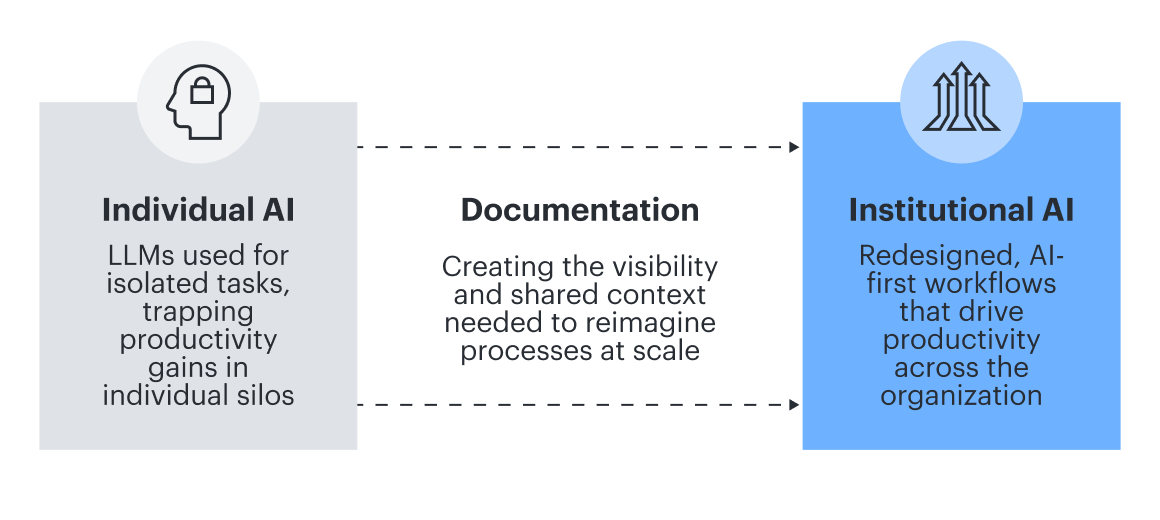
A recent a16z article refers to this problem as the gap between individual AI and institutional AI. Essentially, productive individuals don't automatically equate to a productive organization.
Capturing org-level benefits requires rethinking entire processes, not just individual tasks. And in order to redesign processes, you need visibility. To borrow from the popular idiom, you can’t transform what you can’t see.
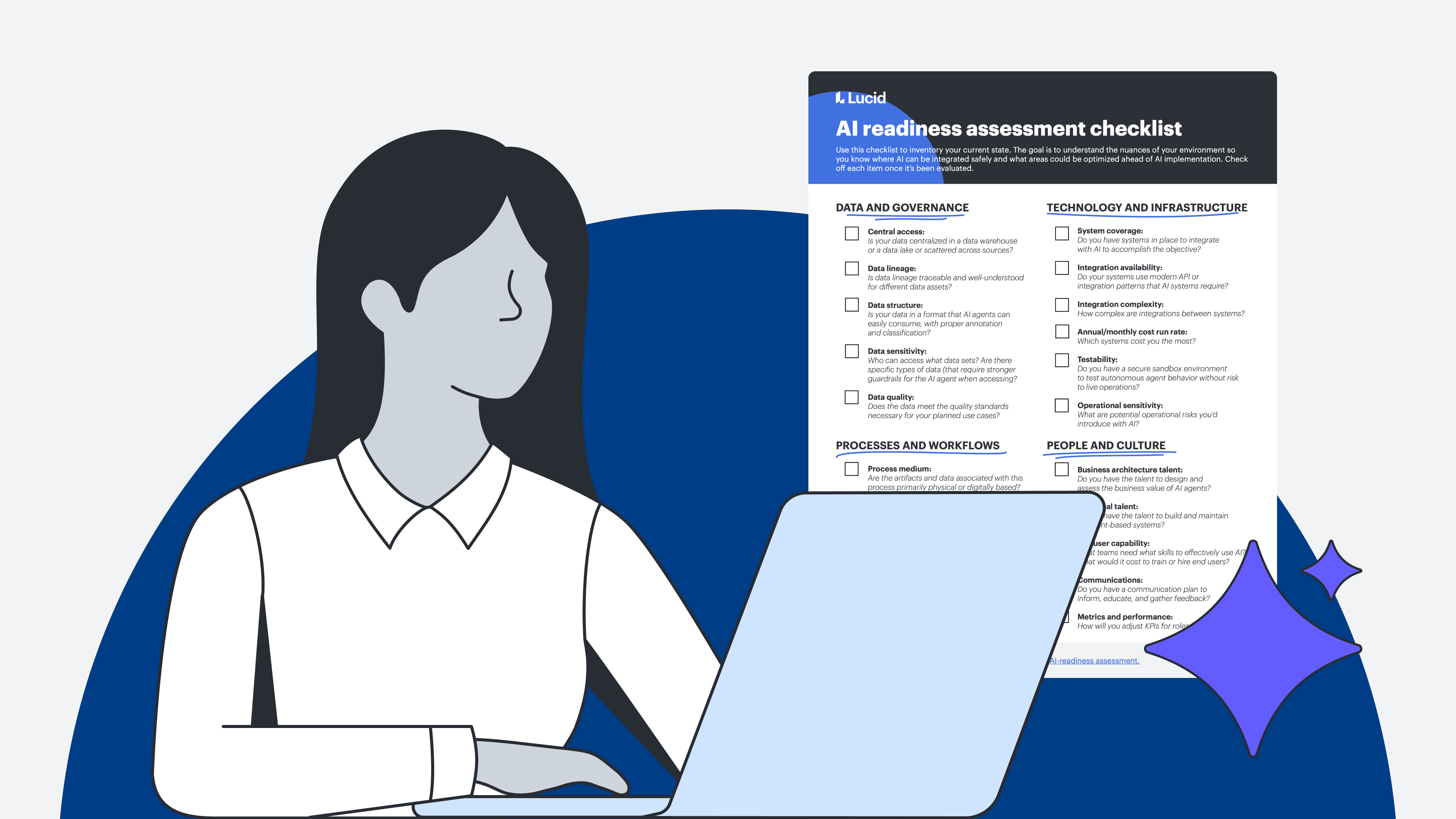
Only when you can see and understand your current processes and systems can you truly identify where AI would provide the most value and how to implement it.
Let’s take a look at how to get this institutional knowledge out of people’s heads and into a shared model that bridges the gap between individual and institutional AI.
Documentation: The missing step in AI transformation
Documentation has gotten a bad rap over the years. Most workers begrudge creating documentation, let alone maintaining it. And because documentation isn’t as flashy as the AI capabilities themselves, it’s easy to overlook.
But documentation is a critical middle step between individual and institutional AI. By documenting processes, systems, and institutional knowledge, teams can examine, challenge, and redesign their operations to integrate AI at scale.
Plus, this documentation serves as onboarding for AI integration. AI, after all, is like a brilliant stranger. It arrives with extraordinary capability but zero context—no idea how decisions actually get made in your organization, which processes are exceptions to the rule, or what workarounds keep things running. You wouldn't hand a new hire your most critical operations without onboarding them first. AI is no different. Documenting all of this context is how to get ready for AI at scale.
Traditional approaches to documentation are manual, time-consuming, and error-prone. When we talk about documentation for AI transformation, we’re not referring to these old-school methods.
Instead, the documentation needed for AI should be:
-
Dynamic: Static documentation is hard to update and quickly becomes out of date, increasing the risk that teams reference outdated versions. Instead, documentation should be linked to live data and easy to update in real time as you optimize and integrate AI.
-
Connected: AI transformation affects every part of the business. Your documentation should show the relationships between systems, processes, and teams, so you can see how changes to one area impact the rest of the org.
-
Easily governed: Documentation provides the map for AI to follow. Having simple controls to standardize and manage documentation helps ensure AI stays on the right path and executes the correct logic.
While some tools may facilitate dynamic documentation, they don’t have any controls in place to govern it or integrations to show the full picture of the organization. Other tools may provide structure and governance but lack the dynamic, collaborative functionality needed to plan for AI implementation.
Lucid meets every documentation need, providing the right balance of flexibility, intelligence, and structure to bridge the gap between individual and institutional AI.
How Lucid bridges individual and institutional AI
With Lucid, teams can easily create, connect, and manage the documentation necessary for AI transformation. Not only does this platform provide the visibility teams need to understand their current state, but it also helps teams optimize their operations and align teams with a single source of truth. Here’s how.
Capture institutional knowledge
When everyone has access to the same AI platforms and capabilities, it’s context that sets your business apart. Think of all the exceptions, trade-offs, and judgment calls in any given process. Every team has unwritten rules, unique to the business and often accumulated over years of experience. And AI will need to know this context, too, if it’s to integrate effectively.
For most organizations, though, this context lives in people’s heads or is scattered across disparate tools in various formats. The first step in preparing for institutional AI is to build a cohesive blueprint that the AI can actually read.
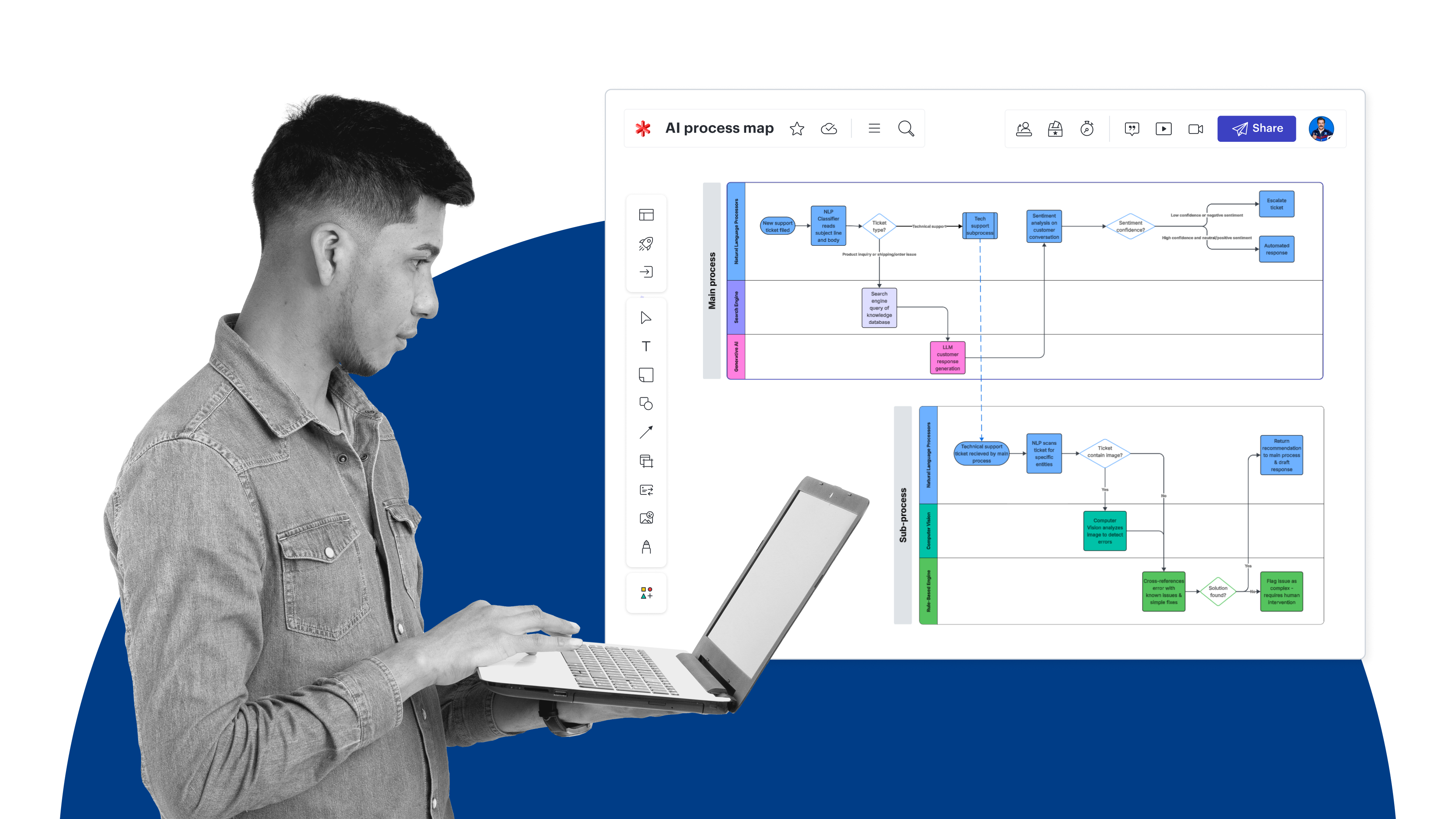
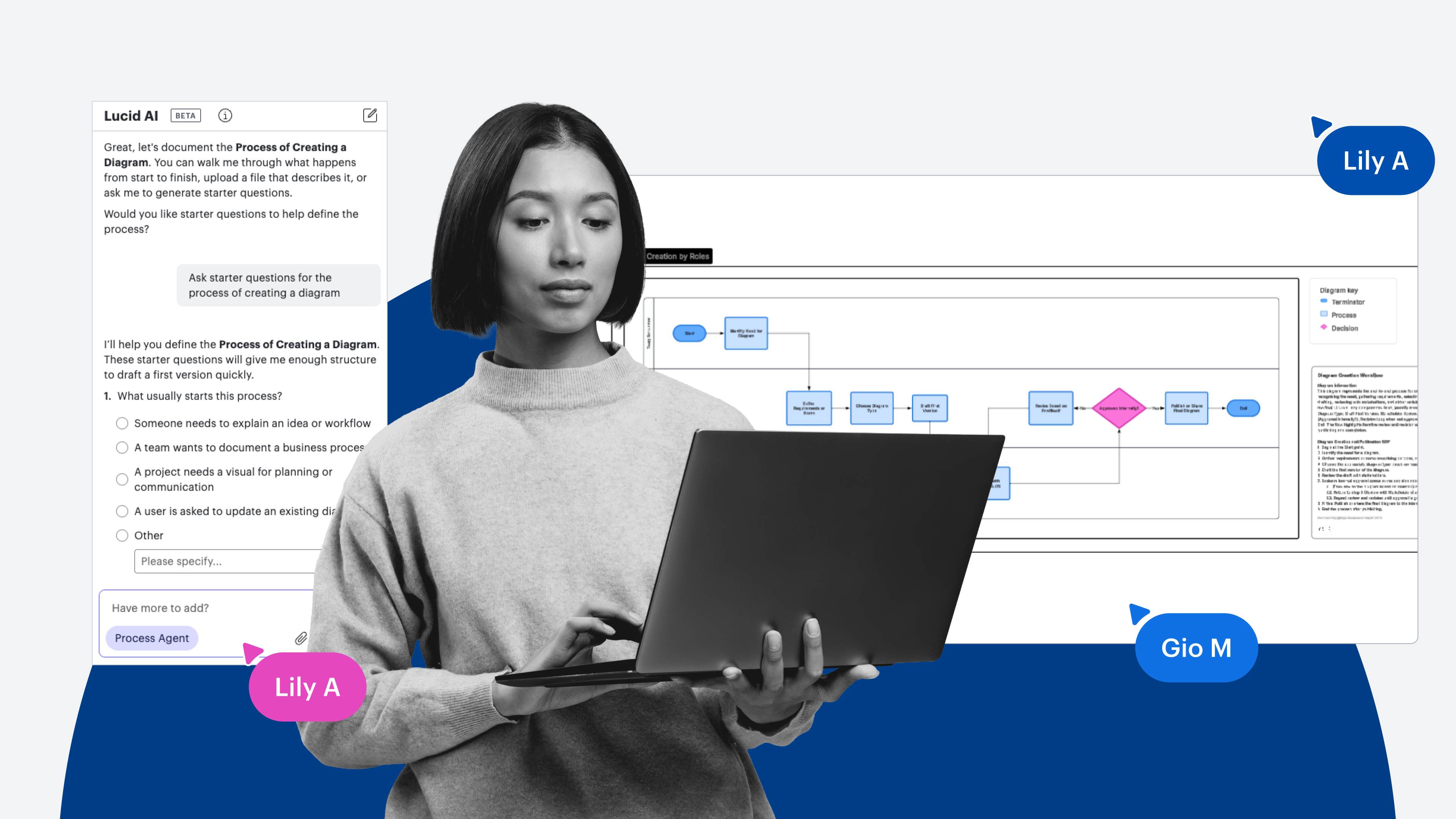
In Lucid, you can kick-start process documentation with ready-made templates, link data to your diagrams for deeper insights, and add conditional formatting for easier evaluation. The fastest way to capture institutional knowledge, though, is with the Process Agent (accessible within Lucid AI).
You can think of the Process Agent as your AI coworker who can help you develop more high-integrity documentation. Instead of starting with a blank canvas, the Process Agent acts as a proactive collaborator, asking you discovery questions needed to generate a process diagram. With the Process Agent, you can capture all the institutional context that’s easy to overlook, such as the different triggers, risks, and approval handoffs in any given process.
Video of Process Agent feature in Lucid
Once you have a draft of your process documentation, the Process Agent will work with you to optimize or even redesign the process for agentic AI. You can either give the agent specific instructions to edit the diagram or have the agent evaluate your diagram and suggest areas of improvement, acting as a collaborative consultant.
You can also refine process documents in the LLM of your choice, including ChatGPT, Claude, and Microsoft Copilot, with the Lucid Model Context Protocol (MCP) server.
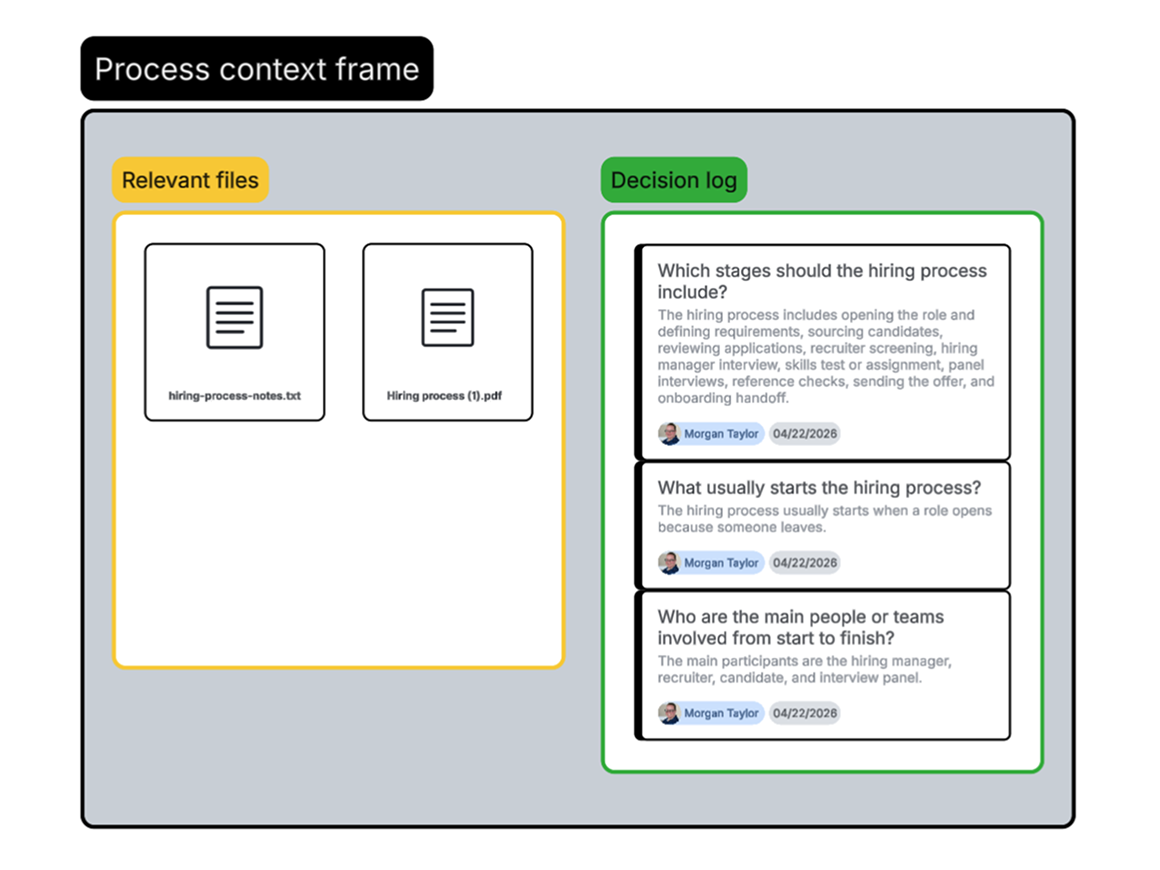
Not only does the Process Agent work with you to draft and optimize process diagrams, but it also creates a context frame where you can add documents for it to reference (like specific architecture standards), ensuring your process diagrams are truly customized to your organizational patterns. Within the context frame, you can also see a decision log that tracks all interactions with the agent, giving everyone visibility into how the process was created.
Coming soon: While the Process Agent currently requires text prompts, audio prompts, or files to get started, it will soon be able to generate diagrams from screen captures with Lucid’s Process Capture, streamlining document creation even further.
Connect process diagrams to the underlying architecture
Moving to institutional AI requires an entire blueprint of your business, not just process diagrams.
If, for example, AI understands your full refund process but doesn’t know which API handles the money, it can’t actually process the refund. You need a way to connect the tasks AI needs to perform (represented via process diagrams) with where it needs to perform them (represented via architecture diagrams).
If you haven’t created architecture diagrams yet, the first step is to create that documentation so you have clear visuals of the systems that AI interacts with.
You can start creating the architecture documentation in Lucid by:
- Generating diagrams, such as entity relationship diagrams (ERDs), network diagrams, and UML diagrams, via a prompt using Lucid AI
- Automatically visualizing AWS, Azure, or Google Cloud environments with the Cloud Accelerator
- Integrating with Ardoq and LeanIX to visualize the current state and use Lucid’s flexible canvas to plan the future state.
Currently, enterprise architects can connect LeanIX or Ardoq to Lucid to visualize their architecture data as dynamic diagrams and collaboratively plan, design, and align on architecture changes needed for AI integration.
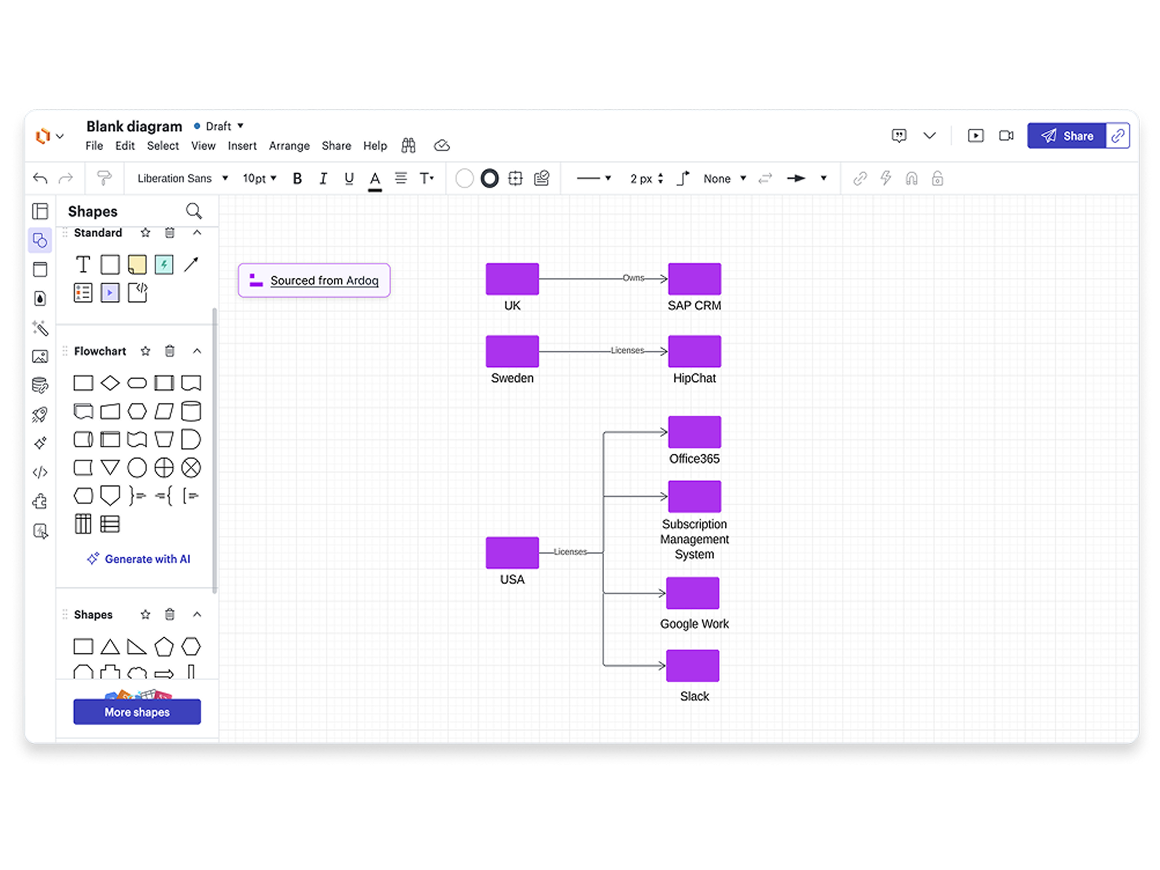
Soon, teams outside of enterprise architecture will be able to embed LeanIX and Ardoq objects directly into their process diagrams with Lucid's Process Accelerator, democratizing access to the data needed to create connected documentation. These shapes carry the full enterprise architecture data with them—not just a label—and stay synced with their source system of record. You can save them as reusable components, and every team working in Lucid always has access to shared and current architecture data.
Establish a source of truth for documentation
For AI, documentation isn’t just a compliance artifact or a presentation visual. It’s the infrastructure that AI needs to operate, which means it needs to be approved and always up to date.
With that in mind, the next step after you have your documentation created is to centralize it in a single, governed source of truth. Doing so ensures that AI agents rely on official documentation so they execute safely.
The best way to create your single source of truth is through Lucid’s Process Accelerator, an add-on to the Lucid Suite designed to accelerate process improvement through governed process documentation, storage, and maintenance.
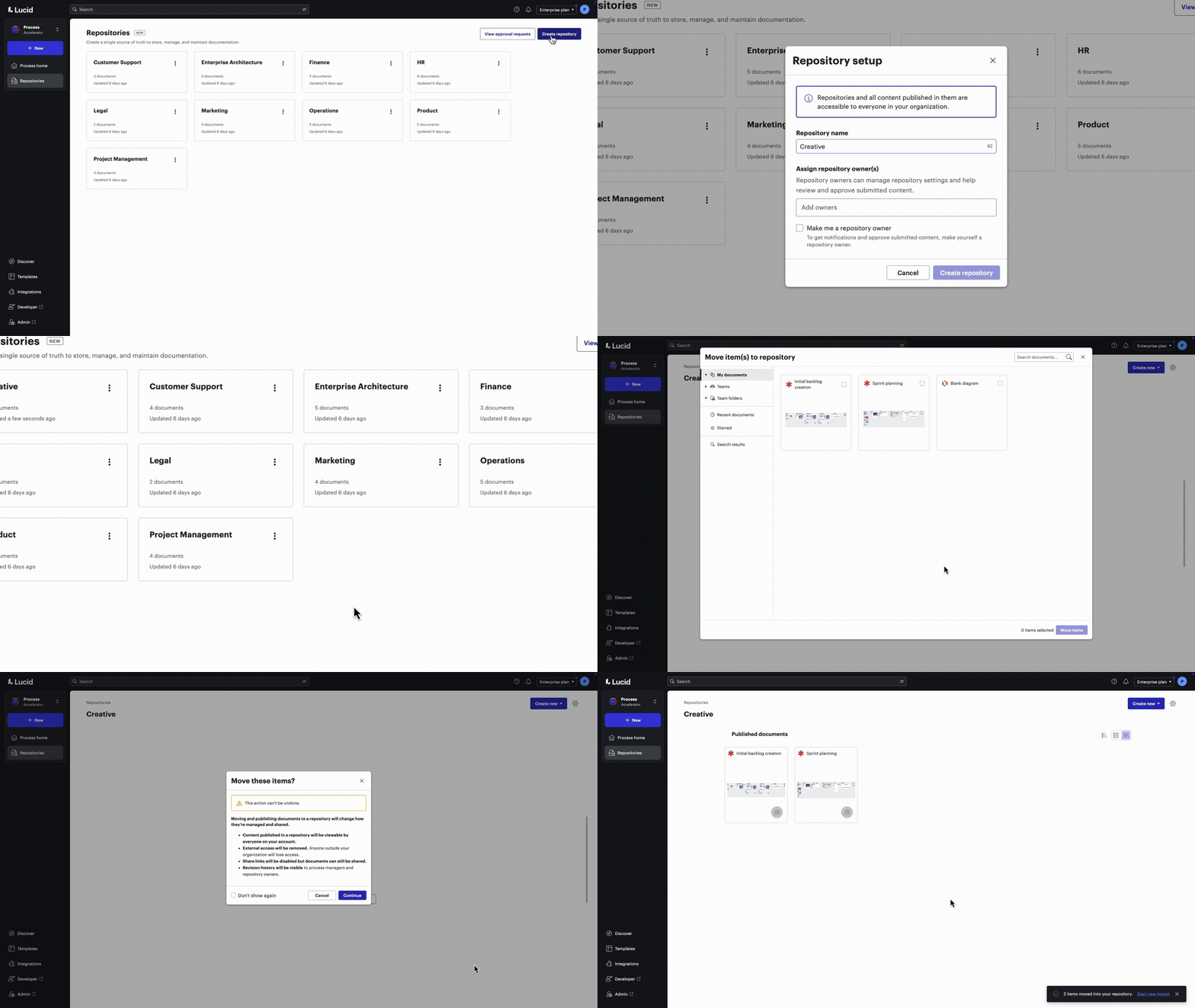
With the Process Accelerator, you can:
- Centralize and secure documentation. Store official, AI-ready process documentation within easily accessible repositories. Keep confidential documentation confidential by using invite-only restricted repositories.
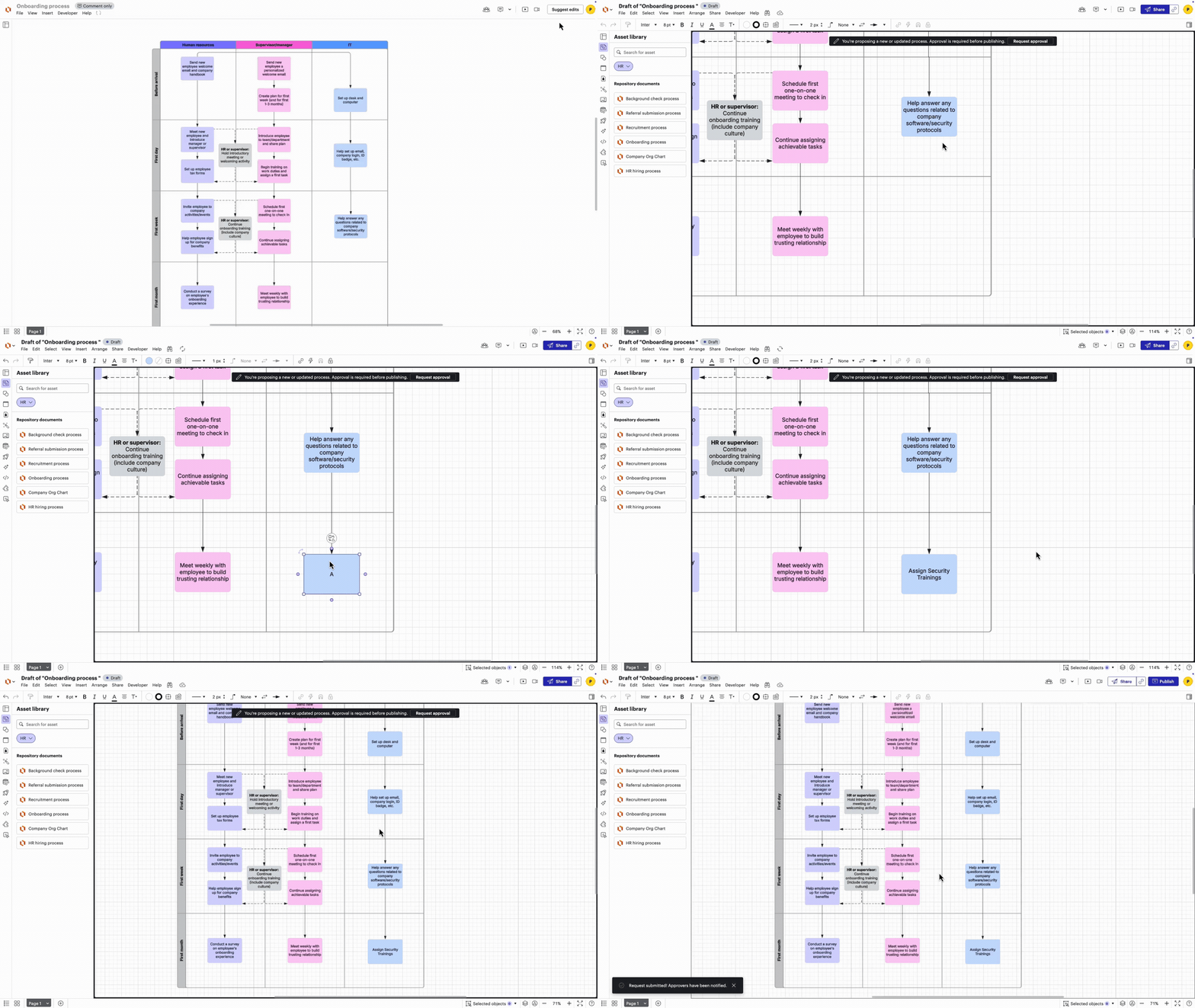
- Streamline approvals. Ensure any changes made to process documentation are reviewed and approved via built-in approval flows. Assign folder owners to approve documents within specific repositories or enable bottom-up sequential approval flows to route reviews to the right subject matter experts.
- See version history. Toggle between the published and historical process documentation to understand changes over time, spot meaningful differences, and assess impact.
- Increase consistency across processes. Create approved, reusable components, including other Lucid documents or shapes with predefined data (such as role, risk, activity, and more), that all users can add to their process diagrams. Any approved changes made to an asset will automatically be reflected in the diagram they’re used in. Users can easily see where these assets are used across their repositories, allowing them to understand how changes to one process or system affect others.
Make AI transformation possible with Lucid
AI transformation initiatives simply won’t reach their full potential without documentation, the bridge between individual and institutional AI. And no solution makes it easier to capture, connect, and govern this documentation than Lucid.
Unlike point AI tools that optimize individual productivity or process mining solutions that surface what's already logged in your systems, Lucid captures what neither can reach: the cross-functional workflows that span multiple teams, multiple systems, and years of undocumented judgment calls.
Get started with Lucid
See how Lucid can help your org capture the institutional context needed for AI transformation.
Contact us